Your next vehicle online WordPress Theme


Stable Vehicle Content for a WordPress-Managed Page
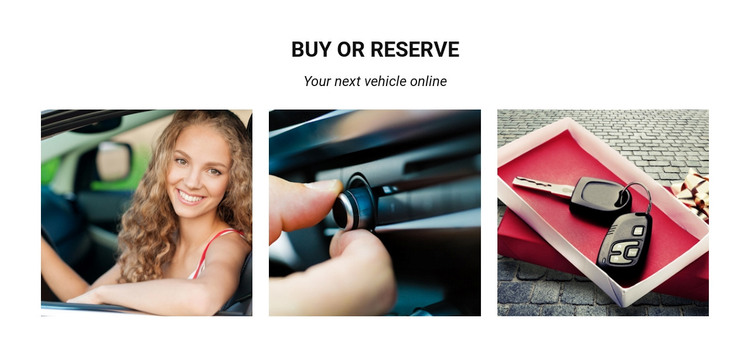
The centered heading “Buy or Reserve” gives the section a durable subject, while “Your next vehicle online” works as supporting page copy that clarifies the intended vehicle journey. Below these text elements, three evenly sized photographs create a compact image group. The subjects—a person in a car, a vehicle control, and a car key—make the section suitable for presenting automotive context without treating the sample imagery as a specific inventory, offer, or confirmed reservation service.
In a WordPress-oriented project, this block can function as stable page content on a vehicle-related page. Its role is closer to a reusable gallery area than to a time-sensitive listing: the centered message and fixed three-image composition can remain visually consistent while other content around it changes. A broader WordPress-managed site can provide separate areas for detailed vehicles, purchasing information, reservation instructions, or contact actions, allowing this section to introduce the subject without carrying the entire page journey.
The block’s white background, black uppercase typography, and even horizontal spacing also make its content boundaries easy to preserve when placed among other page sections. Nicepage supports WordPress page and theme workflows, but those broader CMS capabilities do not alter the block’s underlying structure. The practical interpretation is a prepared content section whose automotive message and image relationship can participate in a managed page while the surrounding project handles navigation, publishing, and additional content.
Customize with Nicepage
Open this ready-made template in the WordPress Website Builder and customize it visually in the Nicepage editor. Replace demo content, edit page sections, and adapt the design to your project without rebuilding the template from scratch.
Edit Template Offline
2. Create a new page or select existing
3. Click Add new block, search for id 54174 and click enter
Edit Template Online
Create Awesome Websites


Free Nicepage Builder
Keywords
Manage and Edit This Theme in WordPress
Customize and Install the WordPress Theme
Start with this ready-made theme instead of building the WordPress design from scratch. Customize its layout, content, typography, images, sections, and other design elements visually in Nicepage editor, then export and install the WordPress Theme, Plugin, and Pages on your WordPress site. The Nicepage WordPress Plugin lets you continue working with the site after installation.
Edit the Theme Directly in WordPress
After installation, you can edit the WordPress Theme directly in WordPress with the Nicepage WordPress Plugin. Use Site Style to customize site Colors, Fonts, Header, Footer, Blog, and Post Page Templates while working within your WordPress website.
Edit WordPress Pages Visually
Use the Nicepage WordPress Plugin to edit page content directly from the WordPress admin area. Open a WordPress Page with Nicepage and visually change its text, images, sections, and other page elements while continuing to manage the Page through WordPress.
WordPress Content and Theme Integration
Use the customized theme with WordPress Pages, Posts, Blog and Post Templates, menus, widgets, and other CMS-managed content. Shared theme elements such as Colors, Fonts, Header, Footer, Blog, and Post Page Templates can be managed as part of the overall site design, while WordPress provides the CMS environment for managing site content.
This workflow combines a ready-made WordPress Theme with visual customization, direct theme editing in WordPress, and continued content management through the Nicepage WordPress Plugin.