Backpacking trips WordPress Theme


A Stable Destination Section for WordPress Page Content
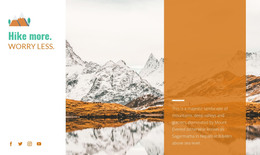
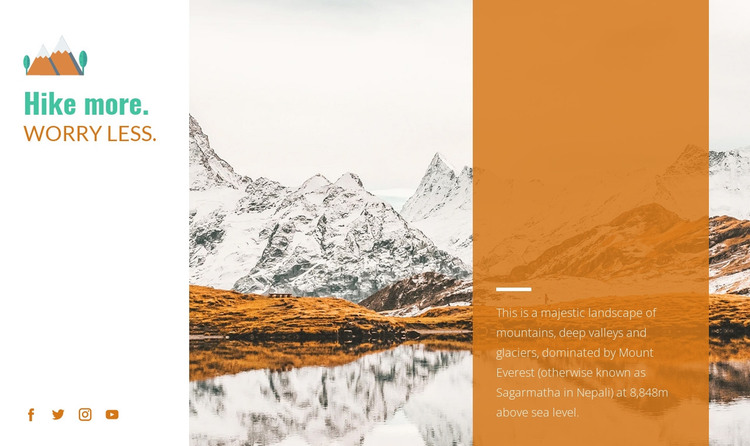
The heading, image, and destination description give this block the character of stable page content rather than a time-sensitive post stream. “Hike more. Worry Less.” appears in two lines on the white left panel, where four social media icons form a separate supporting group. The central mountain landscape reinforces the subject visually, and the translucent orange panel provides the longer explanation alongside a horizontal rule.
That explanation names mountains, valleys, glaciers, and Mount Everest, identifies the peak with the Nepali name Sagarmatha, and presents the 8,848m elevation reference. In a WordPress-managed page, these details can remain part of a visually consistent hiking or travel section while the wider project supplies other page content around it. Related areas might cover routes, practical information, galleries, or inquiries, but none of those needs to be folded into this block.
The section’s static arrangement also gives content editors a clear visual boundary: the brand message stays separate from the destination facts, and the landscape remains the principal image. This makes the block suitable for permanent page material that can be maintained within a broader WordPress design. Nicepage supports WordPress page and theme workflows, including editing content through its WordPress tools, but the practical role here is narrower: one reusable destination section whose wording, image, and social links can sit inside a larger managed page.
Customize with Nicepage
Open this ready-made template in the WordPress Website Builder and customize it visually in the Nicepage editor. Replace demo content, edit page sections, and adapt the design to your project without rebuilding the template from scratch.
Edit Template Offline
2. Create a new page or select existing
3. Click Add new block, search for id 53991 and click enter
Edit Template Online
Create Awesome Websites


Free Nicepage Builder
Keywords
Manage and Edit This Theme in WordPress
Customize and Install the WordPress Theme
Start with this ready-made theme instead of building the WordPress design from scratch. Customize its layout, content, typography, images, sections, and other design elements visually in Nicepage editor, then export and install the WordPress Theme, Plugin, and Pages on your WordPress site. The Nicepage WordPress Plugin lets you continue working with the site after installation.
Edit the Theme Directly in WordPress
After installation, you can edit the WordPress Theme directly in WordPress with the Nicepage WordPress Plugin. Use Site Style to customize site Colors, Fonts, Header, Footer, Blog, and Post Page Templates while working within your WordPress website.
Edit WordPress Pages Visually
Use the Nicepage WordPress Plugin to edit page content directly from the WordPress admin area. Open a WordPress Page with Nicepage and visually change its text, images, sections, and other page elements while continuing to manage the Page through WordPress.
WordPress Content and Theme Integration
Use the customized theme with WordPress Pages, Posts, Blog and Post Templates, menus, widgets, and other CMS-managed content. Shared theme elements such as Colors, Fonts, Header, Footer, Blog, and Post Page Templates can be managed as part of the overall site design, while WordPress provides the CMS environment for managing site content.
This workflow combines a ready-made WordPress Theme with visual customization, direct theme editing in WordPress, and continued content management through the Nicepage WordPress Plugin.