
Mountain hiking travel WordPress Theme


Edit Template Offline
2. Create new page and search for id 32104
Edit Template Online
Create Awesome Websites


Free Nicepage Builder
Keywords
Destination Stories and Repeated Travel Areas Fit Page-Based Content
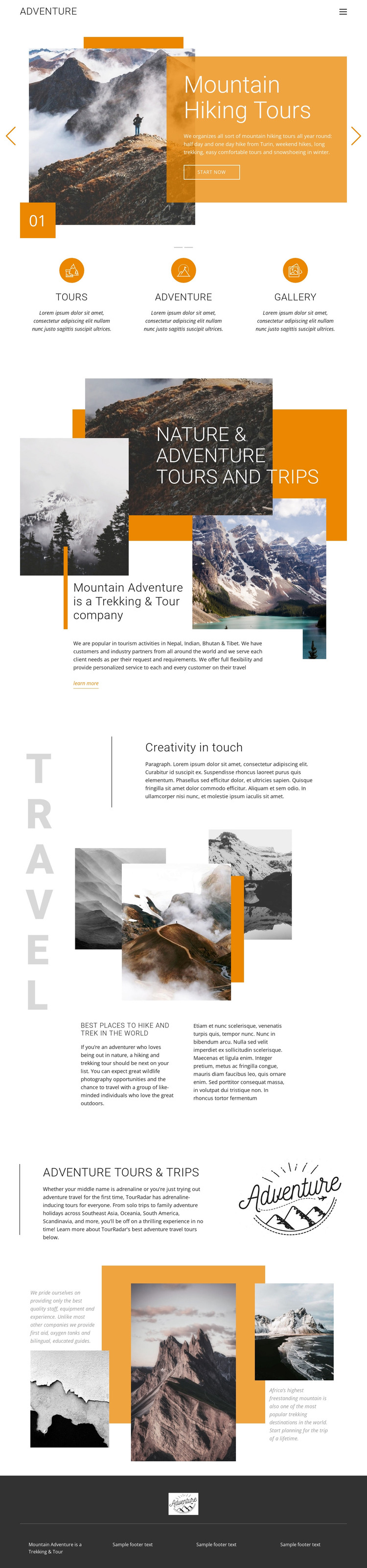
The page divides the travel subject into content areas that can be interpreted naturally within a WordPress-managed site. The Mountain Hiking Tours carousel works as a featured introduction, while the three highlighted categories—Tours, Adventure, and Gallery—provide concise paths into the main subjects without claiming that WordPress Posts or categories already exist in the template. This separation can help permanent page content and later editorial material share the same visual direction.
The destination-focused sections provide a different kind of content relationship. Nature & Adventure Tours and Trips introduces the wider offering, and Best places to hike and trek in the world combines mountain imagery with explanatory copy that could support destination or experience pages. References to Turin, Nepal, Bhutan, Tibet, and other regions show where geographic content may be organized, but the sample names, statements, and locations remain structural evidence and should be verified before use. The final gallery offers a visual area that can accompany those stories rather than replace them.
The compact header and dark footer also establish shared site elements around the page content. In a WordPress project, the design can therefore be understood as a theme direction for permanent travel pages and recurring content while keeping its orange panels, condensed headings, collage imagery, and editorial spacing recognizable. The analysis confirms a single page, so this output describes a suitable CMS interpretation rather than claiming a complete WordPress site or existing blog structure.
Customize with Nicepage
Open this ready-made template in the WordPress Website Builder and customize it visually in the Nicepage editor. Replace demo content, edit page sections, and adapt the design to your project without rebuilding the template from scratch.
Manage and Edit This Theme in WordPress
Customize and Install the WordPress Theme
Start with this ready-made theme instead of building the WordPress design from scratch. Customize its layout, content, typography, images, sections, and other design elements visually in Nicepage editor, then export and install the WordPress Theme, Plugin, and Pages on your WordPress site. The Nicepage WordPress Plugin lets you continue working with the site after installation.
Edit the Theme Directly in WordPress
After installation, you can edit the WordPress Theme directly in WordPress with the Nicepage WordPress Plugin. Use Site Style to customize site Colors, Fonts, Header, Footer, Blog, and Post Page Templates while working within your WordPress website.
Edit WordPress Pages Visually
Use the Nicepage WordPress Plugin to edit page content directly from the WordPress admin area. Open a WordPress Page with Nicepage and visually change its text, images, sections, and other page elements while continuing to manage the Page through WordPress.
WordPress Content and Theme Integration
Use the customized theme with WordPress Pages, Posts, Blog and Post Templates, menus, widgets, and other CMS-managed content. Shared theme elements such as Colors, Fonts, Header, Footer, Blog, and Post Page Templates can be managed as part of the overall site design, while WordPress provides the CMS environment for managing site content.
This workflow combines a ready-made WordPress Theme with visual customization, direct theme editing in WordPress, and continued content management through the Nicepage WordPress Plugin.





















