
Find your next favorite trail WordPress Theme


Edit Template Offline
2. Create new page and search for id 255645
Edit Template Online
Create Awesome Websites


Free Nicepage Builder
Keywords
Travel Content Areas Support Pages and Future Editorial Material
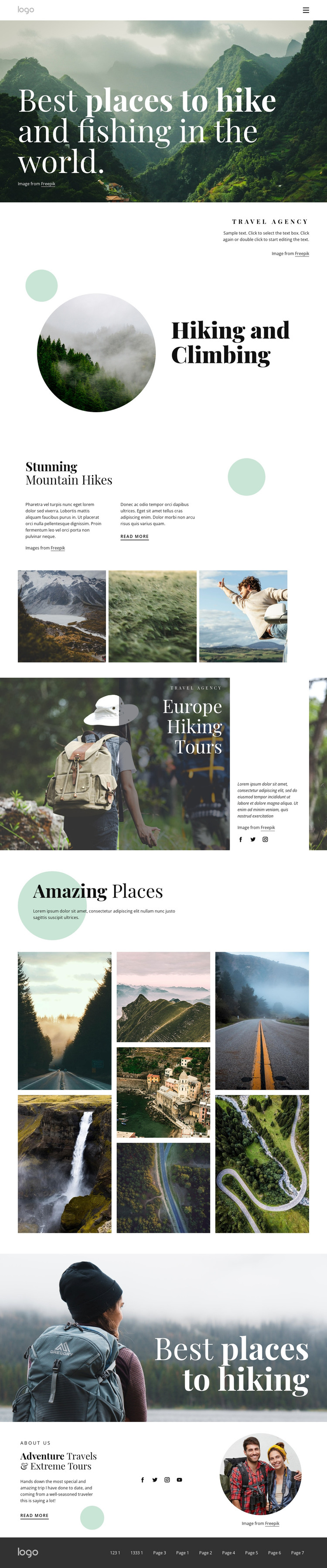
The page-oriented content is divided into clear areas that can translate naturally into a WordPress-managed travel site. Hiking and Climbing can serve as permanent activity information, while the Europe Hiking Tours section gives the design a focused regional tour area with supporting text and imagery. The three-image mountain gallery works as a compact visual story, and the seven-image Amazing Places mosaic can support a broader destination presentation. These relationships make the design useful for keeping permanent agency information and changing travel content within one visual direction.
The repeated header and dark footer navigation provide shared site elements, while social links appear in two content areas and can connect the travel presentation with the agency's external channels. The closing Adventure Travels & Extreme Tours block adds a separate overview role, with a Read more action that can lead visitors toward deeper page content when the project defines that destination. If the site later publishes articles or announcements, the editorial character of the gallery and destination sections provides a visual context for that material, but no blog, posts, categories, or other WordPress-specific structures are claimed as existing in this template. The theme interpretation is based on the verified content relationships: activity information, regional tours, destination imagery, agency overview, navigation, and social areas.
Customize with Nicepage
Open this ready-made template in the WordPress Website Builder and customize it visually in the Nicepage editor. Replace demo content, edit page sections, and adapt the design to your project without rebuilding the template from scratch.
Manage and Edit This Theme in WordPress
Customize and Install the WordPress Theme
Start with this ready-made theme instead of building the WordPress design from scratch. Customize its layout, content, typography, images, sections, and other design elements visually in Nicepage editor, then export and install the WordPress Theme, Plugin, and Pages on your WordPress site. The Nicepage WordPress Plugin lets you continue working with the site after installation.
Edit the Theme Directly in WordPress
After installation, you can edit the WordPress Theme directly in WordPress with the Nicepage WordPress Plugin. Use Site Style to customize site Colors, Fonts, Header, Footer, Blog, and Post Page Templates while working within your WordPress website.
Edit WordPress Pages Visually
Use the Nicepage WordPress Plugin to edit page content directly from the WordPress admin area. Open a WordPress Page with Nicepage and visually change its text, images, sections, and other page elements while continuing to manage the Page through WordPress.
WordPress Content and Theme Integration
Use the customized theme with WordPress Pages, Posts, Blog and Post Templates, menus, widgets, and other CMS-managed content. Shared theme elements such as Colors, Fonts, Header, Footer, Blog, and Post Page Templates can be managed as part of the overall site design, while WordPress provides the CMS environment for managing site content.
This workflow combines a ready-made WordPress Theme with visual customization, direct theme editing in WordPress, and continued content management through the Nicepage WordPress Plugin.





















