Taxi and car service WordPress Theme


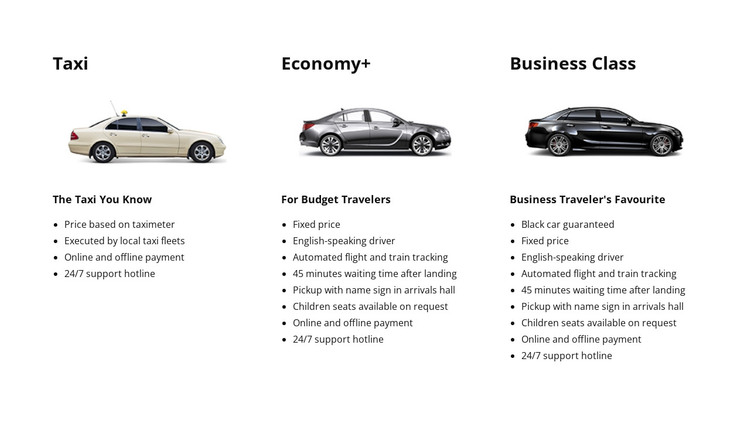
Stable service information forms a reusable page section
The block's content is organized around three durable service categories rather than time-sensitive editorial entries. Taxi, Economy+, and Business Class each occupy a consistent column and explain a distinct transportation option through a heading, vehicle image, descriptor, and feature list. That makes the section suitable for a stable services area in a WordPress-managed page, where the surrounding project can contain other publishable content without changing the block's role.
The feature lists give the three categories different content identities. Taxi describes taximeter pricing, local taxi fleets, online and offline payment, and 24/7 support. Economy+ explains fixed pricing, an English-speaking driver, flight and train tracking, and 45 minutes of waiting after landing. Business Class presents a guaranteed black car, fixed pricing, and pickup with a name sign in the arrivals hall. These details can remain grouped as service information while other content areas handle booking or broader company communication.
The block therefore works as a visual content region within a WordPress-oriented project, not as a complete theme by itself. Nicepage's WordPress Theme and Plugin workflow can support the surrounding CMS project, while this section retains its three-option transportation structure and static presentation.
Customize with Nicepage
Open this ready-made template in the WordPress Website Builder and customize it visually in the Nicepage editor. Replace demo content, edit page sections, and adapt the design to your project without rebuilding the template from scratch.
Edit Template Offline
2. Create a new page or select existing
3. Click Add new block, search for id 67390 and click enter
Edit Template Online
Create Awesome Websites


Free Nicepage Builder
Keywords
Manage and Edit This Theme in WordPress
Customize and Install the WordPress Theme
Start with this ready-made theme instead of building the WordPress design from scratch. Customize its layout, content, typography, images, sections, and other design elements visually in Nicepage editor, then export and install the WordPress Theme, Plugin, and Pages on your WordPress site. The Nicepage WordPress Plugin lets you continue working with the site after installation.
Edit the Theme Directly in WordPress
After installation, you can edit the WordPress Theme directly in WordPress with the Nicepage WordPress Plugin. Use Site Style to customize site Colors, Fonts, Header, Footer, Blog, and Post Page Templates while working within your WordPress website.
Edit WordPress Pages Visually
Use the Nicepage WordPress Plugin to edit page content directly from the WordPress admin area. Open a WordPress Page with Nicepage and visually change its text, images, sections, and other page elements while continuing to manage the Page through WordPress.
WordPress Content and Theme Integration
Use the customized theme with WordPress Pages, Posts, Blog and Post Templates, menus, widgets, and other CMS-managed content. Shared theme elements such as Colors, Fonts, Header, Footer, Blog, and Post Page Templates can be managed as part of the overall site design, while WordPress provides the CMS environment for managing site content.
This workflow combines a ready-made WordPress Theme with visual customization, direct theme editing in WordPress, and continued content management through the Nicepage WordPress Plugin.