Grow our customers business WordPress Theme


Permanent page content with a clear proof-to-contact sequence
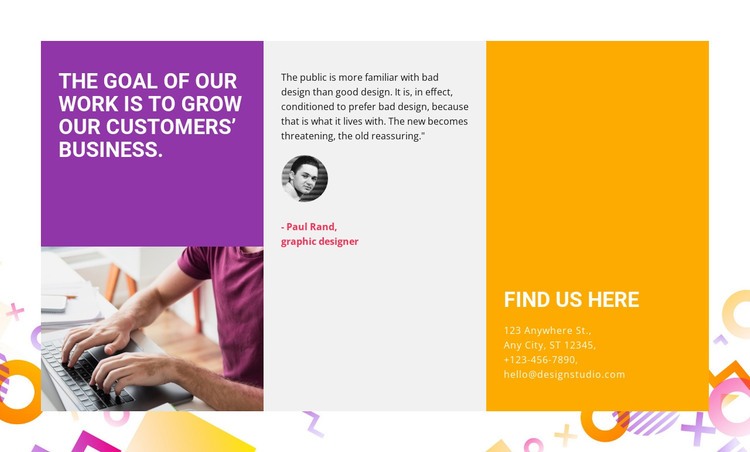
A large statement occupies the purple left panel, giving the section a concise message that can introduce the surrounding page content. The center panel handles a different kind of information by pairing a testimonial quote with a grayscale portrait and an attribution line that includes a role. On the right, the orange panel groups a contact heading with visibly formatted address, phone, and email details. The result is a progression from what the organization says, to supporting human perspective, to where a visitor can find or contact it.
For a WordPress-managed page, this block can function as stable, publishable content within a services, studio, or company-information context. Its content model is more permanent than a changing post stream: the statement, testimonial area, and contact details form one reusable page section that can remain visually consistent while the wider site develops additional pages or editorial content. WordPress-managed material can surround it, but the section’s own purpose stays concentrated in these three adjacent panels.
The visual treatment reinforces that content logic. Saturated purple and orange mark the outer panels, the light gray center creates separation around the testimonial, and white uppercase typography keeps the main labels prominent. The small portrait and geometric decorations prevent the section from reading as a plain text column while preserving a static, easy-to-scan arrangement.
Customize with Nicepage
Open this ready-made template in the WordPress Website Builder and customize it visually in the Nicepage editor. Replace demo content, edit page sections, and adapt the design to your project without rebuilding the template from scratch.
Edit Template Offline
2. Create a new page or select existing
3. Click Add new block, search for id 50428 and click enter
Edit Template Online
Create Awesome Websites


Free Nicepage Builder
Keywords
Manage and Edit This Theme in WordPress
Customize and Install the WordPress Theme
Start with this ready-made theme instead of building the WordPress design from scratch. Customize its layout, content, typography, images, sections, and other design elements visually in Nicepage editor, then export and install the WordPress Theme, Plugin, and Pages on your WordPress site. The Nicepage WordPress Plugin lets you continue working with the site after installation.
Edit the Theme Directly in WordPress
After installation, you can edit the WordPress Theme directly in WordPress with the Nicepage WordPress Plugin. Use Site Style to customize site Colors, Fonts, Header, Footer, Blog, and Post Page Templates while working within your WordPress website.
Edit WordPress Pages Visually
Use the Nicepage WordPress Plugin to edit page content directly from the WordPress admin area. Open a WordPress Page with Nicepage and visually change its text, images, sections, and other page elements while continuing to manage the Page through WordPress.
WordPress Content and Theme Integration
Use the customized theme with WordPress Pages, Posts, Blog and Post Templates, menus, widgets, and other CMS-managed content. Shared theme elements such as Colors, Fonts, Header, Footer, Blog, and Post Page Templates can be managed as part of the overall site design, while WordPress provides the CMS environment for managing site content.
This workflow combines a ready-made WordPress Theme with visual customization, direct theme editing in WordPress, and continued content management through the Nicepage WordPress Plugin.