
A bit about me WordPress Theme


Edit Template Offline
2. Create new page and search for id 3847937
Edit Template Online
Create Awesome Websites


Free Nicepage Builder
Keywords
Portfolio and Profile Areas Suit WordPress-Managed Content
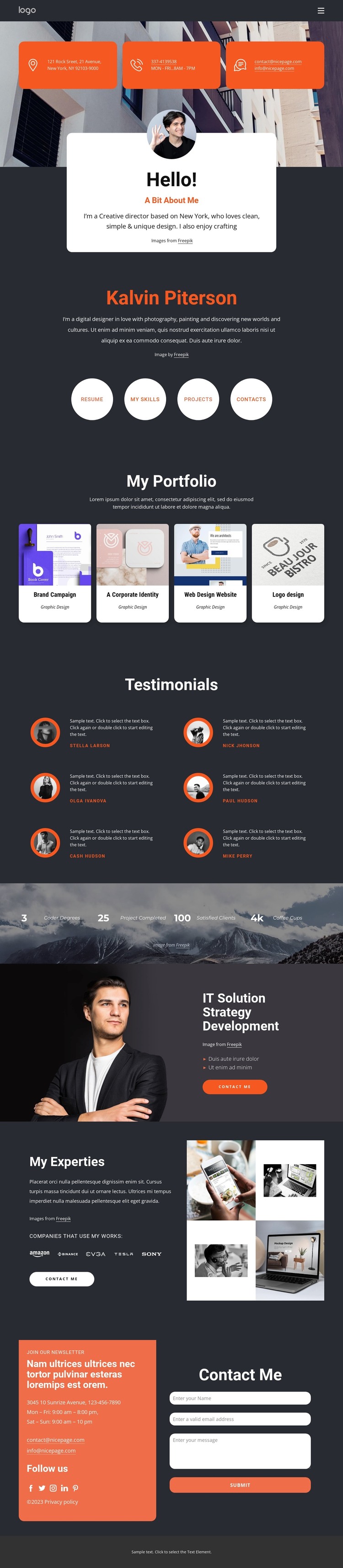
The page separates permanent profile information from repeated creative and client-oriented content. The portrait introduction and biography provide page-oriented identity content, while the four circular actions point toward Resume, My Skills, Projects, and Contacts. The four portfolio cards then create a repeatable presentation for Brand Campaign, Corporate Identity, Web Design Website, and Logo design, giving the theme a clear place for project-focused material.
Six testimonial entries form another recurring content group, supported by circular portraits and names shown as structural examples. The expertise section adds five company logo marks and a four-image collage, while the IT Solution Strategy Development panel presents a distinct service area with supporting bullets and a Contact Me action. These relationships allow permanent profile and service information to sit alongside content that may expand as a creative practice develops, without claiming that specific WordPress posts or categories already exist.
The final section brings together contact information, newsletter content, social links, and a form, making it a natural shared communication area within the theme’s visual system. Nicepage’s WordPress Plugin can support direct theme editing in WordPress when the project uses that workflow. The theme’s main value remains its mapping of personal identity, projects, proof, expertise, and contact content into one coordinated presentation.
Customize with Nicepage
Open this ready-made template in the WordPress Website Builder and customize it visually in the Nicepage editor. Replace demo content, edit page sections, and adapt the design to your project without rebuilding the template from scratch.
Manage and Edit This Theme in WordPress
Customize and Install the WordPress Theme
Start with this ready-made theme instead of building the WordPress design from scratch. Customize its layout, content, typography, images, sections, and other design elements visually in Nicepage editor, then export and install the WordPress Theme, Plugin, and Pages on your WordPress site. The Nicepage WordPress Plugin lets you continue working with the site after installation.
Edit the Theme Directly in WordPress
After installation, you can edit the WordPress Theme directly in WordPress with the Nicepage WordPress Plugin. Use Site Style to customize site Colors, Fonts, Header, Footer, Blog, and Post Page Templates while working within your WordPress website.
Edit WordPress Pages Visually
Use the Nicepage WordPress Plugin to edit page content directly from the WordPress admin area. Open a WordPress Page with Nicepage and visually change its text, images, sections, and other page elements while continuing to manage the Page through WordPress.
WordPress Content and Theme Integration
Use the customized theme with WordPress Pages, Posts, Blog and Post Templates, menus, widgets, and other CMS-managed content. Shared theme elements such as Colors, Fonts, Header, Footer, Blog, and Post Page Templates can be managed as part of the overall site design, while WordPress provides the CMS environment for managing site content.
This workflow combines a ready-made WordPress Theme with visual customization, direct theme editing in WordPress, and continued content management through the Nicepage WordPress Plugin.





















