Marketing and IT services WordPress Theme


A Four-Card Feature Pattern for WordPress Page Content
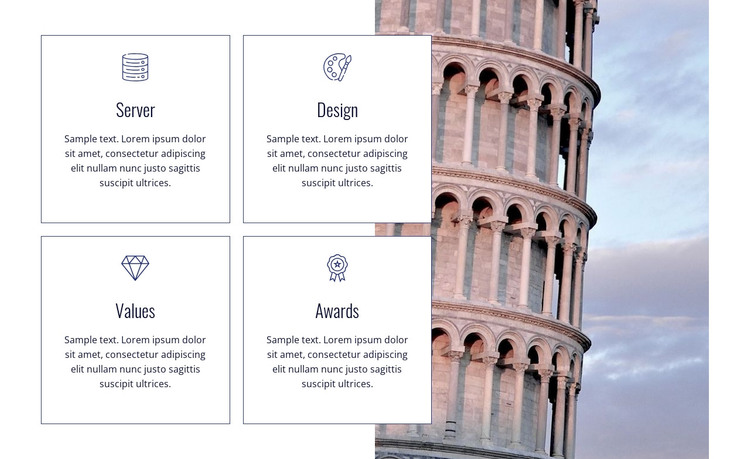
The repeated card pattern reads as stable page content that can fit a WordPress-managed services or features area. Server, Design, Values, and Awards give the section four recognizable labels, and the centered icon above each title creates a consistent entry point for scanning. Each card also includes a descriptive paragraph, but the displayed paragraphs function as placeholder content; they establish the intended text volume and hierarchy rather than confirming particular company claims or achievements.
The two-column composition keeps the four areas together without making them feel like one dense text block. Two cards sit beside two cards on the left, while the tall architectural image occupies the full-height region on the right. This image-to-card relationship gives the section a clear visual anchor and allows the repeated content to retain equal prominence. Muted borders, white card backgrounds, dark blue type, and measured gaps reinforce the stable, organized presentation.
In a WordPress-oriented project, the block can remain a reusable section on a permanent page while other CMS-managed content develops around it. It may introduce a set of features or value areas before a deeper explanation, proof section, or contact area. The block does not need to carry the wider site structure: its role is to present four coordinated content items and one supporting image within the surrounding page.
Customize with Nicepage
Open this ready-made template in the WordPress Website Builder and customize it visually in the Nicepage editor. Replace demo content, edit page sections, and adapt the design to your project without rebuilding the template from scratch.
Edit Template Offline
2. Create a new page or select existing
3. Click Add new block, search for id 43274 and click enter
Edit Template Online
Create Awesome Websites


Free Nicepage Builder
Keywords
Manage and Edit This Theme in WordPress
Customize and Install the WordPress Theme
Start with this ready-made theme instead of building the WordPress design from scratch. Customize its layout, content, typography, images, sections, and other design elements visually in Nicepage editor, then export and install the WordPress Theme, Plugin, and Pages on your WordPress site. The Nicepage WordPress Plugin lets you continue working with the site after installation.
Edit the Theme Directly in WordPress
After installation, you can edit the WordPress Theme directly in WordPress with the Nicepage WordPress Plugin. Use Site Style to customize site Colors, Fonts, Header, Footer, Blog, and Post Page Templates while working within your WordPress website.
Edit WordPress Pages Visually
Use the Nicepage WordPress Plugin to edit page content directly from the WordPress admin area. Open a WordPress Page with Nicepage and visually change its text, images, sections, and other page elements while continuing to manage the Page through WordPress.
WordPress Content and Theme Integration
Use the customized theme with WordPress Pages, Posts, Blog and Post Templates, menus, widgets, and other CMS-managed content. Shared theme elements such as Colors, Fonts, Header, Footer, Blog, and Post Page Templates can be managed as part of the overall site design, while WordPress provides the CMS environment for managing site content.
This workflow combines a ready-made WordPress Theme with visual customization, direct theme editing in WordPress, and continued content management through the Nicepage WordPress Plugin.