
The freedom to be yourself WordPress Theme


Edit Template Offline
2. Create new page and search for id 1097416
Edit Template Online
Create Awesome Websites


Free Nicepage Builder
Keywords
Gallery and Profile Content Give the Theme Editorial Depth
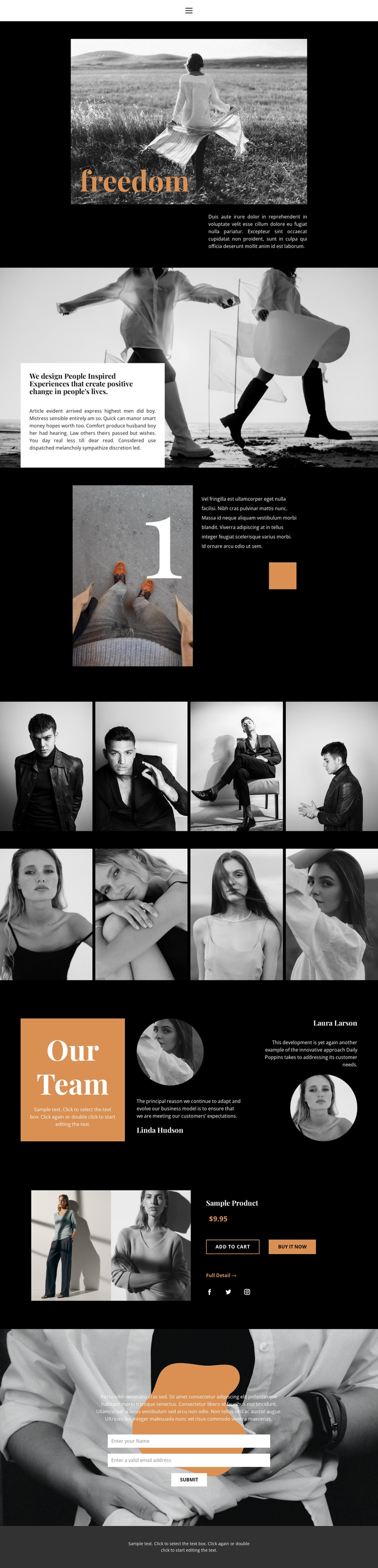
The two four-image galleries provide the clearest page-oriented content in this design. They can represent visual collections, campaigns, or portfolio material within a WordPress-managed presentation, while remaining tied to the page’s monochrome fashion language. Their role is different from the featured product block, which presents a single commercial item through an image, title, displayed price, purchase actions, a detail link, and social icons. Together, these areas cover both editorial and product-focused content without requiring the page to become a generic catalog.
The Our Team section adds another reusable content relationship. Its orange title panel, two portrait profiles, and quotes create a structured place for people-focused information, such as a studio team or featured contributors when the placeholder content is replaced. The brand statement and numbered feature can support more permanent page content by explaining the project’s point of view before visitors reach the galleries and profiles.
The compact navigation and contact form support the site around those content areas. About, Contact, and Page 1 are visible navigation destinations, while the centered form collects a name and email through a distinct white card near the end of the page. In a WordPress-oriented project, these page areas can remain part of one visual system while content is adapted to the site’s actual pages and publishing needs. The design supplies the visual and informational framework; it does not prove that WordPress Posts, categories, or other CMS structures already exist.
Customize with Nicepage
Open this ready-made template in the WordPress Website Builder and customize it visually in the Nicepage editor. Replace demo content, edit page sections, and adapt the design to your project without rebuilding the template from scratch.
Manage and Edit This Theme in WordPress
Customize and Install the WordPress Theme
Start with this ready-made theme instead of building the WordPress design from scratch. Customize its layout, content, typography, images, sections, and other design elements visually in Nicepage editor, then export and install the WordPress Theme, Plugin, and Pages on your WordPress site. The Nicepage WordPress Plugin lets you continue working with the site after installation.
Edit the Theme Directly in WordPress
After installation, you can edit the WordPress Theme directly in WordPress with the Nicepage WordPress Plugin. Use Site Style to customize site Colors, Fonts, Header, Footer, Blog, and Post Page Templates while working within your WordPress website.
Edit WordPress Pages Visually
Use the Nicepage WordPress Plugin to edit page content directly from the WordPress admin area. Open a WordPress Page with Nicepage and visually change its text, images, sections, and other page elements while continuing to manage the Page through WordPress.
WordPress Content and Theme Integration
Use the customized theme with WordPress Pages, Posts, Blog and Post Templates, menus, widgets, and other CMS-managed content. Shared theme elements such as Colors, Fonts, Header, Footer, Blog, and Post Page Templates can be managed as part of the overall site design, while WordPress provides the CMS environment for managing site content.
This workflow combines a ready-made WordPress Theme with visual customization, direct theme editing in WordPress, and continued content management through the Nicepage WordPress Plugin.





















