Techno skills in business WordPress Theme


Edit Template Offline
2. Create new page and search for id 34941
Edit Template Online
Create Awesome Websites


Free Nicepage Builder
Keywords
Service Content and Studio Principles Fit a Managed Editorial Structure
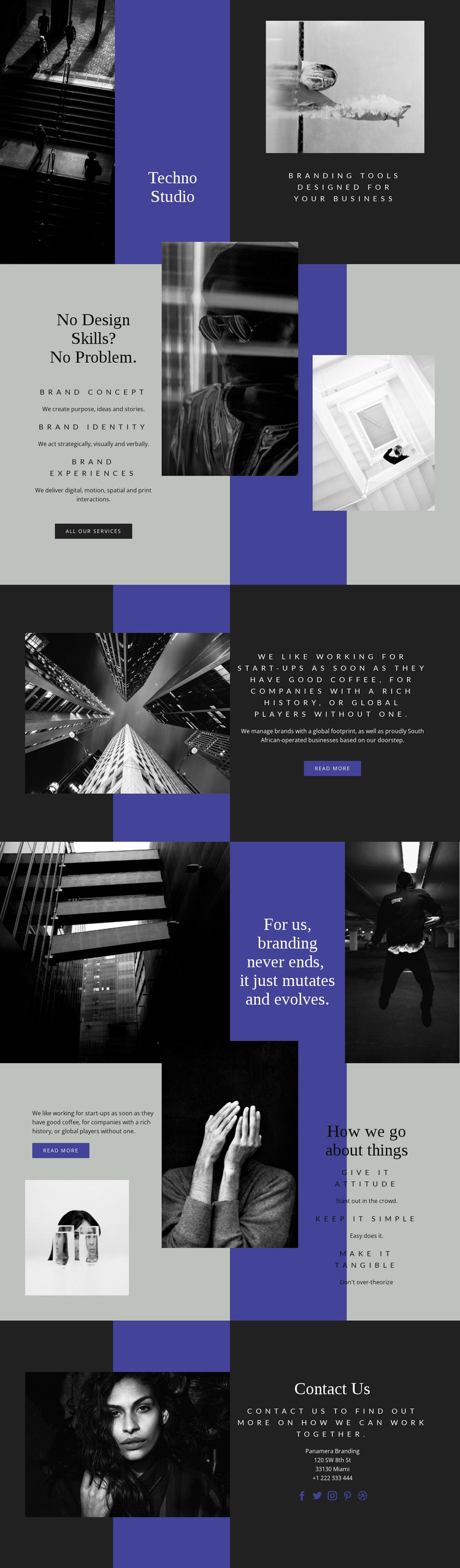
The three service areas provide the strongest page-oriented content for a WordPress interpretation. Brand Concept, Brand Identity, and Brand Experiences are clearly separated but presented within one visual system, making them suitable starting points for permanent service content or expanded descriptions. Their accompanying call to action gives the service group a route toward broader information without claiming that separate WordPress pages or posts already exist in the template.
The page’s editorial voice is carried by the positioning statement, the claim that branding evolves, and the three principles Give it attitude, Keep it simple, and Make it tangible. These elements can support content that changes over time—such as case-study introductions, studio updates, or explanatory articles—while the established typography and image treatment keep those additions connected to the original design. The sample organization and address content should be replaced or verified rather than treated as real business information.
The contact and social section supplies shared site content that can remain visible as the project develops. Its invitation to find out how the studio can work with visitors gives the page a clear relationship between informational content and response. In a WordPress-managed site, the design can therefore organize permanent service and studio sections alongside later editorial material, while preserving the monochrome photography, charcoal-and-indigo contrast, and principle-led brand voice.
Customize with Nicepage
Open this ready-made template in the WordPress Website Builder and customize it visually in the Nicepage editor. Replace demo content, edit page sections, and adapt the design to your project without rebuilding the template from scratch.
Manage and Edit This Theme in WordPress
Customize and Install the WordPress Theme
Start with this ready-made theme instead of building the WordPress design from scratch. Customize its layout, content, typography, images, sections, and other design elements visually in Nicepage editor, then export and install the WordPress Theme, Plugin, and Pages on your WordPress site. The Nicepage WordPress Plugin lets you continue working with the site after installation.
Edit the Theme Directly in WordPress
After installation, you can edit the WordPress Theme directly in WordPress with the Nicepage WordPress Plugin. Use Site Style to customize site Colors, Fonts, Header, Footer, Blog, and Post Page Templates while working within your WordPress website.
Edit WordPress Pages Visually
Use the Nicepage WordPress Plugin to edit page content directly from the WordPress admin area. Open a WordPress Page with Nicepage and visually change its text, images, sections, and other page elements while continuing to manage the Page through WordPress.
WordPress Content and Theme Integration
Use the customized theme with WordPress Pages, Posts, Blog and Post Templates, menus, widgets, and other CMS-managed content. Shared theme elements such as Colors, Fonts, Header, Footer, Blog, and Post Page Templates can be managed as part of the overall site design, while WordPress provides the CMS environment for managing site content.
This workflow combines a ready-made WordPress Theme with visual customization, direct theme editing in WordPress, and continued content management through the Nicepage WordPress Plugin.