PC gaming news WordPress Theme



Edit Template Offline
2. Create new page and search for id 358254
Edit Template Online
Create Awesome Websites


Free Nicepage Builder
Keywords
Editorial Topics and Repeated Cards Support Ongoing Content
The publication heading, category navigation, and Top PC Games carousel give the design a page-oriented editorial starting point. The carousel’s two displayed slides can be read as featured game coverage, while the three repeated cards organize supporting ideas around video games, brain stimulation, and stress relief. Together, these areas create a relationship between featured content and explanatory material rather than presenting one undifferentiated stream.
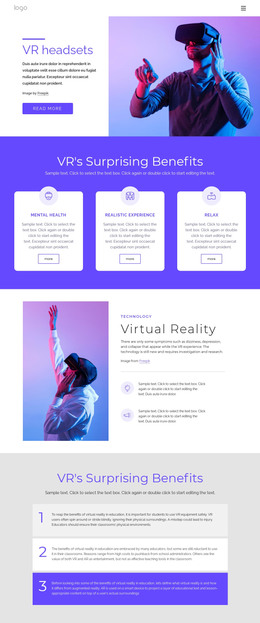
The gaming-gadget banner, free-game section, and VR-Technologies block add further content directions that could be maintained as distinct parts of a gaming media project. The gadget and VR areas are especially useful for separating hardware and technology coverage from game-focused editorial material. At the bottom, the contact form accepts name, email, and message inputs, and the social icons connect the page to publication channels. Those permanent page areas can coexist with future articles or announcements without claiming that posts already appear in this template.
A WordPress-oriented interpretation therefore centers on content that can be organized, updated, and expanded around the existing page structure: featured games, benefit explanations, gadget coverage, VR topics, and reader contact. WordPress Pages or Posts are possible implementation concepts, not verified elements of the source design. The visual system remains anchored by dark imagery, cream cards, circular crops, and bold headings, allowing changing content to stay connected to the same theme character.
Customize with Nicepage
Open this ready-made template in the WordPress Website Builder and customize it visually in the Nicepage editor. Replace demo content, edit page sections, and adapt the design to your project without rebuilding the template from scratch.
Manage and Edit This Theme in WordPress
Customize and Install the WordPress Theme
Start with this ready-made theme instead of building the WordPress design from scratch. Customize its layout, content, typography, images, sections, and other design elements visually in Nicepage editor, then export and install the WordPress Theme, Plugin, and Pages on your WordPress site. The Nicepage WordPress Plugin lets you continue working with the site after installation.
Edit the Theme Directly in WordPress
After installation, you can edit the WordPress Theme directly in WordPress with the Nicepage WordPress Plugin. Use Site Style to customize site Colors, Fonts, Header, Footer, Blog, and Post Page Templates while working within your WordPress website.
Edit WordPress Pages Visually
Use the Nicepage WordPress Plugin to edit page content directly from the WordPress admin area. Open a WordPress Page with Nicepage and visually change its text, images, sections, and other page elements while continuing to manage the Page through WordPress.
WordPress Content and Theme Integration
Use the customized theme with WordPress Pages, Posts, Blog and Post Templates, menus, widgets, and other CMS-managed content. Shared theme elements such as Colors, Fonts, Header, Footer, Blog, and Post Page Templates can be managed as part of the overall site design, while WordPress provides the CMS environment for managing site content.
This workflow combines a ready-made WordPress Theme with visual customization, direct theme editing in WordPress, and continued content management through the Nicepage WordPress Plugin.