New technology perspectives WordPress Theme



Edit Template Offline
2. Create new page and search for id 1241583
Edit Template Online
Create Awesome Websites


Free Nicepage Builder
Keywords
Capability content and program cards create durable page information
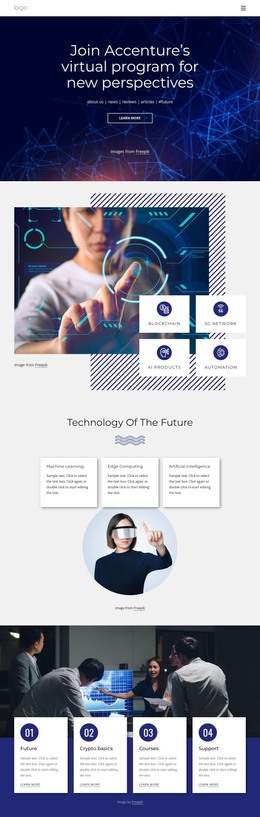
The technology categories give this design a strong set of page-oriented content areas. Machine Learning, Edge Computing, Artificial Intelligence, Blockchain, 5G Network, AI Products, and Automation are presented as related subjects around a visual showcase, so they can be interpreted as a coordinated technology overview rather than isolated promotional labels. The four numbered cards add a different relationship: Future, Crypto basics, Courses, and Support form a repeated program sequence that can organize explanatory or educational content.
The AI & Digital Platform section narrows the subject to one focused message, pairing a short description and Learn more action with a human-machine handshake image. That makes it distinct from the broader capability overview and gives the page a clear area for platform-oriented content. The Essential 8 Emerging Technologies section then spreads information across three columns, creating a more editorial arrangement for category descriptions. These permanent content areas can remain part of the theme’s visual system while a project adds or updates related site content through WordPress. The newsletter section provides a separate response area with an email field, Subscribe action, and Follow us prompt, while navigation and the dark footer frame the page as shared site content. This interpretation uses the design’s actual page regions without claiming that WordPress posts, categories, or blog templates already exist.
Customize with Nicepage
Open this ready-made template in the WordPress Website Builder and customize it visually in the Nicepage editor. Replace demo content, edit page sections, and adapt the design to your project without rebuilding the template from scratch.
Manage and Edit This Theme in WordPress
Customize and Install the WordPress Theme
Start with this ready-made theme instead of building the WordPress design from scratch. Customize its layout, content, typography, images, sections, and other design elements visually in Nicepage editor, then export and install the WordPress Theme, Plugin, and Pages on your WordPress site. The Nicepage WordPress Plugin lets you continue working with the site after installation.
Edit the Theme Directly in WordPress
After installation, you can edit the WordPress Theme directly in WordPress with the Nicepage WordPress Plugin. Use Site Style to customize site Colors, Fonts, Header, Footer, Blog, and Post Page Templates while working within your WordPress website.
Edit WordPress Pages Visually
Use the Nicepage WordPress Plugin to edit page content directly from the WordPress admin area. Open a WordPress Page with Nicepage and visually change its text, images, sections, and other page elements while continuing to manage the Page through WordPress.
WordPress Content and Theme Integration
Use the customized theme with WordPress Pages, Posts, Blog and Post Templates, menus, widgets, and other CMS-managed content. Shared theme elements such as Colors, Fonts, Header, Footer, Blog, and Post Page Templates can be managed as part of the overall site design, while WordPress provides the CMS environment for managing site content.
This workflow combines a ready-made WordPress Theme with visual customization, direct theme editing in WordPress, and continued content management through the Nicepage WordPress Plugin.