Digital world of technology WordPress Theme


Edit Template Offline
2. Create new page and search for id 20573
Edit Template Online
Create Awesome Websites


Free Nicepage Builder
Keywords
Product Pages, Category Content, and Reusable Actions Share One Theme Direction
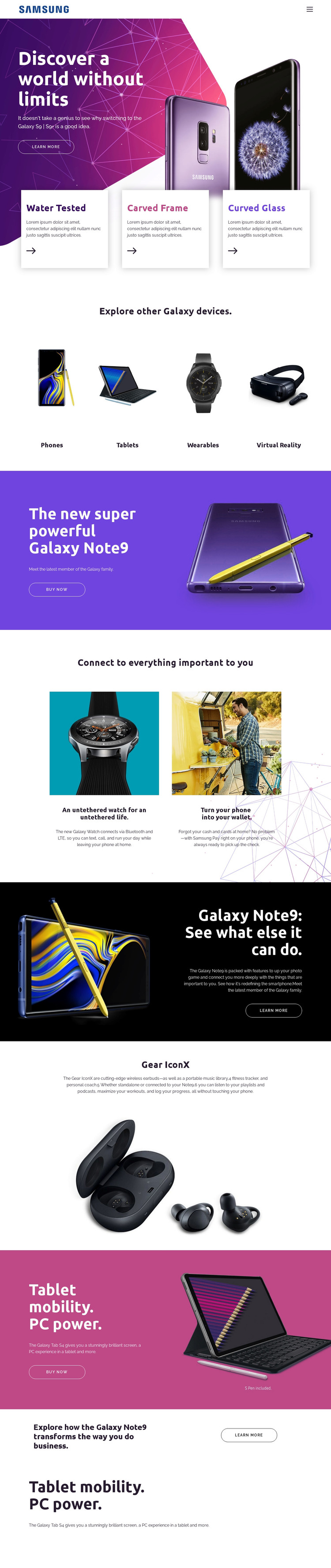
The page separates durable product information into recognizable content areas. The opening Galaxy hero and its three feature cards establish a featured-product presentation, while the Phones, Tablets, Wearables, and Virtual Reality grid provides category-oriented navigation content. This makes the design suitable for a WordPress-managed project where permanent pages can explain products and categories while retaining a shared visual direction.
The repeated Galaxy Note9 sections offer a different content relationship from the accessory and service areas. One Note9 panel emphasizes a purchase action, another explains capabilities, and the business-use section frames the same product for a specific audience context. Galaxy Watch and Samsung Pay can sit together as connected features, while Gear IconX and Galaxy Tab S4 provide distinct product stories. These differences give the theme more useful page content than a single repeated product card.
Learn more and Buy now actions create consistent links between the content areas and deeper product or commercial destinations. The design does not prove that WordPress Posts, categories, or blog structures already exist, so the safest interpretation is page-oriented: a WordPress project can organize permanent product information and related sections around this established theme character. The benefit is continuity between shared navigation, product imagery, category presentation, and recurring promotional blocks.
Customize with Nicepage
Open this ready-made template in the WordPress Website Builder and customize it visually in the Nicepage editor. Replace demo content, edit page sections, and adapt the design to your project without rebuilding the template from scratch.
Manage and Edit This Theme in WordPress
Customize and Install the WordPress Theme
Start with this ready-made theme instead of building the WordPress design from scratch. Customize its layout, content, typography, images, sections, and other design elements visually in Nicepage editor, then export and install the WordPress Theme, Plugin, and Pages on your WordPress site. The Nicepage WordPress Plugin lets you continue working with the site after installation.
Edit the Theme Directly in WordPress
After installation, you can edit the WordPress Theme directly in WordPress with the Nicepage WordPress Plugin. Use Site Style to customize site Colors, Fonts, Header, Footer, Blog, and Post Page Templates while working within your WordPress website.
Edit WordPress Pages Visually
Use the Nicepage WordPress Plugin to edit page content directly from the WordPress admin area. Open a WordPress Page with Nicepage and visually change its text, images, sections, and other page elements while continuing to manage the Page through WordPress.
WordPress Content and Theme Integration
Use the customized theme with WordPress Pages, Posts, Blog and Post Templates, menus, widgets, and other CMS-managed content. Shared theme elements such as Colors, Fonts, Header, Footer, Blog, and Post Page Templates can be managed as part of the overall site design, while WordPress provides the CMS environment for managing site content.
This workflow combines a ready-made WordPress Theme with visual customization, direct theme editing in WordPress, and continued content management through the Nicepage WordPress Plugin.