Bread with special love WordPress Theme


Edit Template Offline
2. Create new page and search for id 3214940
Edit Template Online
Create Awesome Websites


Free Nicepage Builder
Keywords
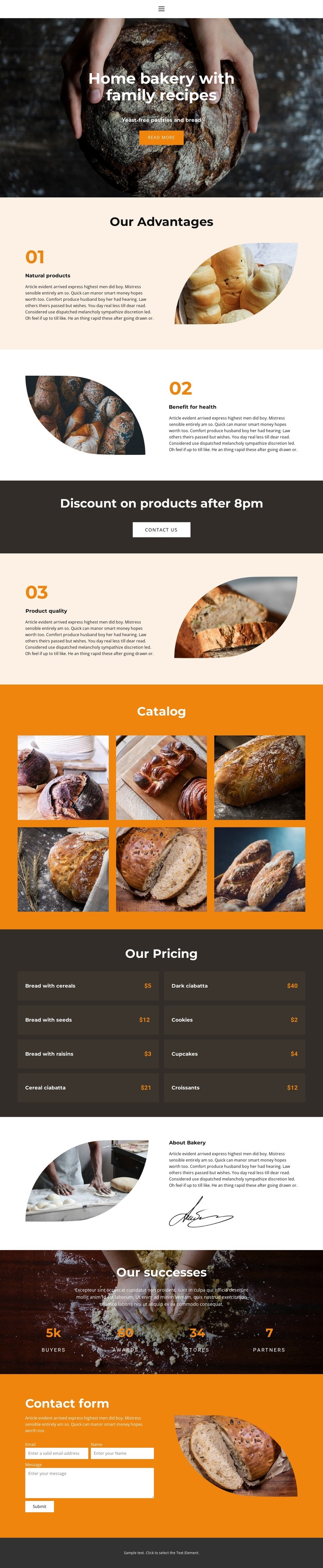
Bakery product areas fit alongside WordPress page content
The product catalog and pricing section provide two different kinds of content that a WordPress-oriented project can organize within the same visual direction. Six labeled bakery images introduce product categories through photography, while the paired pricing rows present a denser reference for displayed products and prices. Their relationship separates visual discovery from quick comparison, giving permanent bakery information a clear place on the page without claiming that specific WordPress posts or catalog structures already exist.
The surrounding sections add page-oriented content. The hero can introduce the home bakery and its yeast-free bread and pastry focus, while the three advantage blocks explain natural products, health benefits, and product quality. About Bakery content supplies background information, and the four displayed success metrics create a separate credibility area. The final contact form preserves a direct inquiry route after visitors have seen the product and bakery context. Navigation and mobile navigation support movement between these content areas as the design evolves.
The theme’s value in WordPress is therefore the mapping between existing visual regions and manageable content categories: product imagery, pricing information, bakery background, explanatory advantages, and inquiries. Nicepage confirms that the WordPress Plugin can edit a theme directly in WordPress, but that capability is only a bridge. The template-specific strength is its already coordinated structure for presenting recurring bakery information without losing the warm visual character.
Customize with Nicepage
Open this ready-made template in the WordPress Website Builder and customize it visually in the Nicepage editor. Replace demo content, edit page sections, and adapt the design to your project without rebuilding the template from scratch.
Manage and Edit This Theme in WordPress
Customize and Install the WordPress Theme
Start with this ready-made theme instead of building the WordPress design from scratch. Customize its layout, content, typography, images, sections, and other design elements visually in Nicepage editor, then export and install the WordPress Theme, Plugin, and Pages on your WordPress site. The Nicepage WordPress Plugin lets you continue working with the site after installation.
Edit the Theme Directly in WordPress
After installation, you can edit the WordPress Theme directly in WordPress with the Nicepage WordPress Plugin. Use Site Style to customize site Colors, Fonts, Header, Footer, Blog, and Post Page Templates while working within your WordPress website.
Edit WordPress Pages Visually
Use the Nicepage WordPress Plugin to edit page content directly from the WordPress admin area. Open a WordPress Page with Nicepage and visually change its text, images, sections, and other page elements while continuing to manage the Page through WordPress.
WordPress Content and Theme Integration
Use the customized theme with WordPress Pages, Posts, Blog and Post Templates, menus, widgets, and other CMS-managed content. Shared theme elements such as Colors, Fonts, Header, Footer, Blog, and Post Page Templates can be managed as part of the overall site design, while WordPress provides the CMS environment for managing site content.
This workflow combines a ready-made WordPress Theme with visual customization, direct theme editing in WordPress, and continued content management through the Nicepage WordPress Plugin.