
Fashion Photography Classic Style WordPress Theme
Edit Template Offline
2. Create new page and search for id 23917
Edit Template Online
Create Awesome Websites


Free Nicepage Builder
Keywords
Profile Content and Repeated Image Features Suit a WordPress Theme
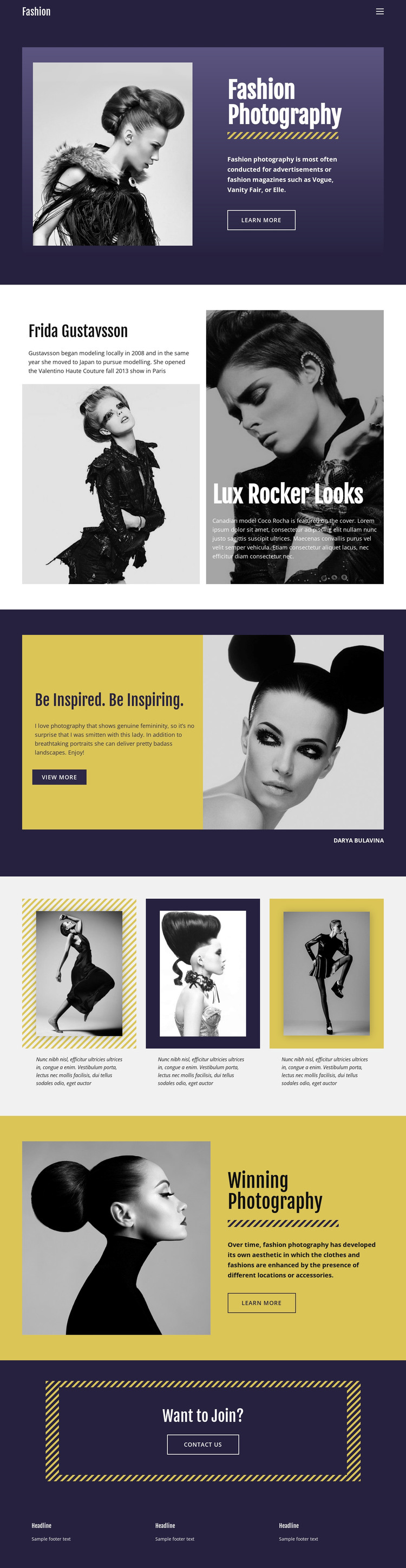
The page contains clear page-oriented content areas that can translate naturally into a WordPress-managed fashion presentation. The Frida Gustavsson block is centered on a named model profile, while the adjoining Lux Rocker Looks feature introduces a separate editorial subject with a Coco Rocha reference. Treating these as distinct content areas would preserve the difference between profile material and fashion-story coverage instead of flattening both into one image list.
The inspirational section adds a commentary-led feature around Darya Bulavina and a large portrait, and the three-item image grid supplies a repeated visual format for selected fashion imagery. Winning Photography returns to a larger image-and-text presentation with a learn-more link. Together, these regions give permanent page content a recognizable visual system while leaving room for additional editorial material to follow the same image, heading, and description relationships.
The Want to Join? block provides a focused Contact Us destination after the visual and editorial content, and the three-column footer supplies shared site information. In a WordPress theme context, the design can therefore organize profiles, features, gallery-style content, and contact messaging around a consistent presentation rather than treating the page as only a static collection of photographs.
Customize with Nicepage
Open this ready-made template in the WordPress Website Builder and customize it visually in the Nicepage editor. Replace demo content, edit page sections, and adapt the design to your project without rebuilding the template from scratch.
Manage and Edit This Theme in WordPress
Customize and Install the WordPress Theme
Start with this ready-made theme instead of building the WordPress design from scratch. Customize its layout, content, typography, images, sections, and other design elements visually in Nicepage editor, then export and install the WordPress Theme, Plugin, and Pages on your WordPress site. The Nicepage WordPress Plugin lets you continue working with the site after installation.
Edit the Theme Directly in WordPress
After installation, you can edit the WordPress Theme directly in WordPress with the Nicepage WordPress Plugin. Use Site Style to customize site Colors, Fonts, Header, Footer, Blog, and Post Page Templates while working within your WordPress website.
Edit WordPress Pages Visually
Use the Nicepage WordPress Plugin to edit page content directly from the WordPress admin area. Open a WordPress Page with Nicepage and visually change its text, images, sections, and other page elements while continuing to manage the Page through WordPress.
WordPress Content and Theme Integration
Use the customized theme with WordPress Pages, Posts, Blog and Post Templates, menus, widgets, and other CMS-managed content. Shared theme elements such as Colors, Fonts, Header, Footer, Blog, and Post Page Templates can be managed as part of the overall site design, while WordPress provides the CMS environment for managing site content.
This workflow combines a ready-made WordPress Theme with visual customization, direct theme editing in WordPress, and continued content management through the Nicepage WordPress Plugin.





















