
Extreme mountain expedition WordPress Theme


Edit Template Offline
2. Create new page and search for id 17754
Edit Template Online
Create Awesome Websites


Free Nicepage Builder
Keywords
Editorial Cards and Permanent Company Content in One Visual System
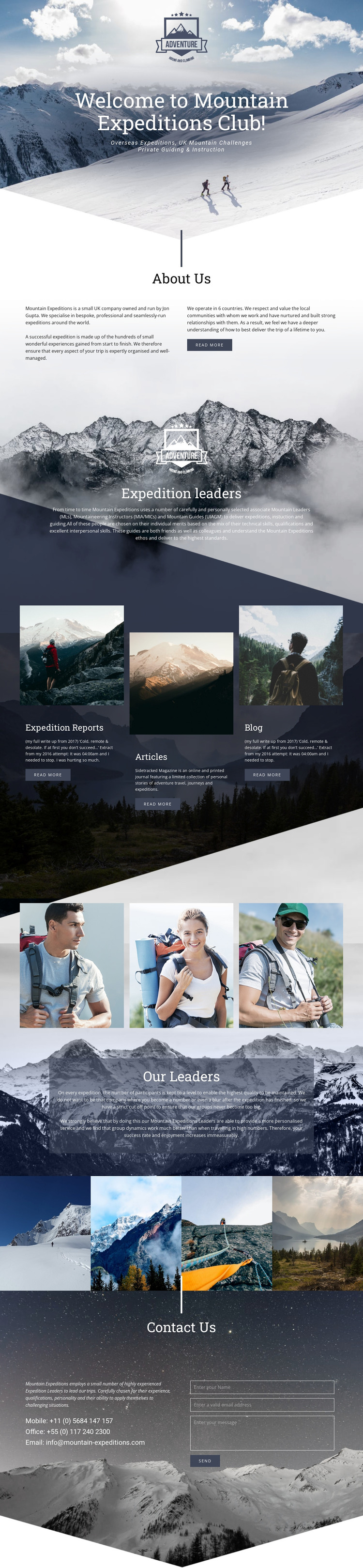
The page contains several areas that can be understood as permanent company content within a WordPress-oriented project. The hero introduces the mountain expedition club, and the About Us section explains the company background while identifying Jon Gupta as the owner and operator. The expedition-leader feature then gives the organization’s guiding expertise a separate content role, rather than leaving the service description disconnected from the people who deliver it.
The three cards for Expedition Reports, Articles, and Blog are especially relevant to an environment that may combine enduring page information with regularly updated material. They are visually repeated, but their labels distinguish reports, articles, and blog content. That gives a WordPress project a coherent place to develop editorial sections without claiming that Posts, categories, or a blog already exist in the template. The leader portraits and Our Leaders panel can similarly support a people-focused content area within the same design direction.
The Contact Us block keeps practical company information visible alongside a message form. It can function as permanent page content while the editorial cards develop over time. Nicepage documentation describes the WordPress Plugin as supporting direct theme editing in WordPress. For this design, the useful interpretation is the continuity between managed company and editorial content, shared visual treatment, and the final contact route—not a claim that WordPress content is already installed.
Customize with Nicepage
Open this ready-made template in the WordPress Website Builder and customize it visually in the Nicepage editor. Replace demo content, edit page sections, and adapt the design to your project without rebuilding the template from scratch.
Manage and Edit This Theme in WordPress
Customize and Install the WordPress Theme
Start with this ready-made theme instead of building the WordPress design from scratch. Customize its layout, content, typography, images, sections, and other design elements visually in Nicepage editor, then export and install the WordPress Theme, Plugin, and Pages on your WordPress site. The Nicepage WordPress Plugin lets you continue working with the site after installation.
Edit the Theme Directly in WordPress
After installation, you can edit the WordPress Theme directly in WordPress with the Nicepage WordPress Plugin. Use Site Style to customize site Colors, Fonts, Header, Footer, Blog, and Post Page Templates while working within your WordPress website.
Edit WordPress Pages Visually
Use the Nicepage WordPress Plugin to edit page content directly from the WordPress admin area. Open a WordPress Page with Nicepage and visually change its text, images, sections, and other page elements while continuing to manage the Page through WordPress.
WordPress Content and Theme Integration
Use the customized theme with WordPress Pages, Posts, Blog and Post Templates, menus, widgets, and other CMS-managed content. Shared theme elements such as Colors, Fonts, Header, Footer, Blog, and Post Page Templates can be managed as part of the overall site design, while WordPress provides the CMS environment for managing site content.
This workflow combines a ready-made WordPress Theme with visual customization, direct theme editing in WordPress, and continued content management through the Nicepage WordPress Plugin.





















