Japan Travel Guide WordPress Theme


Edit Template Offline
2. Create new page and search for id 6665246
Edit Template Online
Create Awesome Websites


Free Nicepage Builder
Keywords
Route Cards and Guest Stories Support Expandable Travel Content
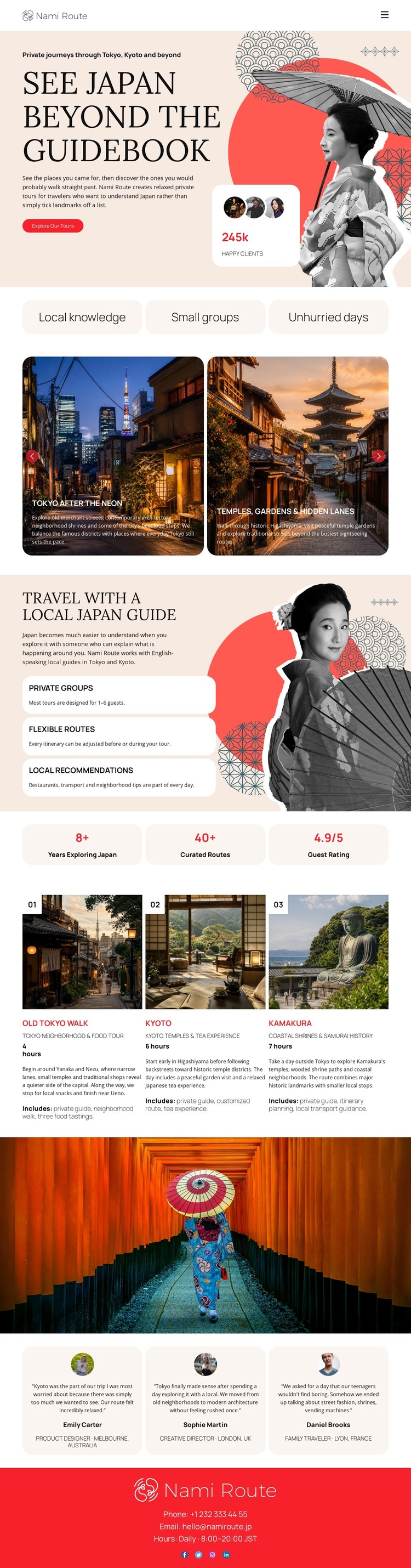
The page separates permanent travel information into clear content areas that can suit a WordPress-managed site. The hero and three philosophy labels establish the editorial direction, while the featured cards provide compact destination examples for Tokyo after dark and temple gardens. The local-guide section then gives the design a durable information layer through private groups, flexible routes, and local recommendations, making the page more than a single promotional image sequence.
The numbered Tokyo, Kyoto, and Kamakura cards are especially useful as a model for recurring destination content. They connect a place name with imagery and a short route description, a pattern that could be extended when the project adds further travel material. Three testimonial cards provide a separate guest-experience area, while the experience metrics create a concise proof section; the displayed sample values should remain treated as demonstration content unless independently verified. The footer keeps Nami Route, phone, email, and business hours in a shared closing region. In a WordPress project, these page-oriented areas can remain part of one coherent theme presentation while additional editorial or travel content is developed around them. The design therefore supports structured content growth through its existing route, guide, guest, and contact relationships rather than relying on an unsupported claim that blog or post sections are already present.
Customize with Nicepage
Open this ready-made template in the WordPress Website Builder and customize it visually in the Nicepage editor. Replace demo content, edit page sections, and adapt the design to your project without rebuilding the template from scratch.
Manage and Edit This Theme in WordPress
Customize and Install the WordPress Theme
Start with this ready-made theme instead of building the WordPress design from scratch. Customize its layout, content, typography, images, sections, and other design elements visually in Nicepage editor, then export and install the WordPress Theme, Plugin, and Pages on your WordPress site. The Nicepage WordPress Plugin lets you continue working with the site after installation.
Edit the Theme Directly in WordPress
After installation, you can edit the WordPress Theme directly in WordPress with the Nicepage WordPress Plugin. Use Site Style to customize site Colors, Fonts, Header, Footer, Blog, and Post Page Templates while working within your WordPress website.
Edit WordPress Pages Visually
Use the Nicepage WordPress Plugin to edit page content directly from the WordPress admin area. Open a WordPress Page with Nicepage and visually change its text, images, sections, and other page elements while continuing to manage the Page through WordPress.
WordPress Content and Theme Integration
Use the customized theme with WordPress Pages, Posts, Blog and Post Templates, menus, widgets, and other CMS-managed content. Shared theme elements such as Colors, Fonts, Header, Footer, Blog, and Post Page Templates can be managed as part of the overall site design, while WordPress provides the CMS environment for managing site content.
This workflow combines a ready-made WordPress Theme with visual customization, direct theme editing in WordPress, and continued content management through the Nicepage WordPress Plugin.