
Adventure and travel WordPress Theme


Edit Template Offline
2. Create new page and search for id 11925
Edit Template Online
Create Awesome Websites


Free Nicepage Builder
Keywords
Page Content and Repeated Travel Sections Support a CMS Theme
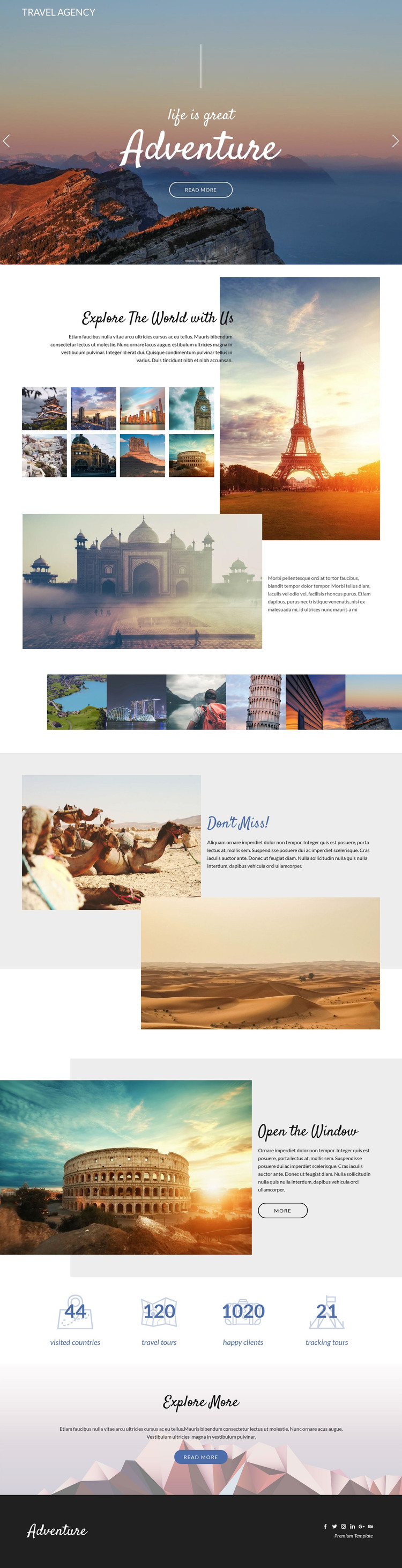
The page separates its travel message into content areas that can remain recognizable as site content is developed. The three-slide hero provides the opening presentation, but the more substantial page content begins with Explore The World with Us, where explanatory copy is paired with destination photography. That relationship gives a permanent overview area a clear visual role. The six-image gallery then creates a distinct collection of destination imagery rather than scattering photographs across unrelated text.
The “Don’t Miss!” and “Open the Window” sections add two repeatable content patterns for highlighted travel recommendations or tour features. Their image-and-text structure can accommodate changing editorial material while preserving the page’s visual character. The four counters form a separate information block with labels for visited countries, travel tours, happy clients, and tracking tours; the sample values should be replaced or verified before publication. Navigation, mobile navigation, and the social footer provide shared site elements around these page regions. A WordPress-oriented project could therefore use this design as a visual environment for permanent travel pages and later updated content, but the analysis does not verify existing posts, categories, or blog structures. The theme value comes from its clear page content relationships and reusable travel presentation, not from an assumed CMS inventory.
Customize with Nicepage
Open this ready-made template in the WordPress Website Builder and customize it visually in the Nicepage editor. Replace demo content, edit page sections, and adapt the design to your project without rebuilding the template from scratch.
Manage and Edit This Theme in WordPress
Customize and Install the WordPress Theme
Start with this ready-made theme instead of building the WordPress design from scratch. Customize its layout, content, typography, images, sections, and other design elements visually in Nicepage editor, then export and install the WordPress Theme, Plugin, and Pages on your WordPress site. The Nicepage WordPress Plugin lets you continue working with the site after installation.
Edit the Theme Directly in WordPress
After installation, you can edit the WordPress Theme directly in WordPress with the Nicepage WordPress Plugin. Use Site Style to customize site Colors, Fonts, Header, Footer, Blog, and Post Page Templates while working within your WordPress website.
Edit WordPress Pages Visually
Use the Nicepage WordPress Plugin to edit page content directly from the WordPress admin area. Open a WordPress Page with Nicepage and visually change its text, images, sections, and other page elements while continuing to manage the Page through WordPress.
WordPress Content and Theme Integration
Use the customized theme with WordPress Pages, Posts, Blog and Post Templates, menus, widgets, and other CMS-managed content. Shared theme elements such as Colors, Fonts, Header, Footer, Blog, and Post Page Templates can be managed as part of the overall site design, while WordPress provides the CMS environment for managing site content.
This workflow combines a ready-made WordPress Theme with visual customization, direct theme editing in WordPress, and continued content management through the Nicepage WordPress Plugin.





















