
Alaska Travel WordPress Theme


Edit Template Offline
2. Create new page and search for id 20516
Edit Template Online
Create Awesome Websites


Free Nicepage Builder
Keywords
Destination Pages, Travel Information, and Inquiry Content in One Theme
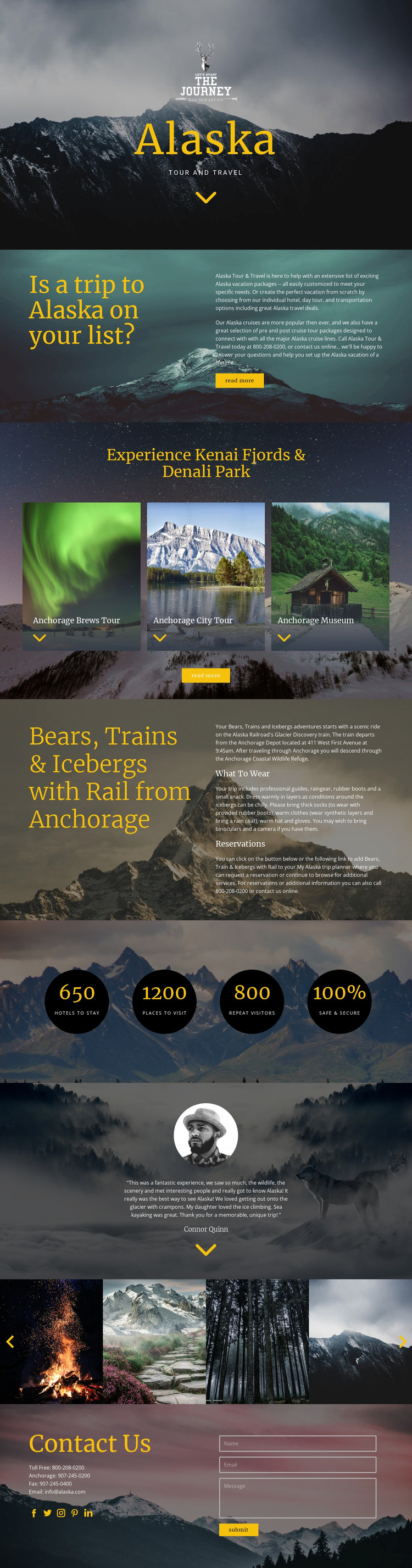
The page separates permanent travel information into clear content areas that can be interpreted naturally within a WordPress-managed site. The introductory split section presents the main service range—Alaska vacation packages, cruises, tours, hotels, and transportation—while the three repeated experience cards create a useful pattern for destination or tour content. Kenai Fjords, Denali Park, and Anchorage attractions are therefore presented as related but distinct subjects rather than being compressed into one paragraph.
The Alaska Railroad feature provides a more detailed content role. Its journey from Anchorage is accompanied by What To Wear and Reservations, allowing an editorial or page-oriented travel presentation to include practical itinerary information beside the main promotional message. The counters and testimonial add separate supporting areas: the four circular metrics create a compact emphasis block, and the portrait quotation supplies a traveler perspective. The scenic carousel can continue the visual storytelling around these content sections without replacing their informational function.
The Contact Us area gives the design a clear place for communication content, combining telephone details, email, social links, and an inquiry form. In a WordPress project, these permanent travel areas could sit alongside additional managed content as the site develops, while the shared visual direction remains recognizable. The interpretation is based on the actual page structure; it does not assume that blog posts, categories, or other WordPress content types already exist in the template.
Customize with Nicepage
Open this ready-made template in the WordPress Website Builder and customize it visually in the Nicepage editor. Replace demo content, edit page sections, and adapt the design to your project without rebuilding the template from scratch.
Manage and Edit This Theme in WordPress
Customize and Install the WordPress Theme
Start with this ready-made theme instead of building the WordPress design from scratch. Customize its layout, content, typography, images, sections, and other design elements visually in Nicepage editor, then export and install the WordPress Theme, Plugin, and Pages on your WordPress site. The Nicepage WordPress Plugin lets you continue working with the site after installation.
Edit the Theme Directly in WordPress
After installation, you can edit the WordPress Theme directly in WordPress with the Nicepage WordPress Plugin. Use Site Style to customize site Colors, Fonts, Header, Footer, Blog, and Post Page Templates while working within your WordPress website.
Edit WordPress Pages Visually
Use the Nicepage WordPress Plugin to edit page content directly from the WordPress admin area. Open a WordPress Page with Nicepage and visually change its text, images, sections, and other page elements while continuing to manage the Page through WordPress.
WordPress Content and Theme Integration
Use the customized theme with WordPress Pages, Posts, Blog and Post Templates, menus, widgets, and other CMS-managed content. Shared theme elements such as Colors, Fonts, Header, Footer, Blog, and Post Page Templates can be managed as part of the overall site design, while WordPress provides the CMS environment for managing site content.
This workflow combines a ready-made WordPress Theme with visual customization, direct theme editing in WordPress, and continued content management through the Nicepage WordPress Plugin.





















