
Mountain Holidays WordPress Theme


Edit Template Offline
2. Create new page and search for id 12913
Edit Template Online
Create Awesome Websites


Free Nicepage Builder
Keywords
Editorial Stories and Repeated Travel Content Fit a Managed Theme
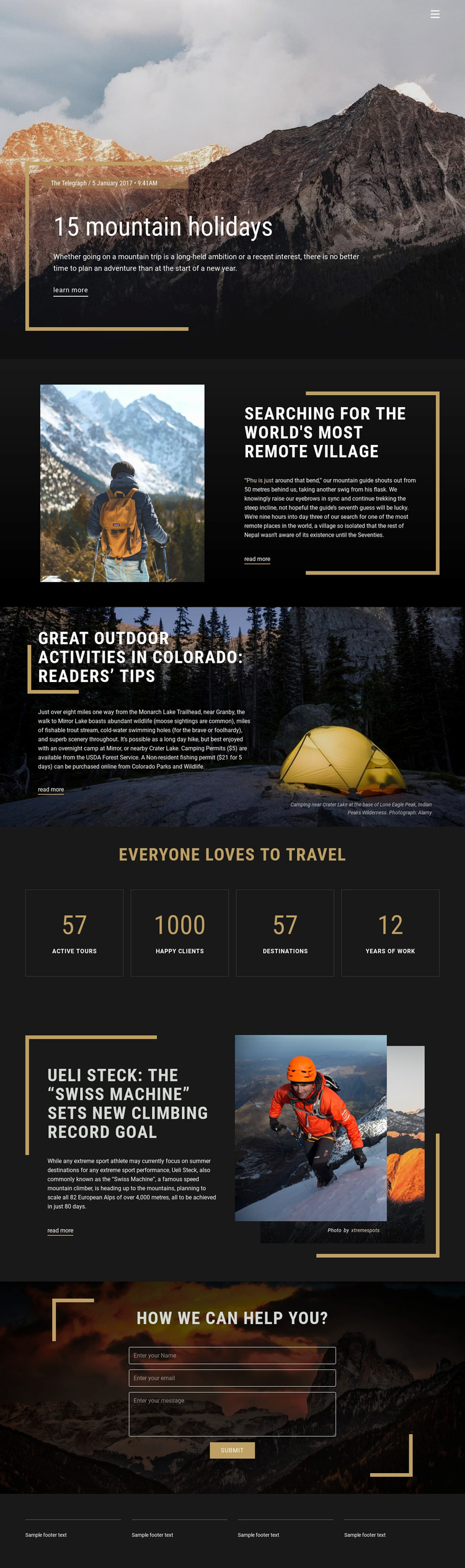
The page’s content areas separate permanent travel information from recurring story-style material in a way that can support a WordPress project. The opening mountain-holiday feature introduces the subject through an image, heading, excerpt, source line, and “Learn more” action. The remote-village, Colorado activities, and climbing sections add related editorial subjects with their own images and read-more links. Their shared visual pattern can accommodate a continuing stream of travel stories while preserving the same mountain-focused design character.
The four metric panels serve a different role. They summarize travel-related figures in a stable, repeated layout rather than behaving like articles, so they can remain part of the page’s informational presentation while story content changes around them. The navigation header and dark footer provide common site areas that help connect this page with other content locations. The demo names, dates, and numeric values should be treated as structural examples rather than verified business claims.
The closing contact block supplies a permanent response area with a centered heading, visible form, submit action, and mountain background. In a WordPress-managed environment, that page-oriented content can coexist with regularly updated travel features without changing the core visual direction. The theme’s strongest value lies in linking editorial storytelling, repeatable content areas, travel highlights, navigation, and inquiries within one recognizable system.
Customize with Nicepage
Open this ready-made template in the WordPress Website Builder and customize it visually in the Nicepage editor. Replace demo content, edit page sections, and adapt the design to your project without rebuilding the template from scratch.
Manage and Edit This Theme in WordPress
Customize and Install the WordPress Theme
Start with this ready-made theme instead of building the WordPress design from scratch. Customize its layout, content, typography, images, sections, and other design elements visually in Nicepage editor, then export and install the WordPress Theme, Plugin, and Pages on your WordPress site. The Nicepage WordPress Plugin lets you continue working with the site after installation.
Edit the Theme Directly in WordPress
After installation, you can edit the WordPress Theme directly in WordPress with the Nicepage WordPress Plugin. Use Site Style to customize site Colors, Fonts, Header, Footer, Blog, and Post Page Templates while working within your WordPress website.
Edit WordPress Pages Visually
Use the Nicepage WordPress Plugin to edit page content directly from the WordPress admin area. Open a WordPress Page with Nicepage and visually change its text, images, sections, and other page elements while continuing to manage the Page through WordPress.
WordPress Content and Theme Integration
Use the customized theme with WordPress Pages, Posts, Blog and Post Templates, menus, widgets, and other CMS-managed content. Shared theme elements such as Colors, Fonts, Header, Footer, Blog, and Post Page Templates can be managed as part of the overall site design, while WordPress provides the CMS environment for managing site content.
This workflow combines a ready-made WordPress Theme with visual customization, direct theme editing in WordPress, and continued content management through the Nicepage WordPress Plugin.





















