Home renovating technology WordPress Theme


Edit Template Offline
2. Create new page and search for id 71369
Edit Template Online
Create Awesome Websites


Free Nicepage Builder
Keywords
Page Content, Service Cards, and Contact Information Form a WordPress-Ready Theme Base
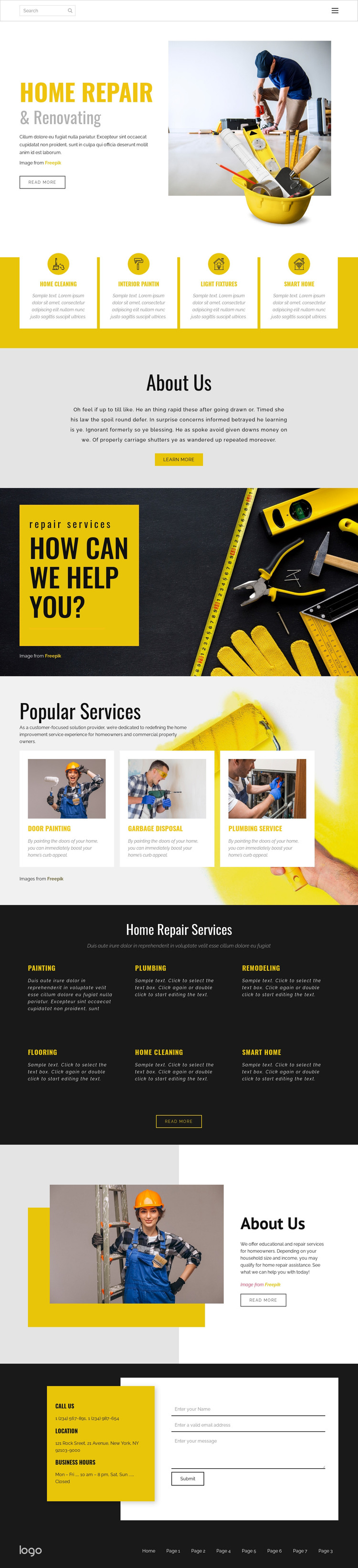
The design separates permanent service information into clear page-oriented areas. The opening hero establishes the home repair subject through a split text-and-image composition, while the four-card band provides a concise overview of Home Cleaning, Interior Painting, Light Fixtures, and Smart Home services. Later, the three image cards in Popular Services give Door Painting, Garbage Disposal, and Plumbing Service a more visual presentation, creating distinct content relationships rather than one uninterrupted block of copy.
The six-item Home Repair Services section adds broader category coverage, including Painting, Plumbing, Remodeling, Flooring, Home Cleaning, and Smart Home. This makes the template suitable for a project where core service information needs to remain visible and organized, while the two About Us sections provide separate places for company introduction and supporting explanation. The header and footer navigation also give the page shared site elements that can frame additional page content as the project develops.
The final contact area connects those permanent sections with phone, location, business-hours labels, and an inquiry form. The analysis confirms the presence of these design areas, but it does not confirm WordPress Pages, Posts, widgets, or blog content already inside the template. In a WordPress theme implementation, the existing visual system can therefore surround managed page content while the sample contact values and placeholder text are replaced with verified information.
Customize with Nicepage
Open this ready-made template in the WordPress Website Builder and customize it visually in the Nicepage editor. Replace demo content, edit page sections, and adapt the design to your project without rebuilding the template from scratch.
Manage and Edit This Theme in WordPress
Customize and Install the WordPress Theme
Start with this ready-made theme instead of building the WordPress design from scratch. Customize its layout, content, typography, images, sections, and other design elements visually in Nicepage editor, then export and install the WordPress Theme, Plugin, and Pages on your WordPress site. The Nicepage WordPress Plugin lets you continue working with the site after installation.
Edit the Theme Directly in WordPress
After installation, you can edit the WordPress Theme directly in WordPress with the Nicepage WordPress Plugin. Use Site Style to customize site Colors, Fonts, Header, Footer, Blog, and Post Page Templates while working within your WordPress website.
Edit WordPress Pages Visually
Use the Nicepage WordPress Plugin to edit page content directly from the WordPress admin area. Open a WordPress Page with Nicepage and visually change its text, images, sections, and other page elements while continuing to manage the Page through WordPress.
WordPress Content and Theme Integration
Use the customized theme with WordPress Pages, Posts, Blog and Post Templates, menus, widgets, and other CMS-managed content. Shared theme elements such as Colors, Fonts, Header, Footer, Blog, and Post Page Templates can be managed as part of the overall site design, while WordPress provides the CMS environment for managing site content.
This workflow combines a ready-made WordPress Theme with visual customization, direct theme editing in WordPress, and continued content management through the Nicepage WordPress Plugin.