News about technologies WordPress Theme


Edit Template Offline
2. Create new page and search for id 17315
Edit Template Online
Create Awesome Websites


Free Nicepage Builder
Keywords
Activity metrics and product detail give WordPress content clear page roles
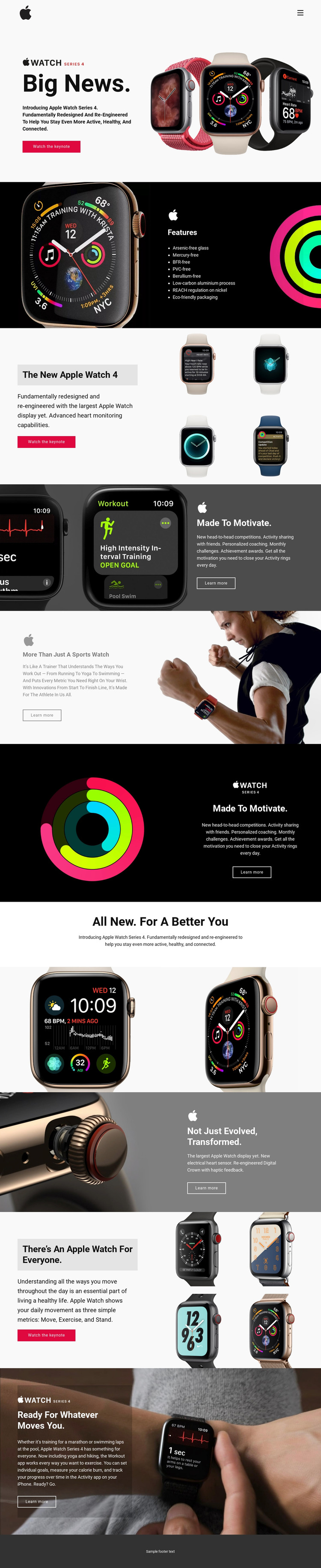
The page contains several permanent content areas that can translate naturally into a WordPress-oriented product presentation. The Apple Watch Series 4 introduction and hardware section provide page-level product information, while the electrical heart sensor, redesigned Digital Crown, and eight environmental features offer distinct subject matter for structured explanatory content. The Move, Exercise, and Stand metrics then give the activity message a concise focal point rather than leaving it as general lifestyle copy.
The workout sections add another editorial direction. Running, yoga, swimming, hiking, and marathon training can be treated as separate content themes around the same visual system, with the existing lifestyle images and dark text panels showing how practical use cases relate to the product. The repeated Learn more actions support connections between the main product presentation and deeper information, while the Watch the keynote action remains tied to the promotional introduction.
The compact header, Home link, mobile menu control, and centered footer line provide shared site elements around those page areas. This analysis confirms the design’s existing structure, not a prebuilt WordPress content model, so additional Pages or Posts should be considered project decisions rather than assumed template components. The theme value lies in its clear division between product facts, activity content, hardware explanation, and visual proof.
Customize with Nicepage
Open this ready-made template in the WordPress Website Builder and customize it visually in the Nicepage editor. Replace demo content, edit page sections, and adapt the design to your project without rebuilding the template from scratch.
Manage and Edit This Theme in WordPress
Customize and Install the WordPress Theme
Start with this ready-made theme instead of building the WordPress design from scratch. Customize its layout, content, typography, images, sections, and other design elements visually in Nicepage editor, then export and install the WordPress Theme, Plugin, and Pages on your WordPress site. The Nicepage WordPress Plugin lets you continue working with the site after installation.
Edit the Theme Directly in WordPress
After installation, you can edit the WordPress Theme directly in WordPress with the Nicepage WordPress Plugin. Use Site Style to customize site Colors, Fonts, Header, Footer, Blog, and Post Page Templates while working within your WordPress website.
Edit WordPress Pages Visually
Use the Nicepage WordPress Plugin to edit page content directly from the WordPress admin area. Open a WordPress Page with Nicepage and visually change its text, images, sections, and other page elements while continuing to manage the Page through WordPress.
WordPress Content and Theme Integration
Use the customized theme with WordPress Pages, Posts, Blog and Post Templates, menus, widgets, and other CMS-managed content. Shared theme elements such as Colors, Fonts, Header, Footer, Blog, and Post Page Templates can be managed as part of the overall site design, while WordPress provides the CMS environment for managing site content.
This workflow combines a ready-made WordPress Theme with visual customization, direct theme editing in WordPress, and continued content management through the Nicepage WordPress Plugin.