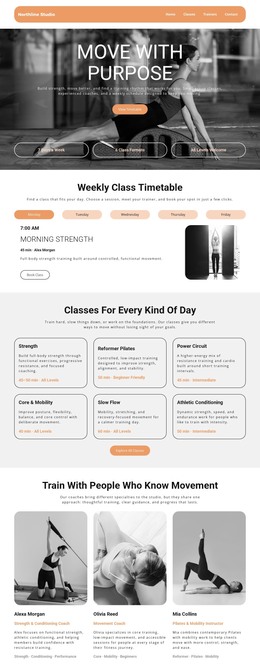
Fitness and yoga WordPress Theme



Edit Template Offline
2. Create new page and search for id 1730515
Edit Template Online
Create Awesome Websites


Free Nicepage Builder
Keywords
Service and program content can remain within one managed visual system
The four named service categories give the design a useful page-content structure for a fitness or wellness site. Gym, Massage, Yoga, and Hydrotherapy can be treated as permanent informational areas, while the flexibility and fitness plan section adds supporting program content. This relationship is different from a page that only presents a visual campaign: the design separates recurring service information from more focused promotional subjects such as Yoga for Relaxation and beginner training.
The additional Pregnancy, About Us, and body-and-mind content creates further page-oriented material that can be revised as the project develops. The circular photographs and rounded cards help these different areas remain visually connected, while the bold headings make each content subject easy to distinguish. The final Join Our Newsletter section contributes a form-based interaction with name, email, message, and submit fields, giving the site a clear place for subscription communication.
For a WordPress project, these established page areas can sit alongside other CMS-managed content without changing the core design character. The analysis does not verify blog posts, categories, or WordPress-specific elements in the template, so those should not be assumed. Where direct visual editing of a theme is useful, Nicepage documents editing a WordPress theme directly, but the template-specific strength remains its organized service content, audience-oriented program sections, and shared image treatment.
Customize with Nicepage
Open this ready-made template in the WordPress Website Builder and customize it visually in the Nicepage editor. Replace demo content, edit page sections, and adapt the design to your project without rebuilding the template from scratch.
Manage and Edit This Theme in WordPress
Customize and Install the WordPress Theme
Start with this ready-made theme instead of building the WordPress design from scratch. Customize its layout, content, typography, images, sections, and other design elements visually in Nicepage editor, then export and install the WordPress Theme, Plugin, and Pages on your WordPress site. The Nicepage WordPress Plugin lets you continue working with the site after installation.
Edit the Theme Directly in WordPress
After installation, you can edit the WordPress Theme directly in WordPress with the Nicepage WordPress Plugin. Use Site Style to customize site Colors, Fonts, Header, Footer, Blog, and Post Page Templates while working within your WordPress website.
Edit WordPress Pages Visually
Use the Nicepage WordPress Plugin to edit page content directly from the WordPress admin area. Open a WordPress Page with Nicepage and visually change its text, images, sections, and other page elements while continuing to manage the Page through WordPress.
WordPress Content and Theme Integration
Use the customized theme with WordPress Pages, Posts, Blog and Post Templates, menus, widgets, and other CMS-managed content. Shared theme elements such as Colors, Fonts, Header, Footer, Blog, and Post Page Templates can be managed as part of the overall site design, while WordPress provides the CMS environment for managing site content.
This workflow combines a ready-made WordPress Theme with visual customization, direct theme editing in WordPress, and continued content management through the Nicepage WordPress Plugin.