Learn to Surf in Australia WordPress Theme


Two publishable surf messages form a stable page content region
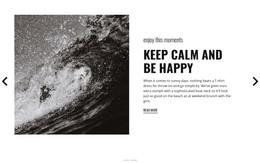
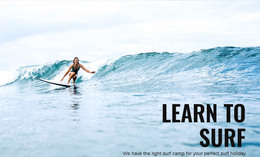
The two slide headings give the section a clear page-content role within a WordPress-managed site. “Surf Camp & Lessons” presents one introductory message, while “Learn to surf” offers a related second view. Each is tied to a full-width surfing photograph and supporting description, so the content reads as a coordinated introduction rather than a loose collection of images. The right-aligned overlay keeps the text position consistent across the carousel.
The local interaction also contributes to the section’s reusable behavior. Pagination indicators communicate the number of available views, and previous and next controls let visitors move through the two messages. Black display typography creates contrast against pale blue and white ocean imagery, while the spacious layout leaves room for the photographs to communicate the surf setting. These details can remain stable when the section is placed within different managed page contexts.
For a WordPress-oriented project, the block can serve as permanent introductory content on a surf camp, lesson, or related travel page. It does not need to represent the entire theme or content system. Other page regions can provide schedules, detailed offerings, and contact or booking information, while this reusable section keeps the first presentation focused on the surf experience and its two related messages.
Customize with Nicepage
Open this ready-made template in the WordPress Website Builder and customize it visually in the Nicepage editor. Replace demo content, edit page sections, and adapt the design to your project without rebuilding the template from scratch.
Edit Template Offline
2. Create a new page or select existing
3. Click Add new block, search for id 76603 and click enter
Edit Template Online
Create Awesome Websites


Free Nicepage Builder
Keywords
Manage and Edit This Theme in WordPress
Customize and Install the WordPress Theme
Start with this ready-made theme instead of building the WordPress design from scratch. Customize its layout, content, typography, images, sections, and other design elements visually in Nicepage editor, then export and install the WordPress Theme, Plugin, and Pages on your WordPress site. The Nicepage WordPress Plugin lets you continue working with the site after installation.
Edit the Theme Directly in WordPress
After installation, you can edit the WordPress Theme directly in WordPress with the Nicepage WordPress Plugin. Use Site Style to customize site Colors, Fonts, Header, Footer, Blog, and Post Page Templates while working within your WordPress website.
Edit WordPress Pages Visually
Use the Nicepage WordPress Plugin to edit page content directly from the WordPress admin area. Open a WordPress Page with Nicepage and visually change its text, images, sections, and other page elements while continuing to manage the Page through WordPress.
WordPress Content and Theme Integration
Use the customized theme with WordPress Pages, Posts, Blog and Post Templates, menus, widgets, and other CMS-managed content. Shared theme elements such as Colors, Fonts, Header, Footer, Blog, and Post Page Templates can be managed as part of the overall site design, while WordPress provides the CMS environment for managing site content.
This workflow combines a ready-made WordPress Theme with visual customization, direct theme editing in WordPress, and continued content management through the Nicepage WordPress Plugin.