Mountain advanture travel WordPress Theme


Edit Template Offline
2. Create new page and search for id 99063
Edit Template Online
Create Awesome Websites


Free Nicepage Builder
Keywords
News Cards and Tour Pages Fit a Content-Led Travel Theme
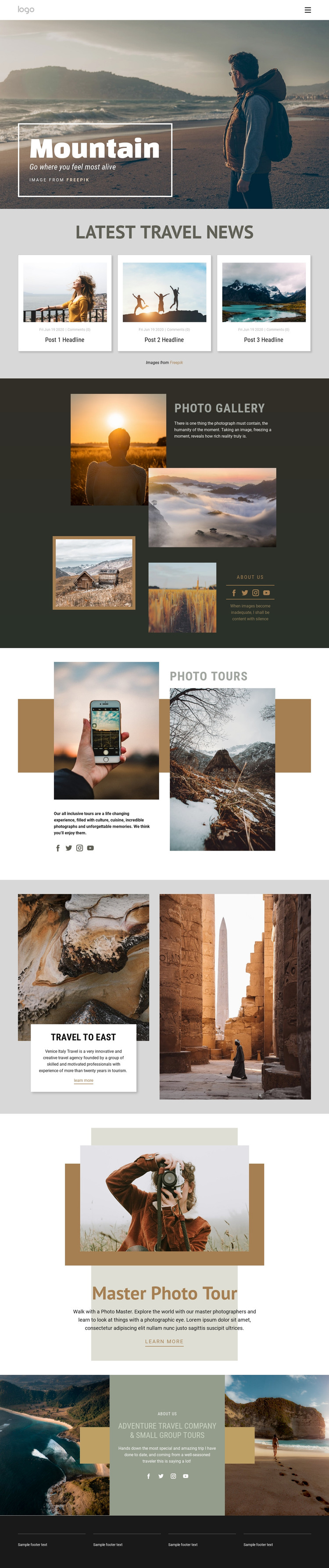
The three Latest Travel News cards are the most natural starting point for a content-led WordPress interpretation. Their repeated image, metadata, and headline pattern can represent a changing editorial area, while the mountain hero and Photo Gallery remain stable visual anchors for the travel photography subject. The displayed dates, comments, and headlines are sample structure only, so they should be replaced with the project’s actual content.
The permanent page areas are equally important. Photo Tours communicates the broader offering through descriptive copy beside a large image. Travel to East provides a destination feature with two photographs and a centered card, and Master Photo Tour creates a more focused presentation for one featured experience. The Adventure Travel Company and Small Group Tours section can carry company information and quote-style content, while social links and the dark four-column footer provide recurring site elements around those areas.
This division works well for a WordPress-managed content environment because stable page information and regularly updated editorial material can occupy different roles within the same visual system. WordPress Pages, Posts, or the Nicepage WordPress Plugin should be treated as optional implementation bridges rather than existing template components. The design’s main value is the relationship between its content areas: editorial cards attract continued updates, while gallery, destination, tour, and company sections preserve the enduring travel presentation.
Customize with Nicepage
Open this ready-made template in the WordPress Website Builder and customize it visually in the Nicepage editor. Replace demo content, edit page sections, and adapt the design to your project without rebuilding the template from scratch.
Manage and Edit This Theme in WordPress
Customize and Install the WordPress Theme
Start with this ready-made theme instead of building the WordPress design from scratch. Customize its layout, content, typography, images, sections, and other design elements visually in Nicepage editor, then export and install the WordPress Theme, Plugin, and Pages on your WordPress site. The Nicepage WordPress Plugin lets you continue working with the site after installation.
Edit the Theme Directly in WordPress
After installation, you can edit the WordPress Theme directly in WordPress with the Nicepage WordPress Plugin. Use Site Style to customize site Colors, Fonts, Header, Footer, Blog, and Post Page Templates while working within your WordPress website.
Edit WordPress Pages Visually
Use the Nicepage WordPress Plugin to edit page content directly from the WordPress admin area. Open a WordPress Page with Nicepage and visually change its text, images, sections, and other page elements while continuing to manage the Page through WordPress.
WordPress Content and Theme Integration
Use the customized theme with WordPress Pages, Posts, Blog and Post Templates, menus, widgets, and other CMS-managed content. Shared theme elements such as Colors, Fonts, Header, Footer, Blog, and Post Page Templates can be managed as part of the overall site design, while WordPress provides the CMS environment for managing site content.
This workflow combines a ready-made WordPress Theme with visual customization, direct theme editing in WordPress, and continued content management through the Nicepage WordPress Plugin.