Levels of learning WordPress Theme



A Stable Learning Introduction for WordPress Page Content
The heading “Free Online Courses” gives this section a durable page-content role rather than a time-sensitive list of individual items. Its supporting statement describes faculty, current business knowledge, tools, skills, challenges, and solutions, creating a concise introduction to what online learning can provide. In a WordPress-managed site, that message can remain as a visually consistent education section on a suitable page while other content areas develop around it.
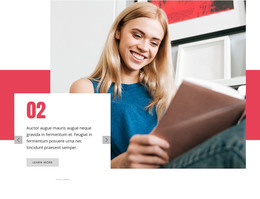
The block’s content relationships are straightforward but visually distinctive. One large laptop photograph establishes the online-learning setting, while a white panel overlaps the image and peach background to hold the supporting text. Offset rectangular shapes create separation between the heading, image, and statement without turning them into unrelated modules. This makes the section readable as one publishable content area: a title, an explanatory message, a feature image, and its image credit arranged within a single hero composition.
The design can therefore support a stable learning or course-introduction area inside a broader WordPress project. Additional pages or sections may present course details, enrollment steps, faculty information, or contact content, but those responsibilities remain outside this block. Its static interaction keeps the core message visible immediately, while the layered image-and-panel treatment gives permanent page content a stronger visual entry point than a plain text introduction.
Customize with Nicepage
Open this ready-made template in the WordPress Website Builder and customize it visually in the Nicepage editor. Replace demo content, edit page sections, and adapt the design to your project without rebuilding the template from scratch.
Edit Template Offline
2. Create a new page or select existing
3. Click Add new block, search for id 74609 and click enter
Edit Template Online
Create Awesome Websites


Free Nicepage Builder
Keywords
Manage and Edit This Theme in WordPress
Customize and Install the WordPress Theme
Start with this ready-made theme instead of building the WordPress design from scratch. Customize its layout, content, typography, images, sections, and other design elements visually in Nicepage editor, then export and install the WordPress Theme, Plugin, and Pages on your WordPress site. The Nicepage WordPress Plugin lets you continue working with the site after installation.
Edit the Theme Directly in WordPress
After installation, you can edit the WordPress Theme directly in WordPress with the Nicepage WordPress Plugin. Use Site Style to customize site Colors, Fonts, Header, Footer, Blog, and Post Page Templates while working within your WordPress website.
Edit WordPress Pages Visually
Use the Nicepage WordPress Plugin to edit page content directly from the WordPress admin area. Open a WordPress Page with Nicepage and visually change its text, images, sections, and other page elements while continuing to manage the Page through WordPress.
WordPress Content and Theme Integration
Use the customized theme with WordPress Pages, Posts, Blog and Post Templates, menus, widgets, and other CMS-managed content. Shared theme elements such as Colors, Fonts, Header, Footer, Blog, and Post Page Templates can be managed as part of the overall site design, while WordPress provides the CMS environment for managing site content.
This workflow combines a ready-made WordPress Theme with visual customization, direct theme editing in WordPress, and continued content management through the Nicepage WordPress Plugin.