Private elementary education WordPress Theme


Edit Template Offline
2. Create new page and search for id 16882
Edit Template Online
Create Awesome Websites


Free Nicepage Builder
Keywords
Page-oriented education content gives the theme a clear WordPress role
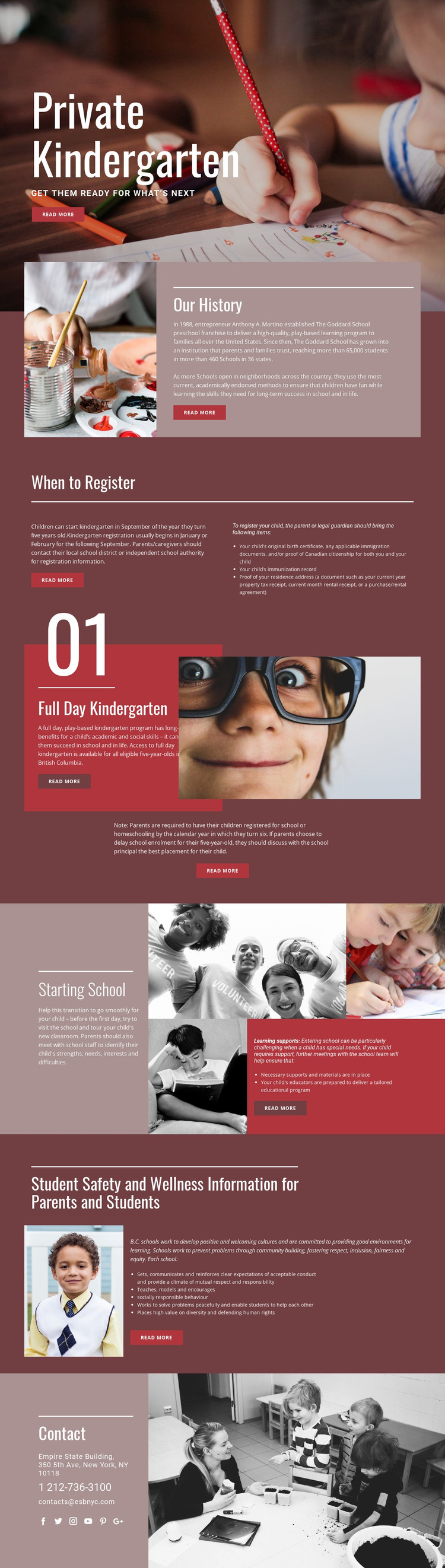
The design divides permanent family information into page-oriented subjects that can remain part of one visual system in a WordPress project. The opening kindergarten introduction establishes the central page message, while Our History provides a distinct background area. When to Register is more procedural: its timing guidance sits beside a three-item list of required documents, giving parents a focused content group rather than a general promotional paragraph.
Full Day Kindergarten and Starting School offer additional page content with different purposes. The program section combines an explanation, a child photograph, a British Columbia eligibility reference, and an enrollment note. The school-transition section brings together learning supports, necessary materials, and a tailored educational program with a child and classroom collage. Student Safety and Wellness then provides content about positive school culture, socially responsible behaviour, inclusion, and community information.
These subjects could work as permanent WordPress Pages or as sections that are later expanded with regularly maintained content, but the analysis does not prove that Posts, categories, or blog structures already exist. The Contact area provides shared practical information through phone, email, address, and social links. A WordPress-oriented implementation can therefore preserve the theme’s parent-focused visual language while organizing the confirmed education content into durable page areas and any future editorial material the project genuinely requires.
Customize with Nicepage
Open this ready-made template in the WordPress Website Builder and customize it visually in the Nicepage editor. Replace demo content, edit page sections, and adapt the design to your project without rebuilding the template from scratch.
Manage and Edit This Theme in WordPress
Customize and Install the WordPress Theme
Start with this ready-made theme instead of building the WordPress design from scratch. Customize its layout, content, typography, images, sections, and other design elements visually in Nicepage editor, then export and install the WordPress Theme, Plugin, and Pages on your WordPress site. The Nicepage WordPress Plugin lets you continue working with the site after installation.
Edit the Theme Directly in WordPress
After installation, you can edit the WordPress Theme directly in WordPress with the Nicepage WordPress Plugin. Use Site Style to customize site Colors, Fonts, Header, Footer, Blog, and Post Page Templates while working within your WordPress website.
Edit WordPress Pages Visually
Use the Nicepage WordPress Plugin to edit page content directly from the WordPress admin area. Open a WordPress Page with Nicepage and visually change its text, images, sections, and other page elements while continuing to manage the Page through WordPress.
WordPress Content and Theme Integration
Use the customized theme with WordPress Pages, Posts, Blog and Post Templates, menus, widgets, and other CMS-managed content. Shared theme elements such as Colors, Fonts, Header, Footer, Blog, and Post Page Templates can be managed as part of the overall site design, while WordPress provides the CMS environment for managing site content.
This workflow combines a ready-made WordPress Theme with visual customization, direct theme editing in WordPress, and continued content management through the Nicepage WordPress Plugin.