
Get happier with great travel WordPress Theme


Edit Template Offline
2. Create new page and search for id 67828
Edit Template Online
Create Awesome Websites


Free Nicepage Builder
Keywords
Travel Content, Destination Imagery, and Repeated Cards Fit a WordPress Theme
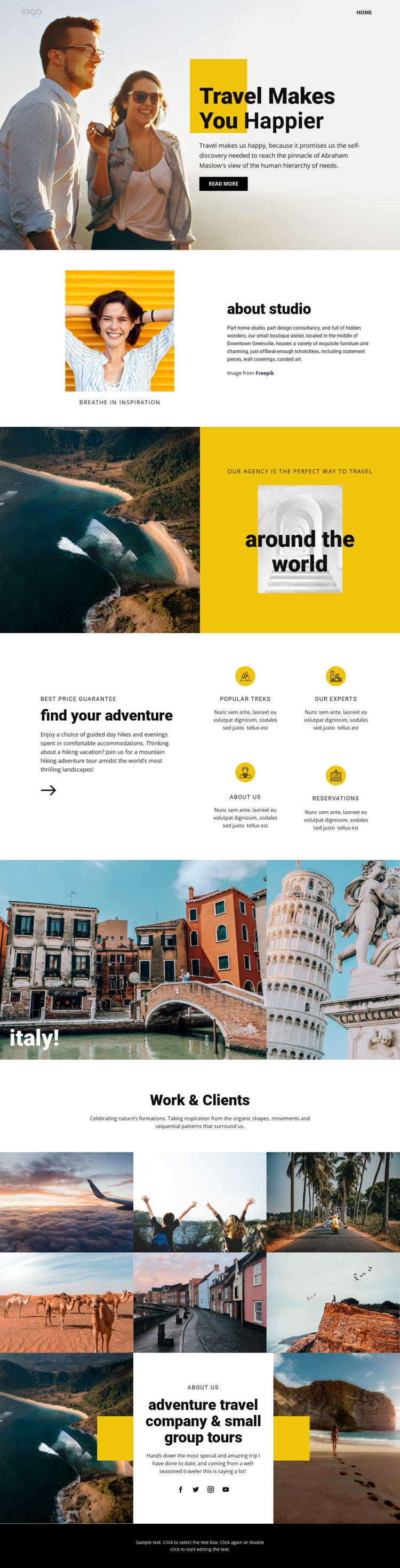
The hero and split sections provide durable page content rather than relying only on promotional decoration. Travel Makes You Happier introduces the site, about studio supplies explanatory company or concept material, and around the world presents a broader travel statement. These areas can remain part of a permanent homepage while their wording and images are replaced with the project’s own content.
The repeated feature cards give the design a useful structure for recurring travel information. Popular Treks, Our Experts, About Us, and Reservations can be treated as distinct content directions within the theme, with the same visual treatment keeping them connected. The Italy showcase and six-image Work & Clients gallery then support destination and visual-storytelling content, while the company statement provides a more personal closing section.
The Home navigation link, social icons, and dark footer help frame those page areas as part of a shared site presentation. In a WordPress-managed project, the design could therefore support permanent agency information alongside additional regularly updated travel material, but the analysis does not verify existing Posts, blog layouts, or categories. The WordPress interpretation comes from the template’s clear page content, repeated cards, destination imagery, and shared site elements. A theme based on this design would preserve the editorial travel character while allowing the content itself to develop over time.
Customize with Nicepage
Open this ready-made template in the WordPress Website Builder and customize it visually in the Nicepage editor. Replace demo content, edit page sections, and adapt the design to your project without rebuilding the template from scratch.
Manage and Edit This Theme in WordPress
Customize and Install the WordPress Theme
Start with this ready-made theme instead of building the WordPress design from scratch. Customize its layout, content, typography, images, sections, and other design elements visually in Nicepage editor, then export and install the WordPress Theme, Plugin, and Pages on your WordPress site. The Nicepage WordPress Plugin lets you continue working with the site after installation.
Edit the Theme Directly in WordPress
After installation, you can edit the WordPress Theme directly in WordPress with the Nicepage WordPress Plugin. Use Site Style to customize site Colors, Fonts, Header, Footer, Blog, and Post Page Templates while working within your WordPress website.
Edit WordPress Pages Visually
Use the Nicepage WordPress Plugin to edit page content directly from the WordPress admin area. Open a WordPress Page with Nicepage and visually change its text, images, sections, and other page elements while continuing to manage the Page through WordPress.
WordPress Content and Theme Integration
Use the customized theme with WordPress Pages, Posts, Blog and Post Templates, menus, widgets, and other CMS-managed content. Shared theme elements such as Colors, Fonts, Header, Footer, Blog, and Post Page Templates can be managed as part of the overall site design, while WordPress provides the CMS environment for managing site content.
This workflow combines a ready-made WordPress Theme with visual customization, direct theme editing in WordPress, and continued content management through the Nicepage WordPress Plugin.





















