
Best Places to Visit WordPress Theme


Edit Template Offline
2. Create new page and search for id 14154
Edit Template Online
Create Awesome Websites


Free Nicepage Builder
Keywords
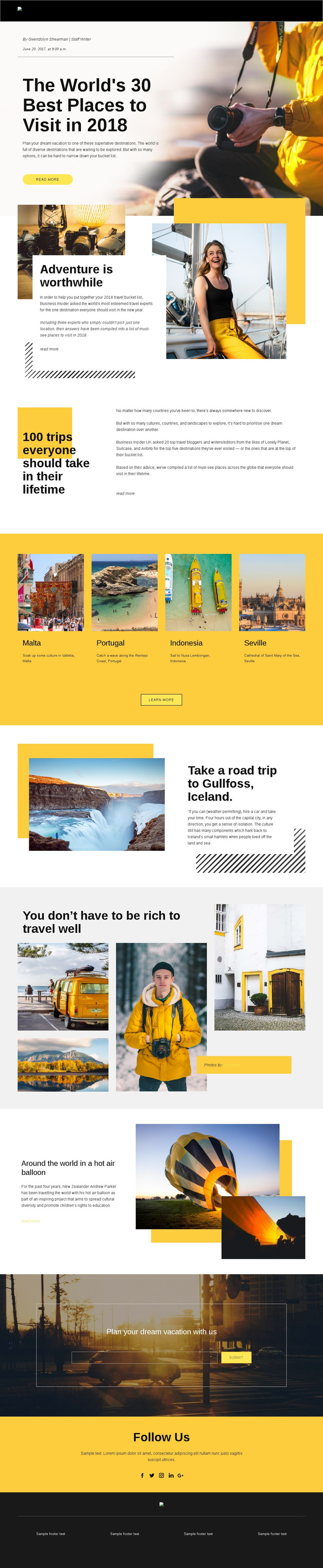
Destination Cards and Editorial Features Suit Managed Travel Content
The four destination cards create a useful page-oriented content pattern for a travel site: Malta, Portugal, Indonesia, and Seville can be treated as separate destination subjects while retaining a shared presentation. That structure works alongside the larger editorial features, including the opening travel article, the adventure section, the lifetime-trip introduction, and the Gullfoss and hot-air-balloon stories. Together, these areas distinguish quick destination discovery from longer-form travel storytelling.
The photography collage adds a visual publishing role rather than another card list, while the email subscription section provides a permanent response area for readers interested in dream vacations. The social block can remain a shared follow-oriented section, with Facebook, Twitter, Instagram, LinkedIn, and Google icons reinforcing the publication’s distribution channel. These relationships give the design clear permanent page content that can coexist with additional regularly updated travel material.
In a WordPress project, the core value is the way page content, recurring destination subjects, editorial imagery, and shared site elements already belong to one visual system. The analysis does not prove that WordPress Posts, categories, or blog templates are present in this specific design, so those structures should be added only if the project requires them. The existing layout instead supplies a coherent theme direction for organizing and presenting managed travel content.
Customize with Nicepage
Open this ready-made template in the WordPress Website Builder and customize it visually in the Nicepage editor. Replace demo content, edit page sections, and adapt the design to your project without rebuilding the template from scratch.
Manage and Edit This Theme in WordPress
Customize and Install the WordPress Theme
Start with this ready-made theme instead of building the WordPress design from scratch. Customize its layout, content, typography, images, sections, and other design elements visually in Nicepage editor, then export and install the WordPress Theme, Plugin, and Pages on your WordPress site. The Nicepage WordPress Plugin lets you continue working with the site after installation.
Edit the Theme Directly in WordPress
After installation, you can edit the WordPress Theme directly in WordPress with the Nicepage WordPress Plugin. Use Site Style to customize site Colors, Fonts, Header, Footer, Blog, and Post Page Templates while working within your WordPress website.
Edit WordPress Pages Visually
Use the Nicepage WordPress Plugin to edit page content directly from the WordPress admin area. Open a WordPress Page with Nicepage and visually change its text, images, sections, and other page elements while continuing to manage the Page through WordPress.
WordPress Content and Theme Integration
Use the customized theme with WordPress Pages, Posts, Blog and Post Templates, menus, widgets, and other CMS-managed content. Shared theme elements such as Colors, Fonts, Header, Footer, Blog, and Post Page Templates can be managed as part of the overall site design, while WordPress provides the CMS environment for managing site content.
This workflow combines a ready-made WordPress Theme with visual customization, direct theme editing in WordPress, and continued content management through the Nicepage WordPress Plugin.





















