
Travel on Seaboat WordPress Theme


Edit Template Offline
2. Create new page and search for id 12435
Edit Template Online
Create Awesome Websites


Free Nicepage Builder
Keywords
Service cards and recurring maintenance content fit a WordPress page structure
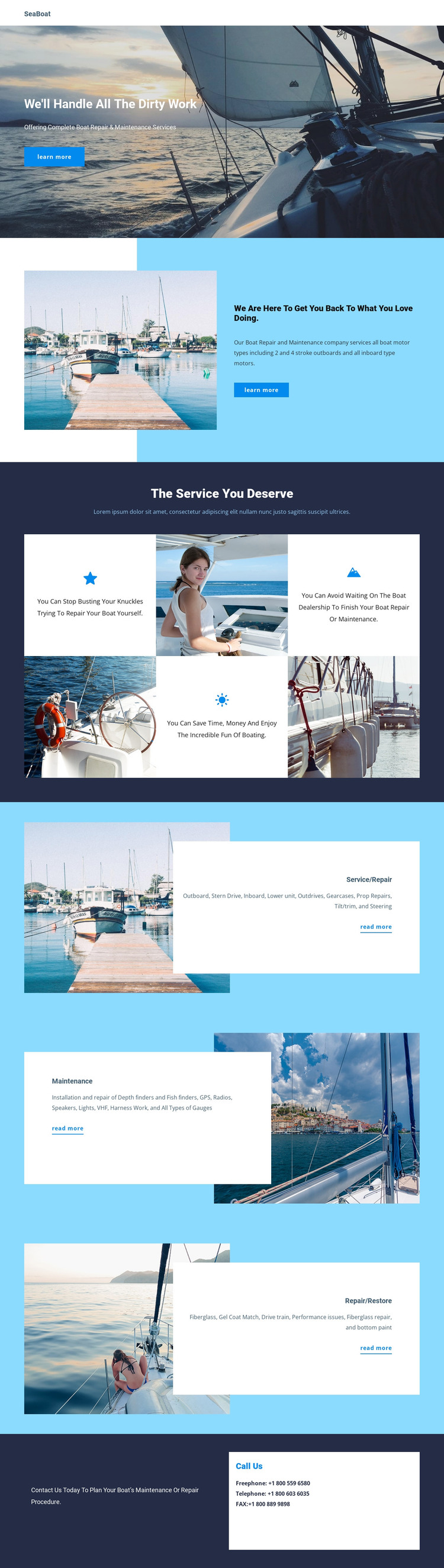
The page separates permanent service information into content areas that can remain visually coordinated as the site develops. The hero and introductory section provide page-oriented context, while the four benefit items summarize the broader value of the boat-service offering. Below them, the repeated Service/Repair, Maintenance, and Repair/Restore cards create distinct areas for updating descriptions, categories, and supporting images without losing the overall design character.
The content relationships are especially useful for a WordPress-managed project because they distinguish different kinds of information rather than relying on one long service paragraph. Repair-related material includes outboard and inboard motors, propeller repairs, tilt and trim, steering, and gauges. Maintenance content covers equipment such as depth and fish finders, GPS, radios, speakers, and lights, while restoration content includes fiberglass and gel coat matching. Those areas can serve as permanent service-page content, and the Call Us section can remain a shared contact destination for visitors who have reviewed them. The analysis does not verify blog posts, categories, or existing WordPress structures, so those should not be treated as built-in template components. The verified design instead offers a clear visual framework around which page content and future published material can be organized.
Customize with Nicepage
Open this ready-made template in the WordPress Website Builder and customize it visually in the Nicepage editor. Replace demo content, edit page sections, and adapt the design to your project without rebuilding the template from scratch.
Manage and Edit This Theme in WordPress
Customize and Install the WordPress Theme
Start with this ready-made theme instead of building the WordPress design from scratch. Customize its layout, content, typography, images, sections, and other design elements visually in Nicepage editor, then export and install the WordPress Theme, Plugin, and Pages on your WordPress site. The Nicepage WordPress Plugin lets you continue working with the site after installation.
Edit the Theme Directly in WordPress
After installation, you can edit the WordPress Theme directly in WordPress with the Nicepage WordPress Plugin. Use Site Style to customize site Colors, Fonts, Header, Footer, Blog, and Post Page Templates while working within your WordPress website.
Edit WordPress Pages Visually
Use the Nicepage WordPress Plugin to edit page content directly from the WordPress admin area. Open a WordPress Page with Nicepage and visually change its text, images, sections, and other page elements while continuing to manage the Page through WordPress.
WordPress Content and Theme Integration
Use the customized theme with WordPress Pages, Posts, Blog and Post Templates, menus, widgets, and other CMS-managed content. Shared theme elements such as Colors, Fonts, Header, Footer, Blog, and Post Page Templates can be managed as part of the overall site design, while WordPress provides the CMS environment for managing site content.
This workflow combines a ready-made WordPress Theme with visual customization, direct theme editing in WordPress, and continued content management through the Nicepage WordPress Plugin.





















