
Exploring new places WordPress Theme


Edit Template Offline
2. Create new page and search for id 25193
Edit Template Online
Create Awesome Websites


Free Nicepage Builder
Keywords
Travel Content Areas Ready for WordPress Page Management
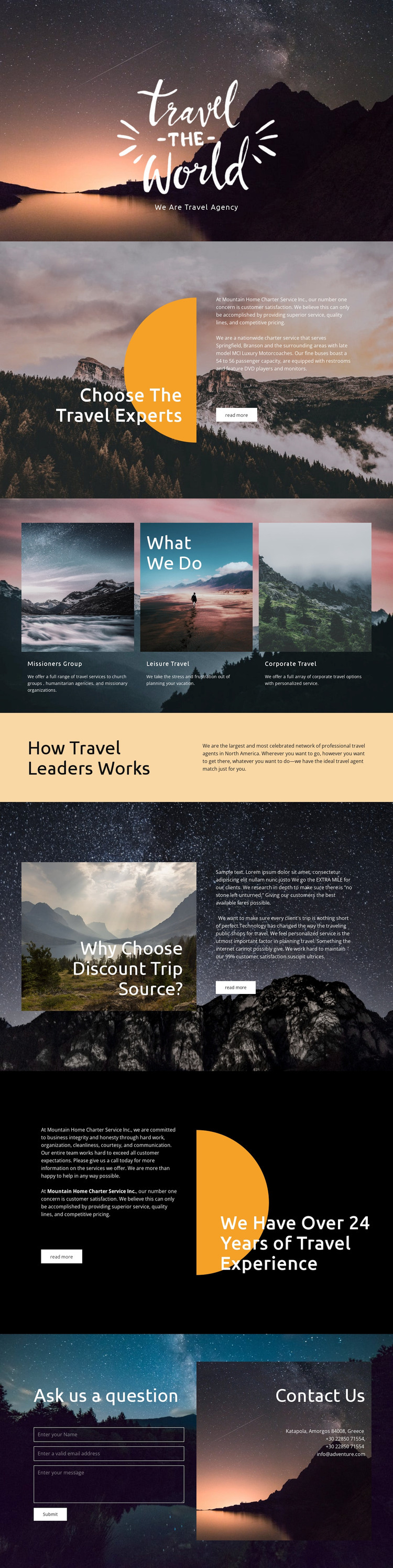
The design separates permanent agency information into clear page-oriented areas. The opening introduces the travel identity, the expertise section explains the service direction, and the repeated panels distinguish leisure travel, corporate travel, and the group-oriented category. This arrangement gives a WordPress-managed project a practical content foundation: service descriptions can remain separate and understandable while continuing to share the same scenic presentation and typography.
The network explanation and experience-focused sections add content relationships beyond the service list. The network section can support broader information about how travel assistance is organized, while the “Why Choose” and experience areas provide space for agency context and reasons to consider the service. These are not verified WordPress Posts or blog structures in the template; they are existing design regions that can be interpreted as page content within a WordPress theme. The visual distinction between dark scenic sections and the lighter explanatory band also helps separate related information without changing the overall identity.
The closing inquiry form and direct contact details create a natural page endpoint for questions from travelers, groups, or corporate clients. In a WordPress project, that permanent contact content can remain connected to the theme’s shared visual system while additional regularly maintained content is added separately when needed. The result is a theme interpretation grounded in the actual service, explanation, and contact areas rather than in CMS terminology alone.
Customize with Nicepage
Open this ready-made template in the WordPress Website Builder and customize it visually in the Nicepage editor. Replace demo content, edit page sections, and adapt the design to your project without rebuilding the template from scratch.
Manage and Edit This Theme in WordPress
Customize and Install the WordPress Theme
Start with this ready-made theme instead of building the WordPress design from scratch. Customize its layout, content, typography, images, sections, and other design elements visually in Nicepage editor, then export and install the WordPress Theme, Plugin, and Pages on your WordPress site. The Nicepage WordPress Plugin lets you continue working with the site after installation.
Edit the Theme Directly in WordPress
After installation, you can edit the WordPress Theme directly in WordPress with the Nicepage WordPress Plugin. Use Site Style to customize site Colors, Fonts, Header, Footer, Blog, and Post Page Templates while working within your WordPress website.
Edit WordPress Pages Visually
Use the Nicepage WordPress Plugin to edit page content directly from the WordPress admin area. Open a WordPress Page with Nicepage and visually change its text, images, sections, and other page elements while continuing to manage the Page through WordPress.
WordPress Content and Theme Integration
Use the customized theme with WordPress Pages, Posts, Blog and Post Templates, menus, widgets, and other CMS-managed content. Shared theme elements such as Colors, Fonts, Header, Footer, Blog, and Post Page Templates can be managed as part of the overall site design, while WordPress provides the CMS environment for managing site content.
This workflow combines a ready-made WordPress Theme with visual customization, direct theme editing in WordPress, and continued content management through the Nicepage WordPress Plugin.





















