meet our global team WordPress Theme


Edit Template Offline
2. Create new page and search for id 6319355
Edit Template Online
Create Awesome Websites


Free Nicepage Builder
Keywords
Profile content and volunteer information fit a page-oriented nonprofit theme
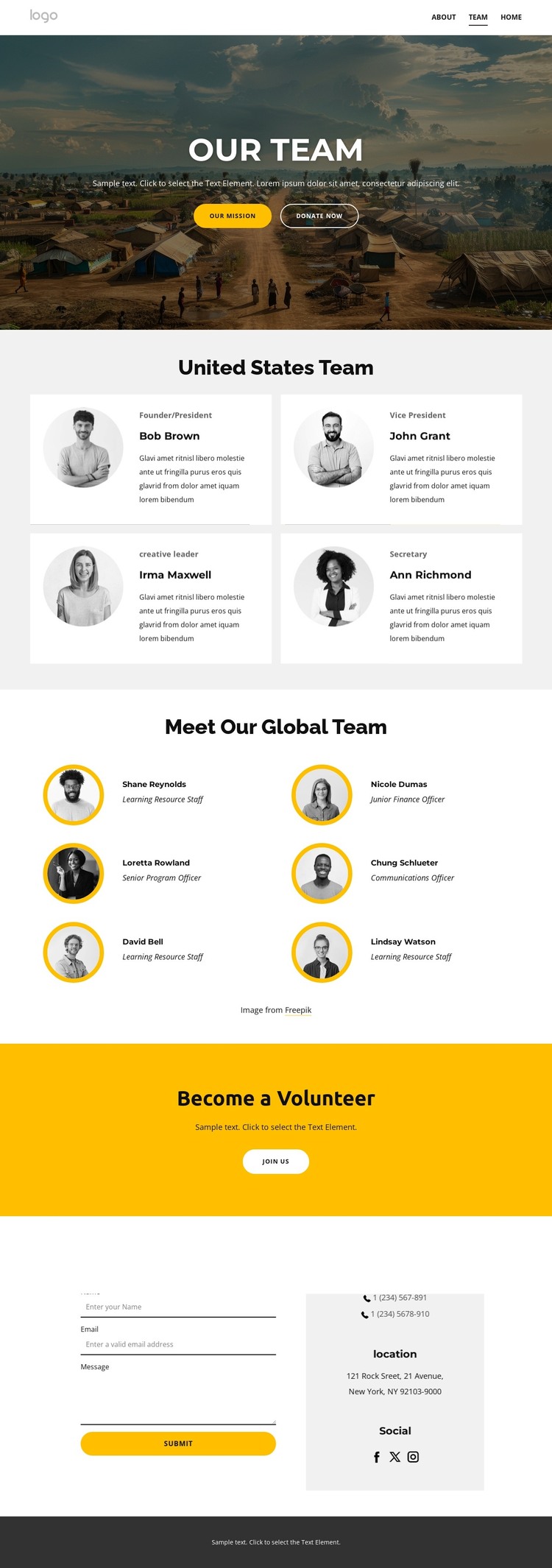
The page contains clear permanent content areas that can be interpreted naturally within a WordPress-managed site. The hero establishes the main team-page message with a landscape image, the Our Team heading, and the Our Mission and Donate now actions. The United States directory provides four richer profile entries, each combining a circular portrait with a role, name, and short description. The global directory uses six compact profile items in two columns, making it a separate content group rather than a continuation of the same card grid.
The volunteer band adds an important page section for participation-focused messaging. Its Become a Volunteer heading and Join us button can remain part of the page’s core content, while the lower form handles direct inquiries through name, email, and message fields. A telephone contact channel and the footer’s Facebook, Twitter, and Instagram links extend the communication framework around those page areas.
For a WordPress-oriented interpretation, the design is especially useful because it separates stable organizational information into recognizable page sections: mission, regional team, global team, volunteer invitation, contact, and shared footer content. The analysis does not verify blog posts or other editorial structures, so none should be assumed. Instead, the theme foundation is the coordinated presentation of people, participation, and contact content within one reusable visual system.
Customize with Nicepage
Open this ready-made template in the WordPress Website Builder and customize it visually in the Nicepage editor. Replace demo content, edit page sections, and adapt the design to your project without rebuilding the template from scratch.
Manage and Edit This Theme in WordPress
Customize and Install the WordPress Theme
Start with this ready-made theme instead of building the WordPress design from scratch. Customize its layout, content, typography, images, sections, and other design elements visually in Nicepage editor, then export and install the WordPress Theme, Plugin, and Pages on your WordPress site. The Nicepage WordPress Plugin lets you continue working with the site after installation.
Edit the Theme Directly in WordPress
After installation, you can edit the WordPress Theme directly in WordPress with the Nicepage WordPress Plugin. Use Site Style to customize site Colors, Fonts, Header, Footer, Blog, and Post Page Templates while working within your WordPress website.
Edit WordPress Pages Visually
Use the Nicepage WordPress Plugin to edit page content directly from the WordPress admin area. Open a WordPress Page with Nicepage and visually change its text, images, sections, and other page elements while continuing to manage the Page through WordPress.
WordPress Content and Theme Integration
Use the customized theme with WordPress Pages, Posts, Blog and Post Templates, menus, widgets, and other CMS-managed content. Shared theme elements such as Colors, Fonts, Header, Footer, Blog, and Post Page Templates can be managed as part of the overall site design, while WordPress provides the CMS environment for managing site content.
This workflow combines a ready-made WordPress Theme with visual customization, direct theme editing in WordPress, and continued content management through the Nicepage WordPress Plugin.