Holly Meyer WordPress Theme


Edit Template Offline
2. Create new page and search for id 22404
Edit Template Online
Create Awesome Websites


Free Nicepage Builder
Keywords
Speaker Profiles and Lecture Content Fit Distinct WordPress Page Areas
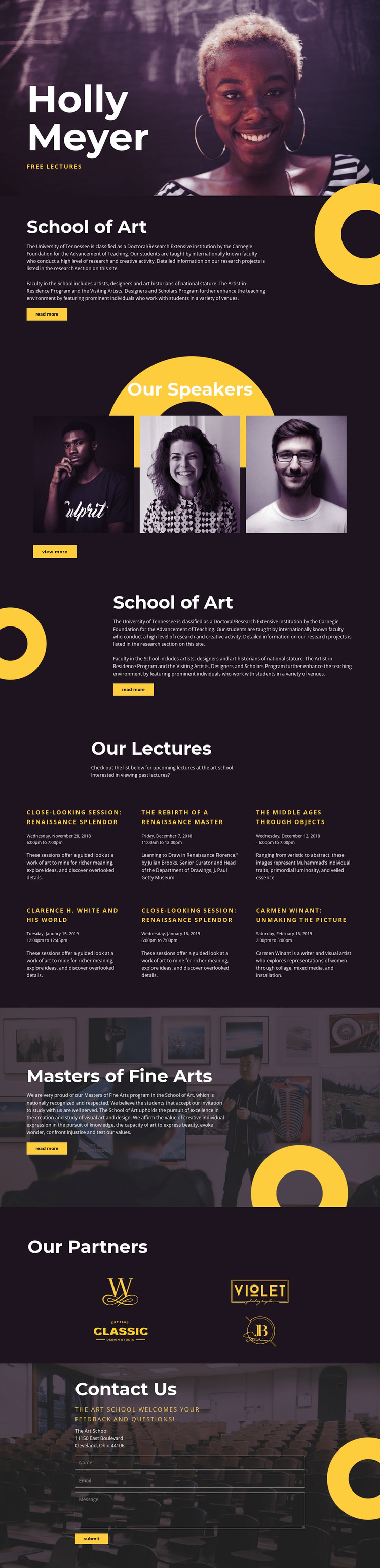
The design separates permanent institutional information from repeated program content in a way that can translate naturally to a WordPress-managed site. The School of Art sections provide stable explanatory material, while the three speaker portraits can be interpreted as profile-oriented content that introduces the people connected with the program. The six lecture entries form a different recurring group, with each item carrying its own date and description rather than being absorbed into the general school overview.
The Masters of Fine Arts block gives the theme another page-oriented content area for graduate education. Four partner marks can support an associated-organizations section, and the final Contact Us block keeps location information and message communication together. These relationships matter more than simply applying a CMS label: they show how permanent pages, repeated content, profiles, program entries, and contact information could share one visual system while retaining different editorial purposes.
The verified template does not prove that WordPress Posts, categories, or blog structures already exist, so the interpretation remains deliberately grounded in the visible design. If the school later adds regularly updated lecture announcements or articles, the existing six-item lecture rhythm offers a useful reference for maintaining consistency. Nicepage's WordPress Plugin is a relevant bridge for continuing theme work in WordPress, but the page's content relationships remain the primary reason the design fits this environment.
Customize with Nicepage
Open this ready-made template in the WordPress Website Builder and customize it visually in the Nicepage editor. Replace demo content, edit page sections, and adapt the design to your project without rebuilding the template from scratch.
Manage and Edit This Theme in WordPress
Customize and Install the WordPress Theme
Start with this ready-made theme instead of building the WordPress design from scratch. Customize its layout, content, typography, images, sections, and other design elements visually in Nicepage editor, then export and install the WordPress Theme, Plugin, and Pages on your WordPress site. The Nicepage WordPress Plugin lets you continue working with the site after installation.
Edit the Theme Directly in WordPress
After installation, you can edit the WordPress Theme directly in WordPress with the Nicepage WordPress Plugin. Use Site Style to customize site Colors, Fonts, Header, Footer, Blog, and Post Page Templates while working within your WordPress website.
Edit WordPress Pages Visually
Use the Nicepage WordPress Plugin to edit page content directly from the WordPress admin area. Open a WordPress Page with Nicepage and visually change its text, images, sections, and other page elements while continuing to manage the Page through WordPress.
WordPress Content and Theme Integration
Use the customized theme with WordPress Pages, Posts, Blog and Post Templates, menus, widgets, and other CMS-managed content. Shared theme elements such as Colors, Fonts, Header, Footer, Blog, and Post Page Templates can be managed as part of the overall site design, while WordPress provides the CMS environment for managing site content.
This workflow combines a ready-made WordPress Theme with visual customization, direct theme editing in WordPress, and continued content management through the Nicepage WordPress Plugin.