English no rules school WordPress Theme


Edit Template Offline
2. Create new page and search for id 119405
Edit Template Online
Create Awesome Websites


Free Nicepage Builder
Keywords
Course pages and recurring learner content fit the visual theme
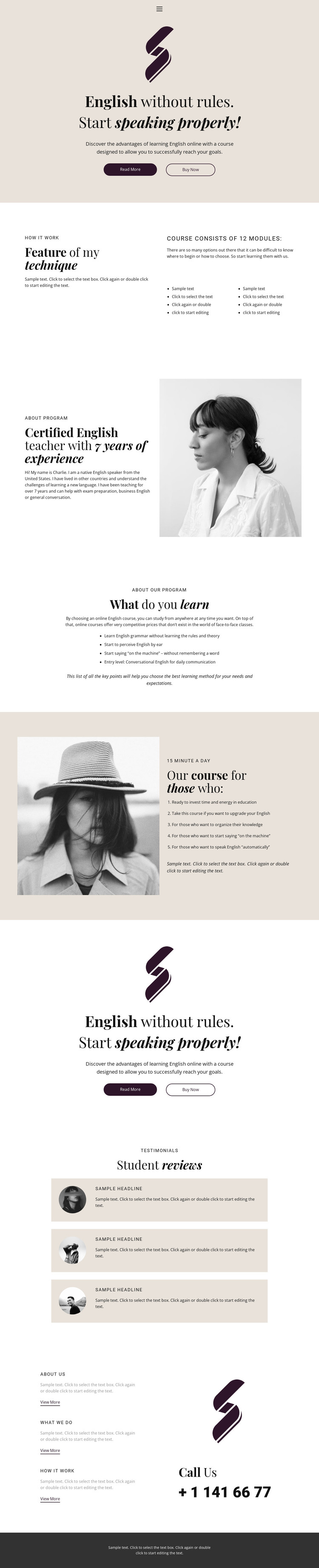
The page-oriented course material gives this design a clear WordPress theme interpretation. The hero and technique section can be understood as permanent course information, with the 12-module reference adding a defined content detail rather than a generic introduction. The instructor profile provides another page-focused area, combining biographical text with a portrait, while the four learning outcomes offer a compact information group that can remain visually distinct from the course method.
The five audience statements create a second learner-facing content group, and the repeated promotional block reinforces the relationship between course explanation and response. Three student review cards introduce recurring testimonial-style content within the same visual system, while the About Us, What We Do, and How It Work cards suggest additional informational directions near the phone contact. In a WordPress project, these areas could support permanent page content and later editorial additions without losing the cream, plum, serif, and portrait-led character of the design. The interpretation is not a claim that WordPress Posts, blog templates, or categories already exist in this template. Instead, it maps the confirmed course, instructor, outcome, review, and contact areas to a WordPress-managed site where page content and future updates can share one theme direction.
Customize with Nicepage
Open this ready-made template in the WordPress Website Builder and customize it visually in the Nicepage editor. Replace demo content, edit page sections, and adapt the design to your project without rebuilding the template from scratch.
Manage and Edit This Theme in WordPress
Customize and Install the WordPress Theme
Start with this ready-made theme instead of building the WordPress design from scratch. Customize its layout, content, typography, images, sections, and other design elements visually in Nicepage editor, then export and install the WordPress Theme, Plugin, and Pages on your WordPress site. The Nicepage WordPress Plugin lets you continue working with the site after installation.
Edit the Theme Directly in WordPress
After installation, you can edit the WordPress Theme directly in WordPress with the Nicepage WordPress Plugin. Use Site Style to customize site Colors, Fonts, Header, Footer, Blog, and Post Page Templates while working within your WordPress website.
Edit WordPress Pages Visually
Use the Nicepage WordPress Plugin to edit page content directly from the WordPress admin area. Open a WordPress Page with Nicepage and visually change its text, images, sections, and other page elements while continuing to manage the Page through WordPress.
WordPress Content and Theme Integration
Use the customized theme with WordPress Pages, Posts, Blog and Post Templates, menus, widgets, and other CMS-managed content. Shared theme elements such as Colors, Fonts, Header, Footer, Blog, and Post Page Templates can be managed as part of the overall site design, while WordPress provides the CMS environment for managing site content.
This workflow combines a ready-made WordPress Theme with visual customization, direct theme editing in WordPress, and continued content management through the Nicepage WordPress Plugin.