Women’s Quran Classes WordPress Theme


Edit Template Offline
2. Create new page and search for id 6659963
Edit Template Online
Create Awesome Websites


Free Nicepage Builder
Keywords
Program Content and Repeated Learning Areas Suit a WordPress Theme Structure
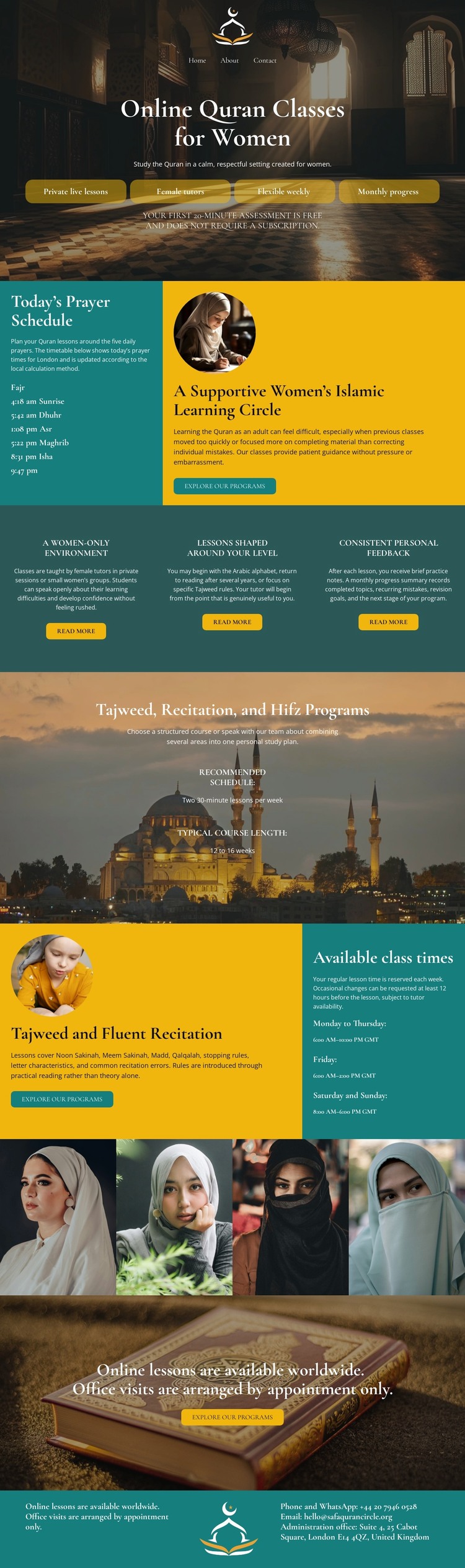
The page separates permanent educational information into recognizable content areas. The opening block introduces online Quran classes for women, while the prayer schedule supplies a practical information section that can remain distinct from the program description. Three feature items then present the women-only setting, level-appropriate lessons, and personal feedback as separate learning points. This page-oriented organization gives a WordPress project clear material for permanent content without claiming that posts, categories, or blog templates already appear in the design.
The named Tajweed, recitation, and Hifz programs form the central subject grouping. The later class-time section adds availability information and a timetable panel, creating a useful relationship between what the program offers and when lessons may occur. The four-portrait strip adds recurring visual content related to women learners, but the sample imagery should be treated as structural evidence rather than as verified staff, student identities, or testimonials.
A WordPress-managed project could preserve these page areas while expanding the surrounding content with additional educational information or regularly updated material when needed. The theme’s mosque and Quran imagery, teal sections, serif headings, and gold action buttons provide the shared visual direction. Its strongest CMS interpretation is therefore the relationship between stable program pages, schedule-oriented information, repeated learner imagery, and enrollment content—not a claim about specific WordPress content already installed.
Customize with Nicepage
Open this ready-made template in the WordPress Website Builder and customize it visually in the Nicepage editor. Replace demo content, edit page sections, and adapt the design to your project without rebuilding the template from scratch.
Manage and Edit This Theme in WordPress
Customize and Install the WordPress Theme
Start with this ready-made theme instead of building the WordPress design from scratch. Customize its layout, content, typography, images, sections, and other design elements visually in Nicepage editor, then export and install the WordPress Theme, Plugin, and Pages on your WordPress site. The Nicepage WordPress Plugin lets you continue working with the site after installation.
Edit the Theme Directly in WordPress
After installation, you can edit the WordPress Theme directly in WordPress with the Nicepage WordPress Plugin. Use Site Style to customize site Colors, Fonts, Header, Footer, Blog, and Post Page Templates while working within your WordPress website.
Edit WordPress Pages Visually
Use the Nicepage WordPress Plugin to edit page content directly from the WordPress admin area. Open a WordPress Page with Nicepage and visually change its text, images, sections, and other page elements while continuing to manage the Page through WordPress.
WordPress Content and Theme Integration
Use the customized theme with WordPress Pages, Posts, Blog and Post Templates, menus, widgets, and other CMS-managed content. Shared theme elements such as Colors, Fonts, Header, Footer, Blog, and Post Page Templates can be managed as part of the overall site design, while WordPress provides the CMS environment for managing site content.
This workflow combines a ready-made WordPress Theme with visual customization, direct theme editing in WordPress, and continued content management through the Nicepage WordPress Plugin.