Online education courses WordPress Theme



Edit Template Offline
2. Create new page and search for id 6307228
Edit Template Online
Create Awesome Websites


Free Nicepage Builder
Keywords
Course Cards and Teaching Profiles Separate Permanent Page Content
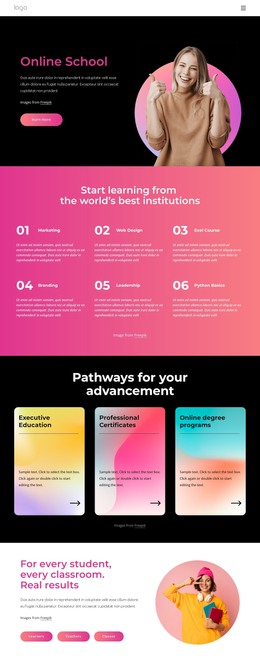
The six course category cards and six learning benefits provide clear page-oriented content for an online education site. Together, they can present the main learning offer while keeping category discovery separate from the explanation of how studying works. The four pathway cards add programs, results, coaching, and events as distinct content areas, and the two study panels can support more focused descriptions of available learning options.
The About Us section and four team profiles are especially useful for a WordPress-oriented content interpretation because they separate organizational information from course presentation. The two testimonial cards and four metric tiles provide additional recurring content areas, but their sample names, statements, and values should be treated as structural placeholders rather than published claims. The FAQ accordion then gives common questions a dedicated explanatory region, while the newsletter section offers a clear subscriber-oriented content endpoint.
The map and dark footer complete the current page with location and shared closing information. If the project later adds regularly updated articles, announcements, or other editorial material, those additions would need their own verified content structure; they should not be assumed to exist here. The existing design is still useful as a WordPress theme foundation because its permanent page areas are clearly separated and can remain within one visual system as the site's managed content develops.
Customize with Nicepage
Open this ready-made template in the WordPress Website Builder and customize it visually in the Nicepage editor. Replace demo content, edit page sections, and adapt the design to your project without rebuilding the template from scratch.
Manage and Edit This Theme in WordPress
Customize and Install the WordPress Theme
Start with this ready-made theme instead of building the WordPress design from scratch. Customize its layout, content, typography, images, sections, and other design elements visually in Nicepage editor, then export and install the WordPress Theme, Plugin, and Pages on your WordPress site. The Nicepage WordPress Plugin lets you continue working with the site after installation.
Edit the Theme Directly in WordPress
After installation, you can edit the WordPress Theme directly in WordPress with the Nicepage WordPress Plugin. Use Site Style to customize site Colors, Fonts, Header, Footer, Blog, and Post Page Templates while working within your WordPress website.
Edit WordPress Pages Visually
Use the Nicepage WordPress Plugin to edit page content directly from the WordPress admin area. Open a WordPress Page with Nicepage and visually change its text, images, sections, and other page elements while continuing to manage the Page through WordPress.
WordPress Content and Theme Integration
Use the customized theme with WordPress Pages, Posts, Blog and Post Templates, menus, widgets, and other CMS-managed content. Shared theme elements such as Colors, Fonts, Header, Footer, Blog, and Post Page Templates can be managed as part of the overall site design, while WordPress provides the CMS environment for managing site content.
This workflow combines a ready-made WordPress Theme with visual customization, direct theme editing in WordPress, and continued content management through the Nicepage WordPress Plugin.