Local real estate agency WordPress Theme


Edit Template Offline
2. Create new page and search for id 48825
Edit Template Online
Create Awesome Websites


Free Nicepage Builder
Keywords
Process and Editorial Areas Give WordPress Content Clear Roles
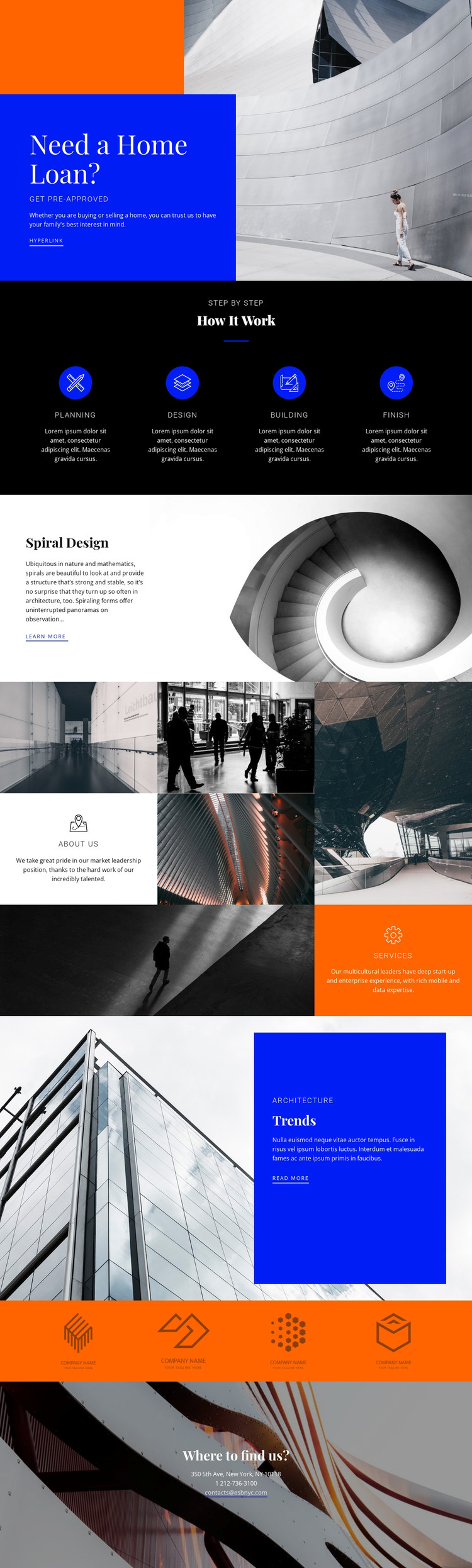
The four-stage process section gives the design a strong set of page-oriented content areas: Planning, design, Building, and Finish can each carry a concise explanation of work without changing the visual structure. That repeated arrangement works alongside the opening home-loan section, where the “Need a Home Loan?” message and pre-approval action establish a permanent introductory page area. The combination separates a financing message from the service process that follows it.
The Spiral Design feature and Trends section offer different kinds of content relationships. Spiral Design is presented as a focused architecture highlight beside a large staircase photograph, while Trends pairs a building image with supporting copy and a “read more” link. The image mosaic adds About us and services cards among architectural photographs, creating several page-content zones that can be maintained as part of the same theme direction. These facts support a WordPress interpretation without claiming that blog posts or other dynamic content already exists in the template.
The closing “Where to find us?” area is suited to permanent contact information, with location, telephone, and email lines kept distinct from the promotional sections above. The orange band of four graphic marks can remain a compact visual region between editorial content and contact. In a WordPress project, the value lies in keeping these page areas visually coordinated while future page content, updates, or additional publishable material can be arranged around the established architecture-focused theme.
Customize with Nicepage
Open this ready-made template in the WordPress Website Builder and customize it visually in the Nicepage editor. Replace demo content, edit page sections, and adapt the design to your project without rebuilding the template from scratch.
Manage and Edit This Theme in WordPress
Customize and Install the WordPress Theme
Start with this ready-made theme instead of building the WordPress design from scratch. Customize its layout, content, typography, images, sections, and other design elements visually in Nicepage editor, then export and install the WordPress Theme, Plugin, and Pages on your WordPress site. The Nicepage WordPress Plugin lets you continue working with the site after installation.
Edit the Theme Directly in WordPress
After installation, you can edit the WordPress Theme directly in WordPress with the Nicepage WordPress Plugin. Use Site Style to customize site Colors, Fonts, Header, Footer, Blog, and Post Page Templates while working within your WordPress website.
Edit WordPress Pages Visually
Use the Nicepage WordPress Plugin to edit page content directly from the WordPress admin area. Open a WordPress Page with Nicepage and visually change its text, images, sections, and other page elements while continuing to manage the Page through WordPress.
WordPress Content and Theme Integration
Use the customized theme with WordPress Pages, Posts, Blog and Post Templates, menus, widgets, and other CMS-managed content. Shared theme elements such as Colors, Fonts, Header, Footer, Blog, and Post Page Templates can be managed as part of the overall site design, while WordPress provides the CMS environment for managing site content.
This workflow combines a ready-made WordPress Theme with visual customization, direct theme editing in WordPress, and continued content management through the Nicepage WordPress Plugin.