
Inspiring ways of architecture WordPress Theme
Edit Template Offline
2. Create new page and search for id 66953
Edit Template Online
Create Awesome Websites


Free Nicepage Builder
Keywords
Project galleries and page content support a WordPress theme structure
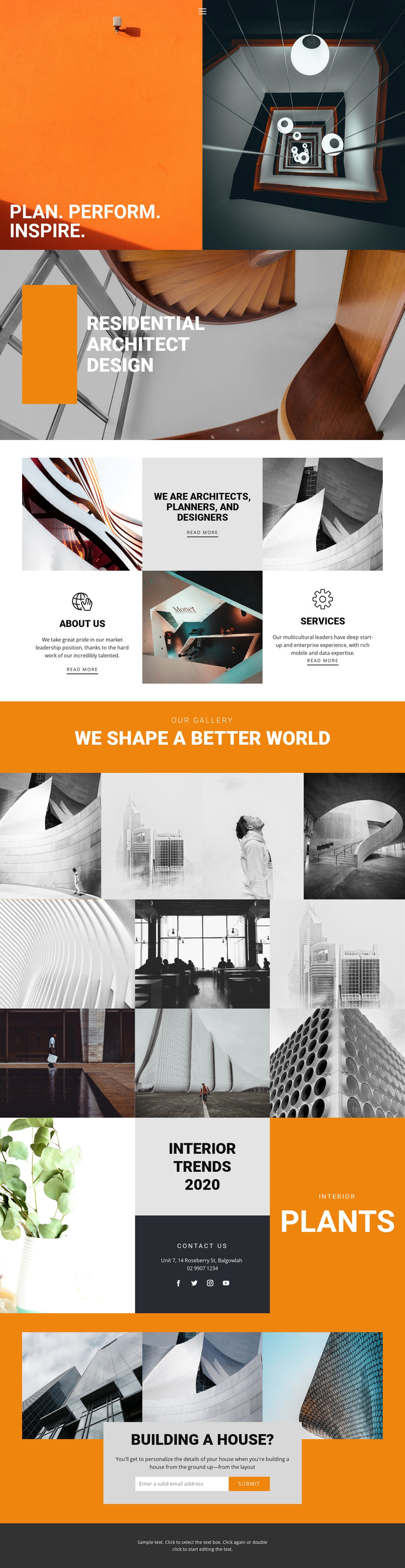
The practice grid gives the design a useful page-oriented content base. Its alternating image and text tiles introduce the architects, planners, and designers, while the About Us and Services labels separate background information from the offered work. That relationship fits a WordPress-oriented interpretation in which permanent practice content can remain visually connected while individual sections are updated as the project develops.
The portfolio imagery provides a second content pattern. The titled four-image gallery presents a compact selection, and the separate six-image mosaic creates a larger visual area for architectural work. Rather than treating both galleries as one repeated component, a WordPress project could interpret them as different presentation areas for selected projects and broader portfolio material, while preserving the same orange, black, white, and grayscale direction. The Plants section can similarly support interior-design or editorial content alongside contact details and social links.
The Building a House? section supplies the clearest page-level response area. Three images frame descriptive content and an email form, creating a natural place for inquiries from prospective clients. Navigation and the dark footer provide shared site elements around these areas. The design therefore translates into a WordPress theme through its permanent practice content, repeatable image-led sections, and contact page material, without assuming that posts, categories, or blog structures already exist in the template.
Customize with Nicepage
Open this ready-made template in the WordPress Website Builder and customize it visually in the Nicepage editor. Replace demo content, edit page sections, and adapt the design to your project without rebuilding the template from scratch.
Manage and Edit This Theme in WordPress
Customize and Install the WordPress Theme
Start with this ready-made theme instead of building the WordPress design from scratch. Customize its layout, content, typography, images, sections, and other design elements visually in Nicepage editor, then export and install the WordPress Theme, Plugin, and Pages on your WordPress site. The Nicepage WordPress Plugin lets you continue working with the site after installation.
Edit the Theme Directly in WordPress
After installation, you can edit the WordPress Theme directly in WordPress with the Nicepage WordPress Plugin. Use Site Style to customize site Colors, Fonts, Header, Footer, Blog, and Post Page Templates while working within your WordPress website.
Edit WordPress Pages Visually
Use the Nicepage WordPress Plugin to edit page content directly from the WordPress admin area. Open a WordPress Page with Nicepage and visually change its text, images, sections, and other page elements while continuing to manage the Page through WordPress.
WordPress Content and Theme Integration
Use the customized theme with WordPress Pages, Posts, Blog and Post Templates, menus, widgets, and other CMS-managed content. Shared theme elements such as Colors, Fonts, Header, Footer, Blog, and Post Page Templates can be managed as part of the overall site design, while WordPress provides the CMS environment for managing site content.
This workflow combines a ready-made WordPress Theme with visual customization, direct theme editing in WordPress, and continued content management through the Nicepage WordPress Plugin.





















