Experienced legal advice in Transactions WordPress Theme



Named Legal Services as Stable WordPress Page Content
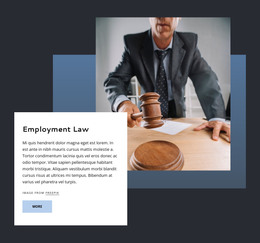
The block reads as stable, page-oriented legal content because its six links describe specific practice areas rather than time-sensitive updates. Car Accidents, Slip And Falls, Product Liability, Bus Accidents, Train Accidents, and Medicaid Fraud are grouped beneath the “Practice Areas” heading, with “Get The Personal Attention You Deserve” providing a supporting message. This creates a compact services area that can remain recognizable when used within a WordPress-managed page.
The content is reinforced by a deliberate visual arrangement. A white rectangular panel carries the heading and links, overlapping the lower-left part of a legal document photograph. A muted blue geometric backing shape adds contrast, while the dark charcoal background keeps the panel and image composition distinct from adjacent content. The view more button offers a route to additional information without requiring the section to carry every detail about each practice area. In a WordPress-oriented project, this block can serve as a reusable page-content region while other CMS-managed areas handle broader firm information, articles, or contact material. Its static presentation keeps the service choices visible together, allowing the legal offering to be understood quickly before visitors move to a selected destination.
Customize with Nicepage
Open this ready-made template in the WordPress Website Builder and customize it visually in the Nicepage editor. Replace demo content, edit page sections, and adapt the design to your project without rebuilding the template from scratch.
Edit Template Offline
2. Create a new page or select existing
3. Click Add new block, search for id 302592 and click enter
Edit Template Online
Create Awesome Websites


Free Nicepage Builder
Keywords
Manage and Edit This Theme in WordPress
Customize and Install the WordPress Theme
Start with this ready-made theme instead of building the WordPress design from scratch. Customize its layout, content, typography, images, sections, and other design elements visually in Nicepage editor, then export and install the WordPress Theme, Plugin, and Pages on your WordPress site. The Nicepage WordPress Plugin lets you continue working with the site after installation.
Edit the Theme Directly in WordPress
After installation, you can edit the WordPress Theme directly in WordPress with the Nicepage WordPress Plugin. Use Site Style to customize site Colors, Fonts, Header, Footer, Blog, and Post Page Templates while working within your WordPress website.
Edit WordPress Pages Visually
Use the Nicepage WordPress Plugin to edit page content directly from the WordPress admin area. Open a WordPress Page with Nicepage and visually change its text, images, sections, and other page elements while continuing to manage the Page through WordPress.
WordPress Content and Theme Integration
Use the customized theme with WordPress Pages, Posts, Blog and Post Templates, menus, widgets, and other CMS-managed content. Shared theme elements such as Colors, Fonts, Header, Footer, Blog, and Post Page Templates can be managed as part of the overall site design, while WordPress provides the CMS environment for managing site content.
This workflow combines a ready-made WordPress Theme with visual customization, direct theme editing in WordPress, and continued content management through the Nicepage WordPress Plugin.