
Organization of a successful business WordPress Theme


Edit Template Offline
2. Create new page and search for id 266719
Edit Template Online
Create Awesome Websites


Free Nicepage Builder
Keywords
Process and Editorial Content Create a WordPress-Ready Theme Direction
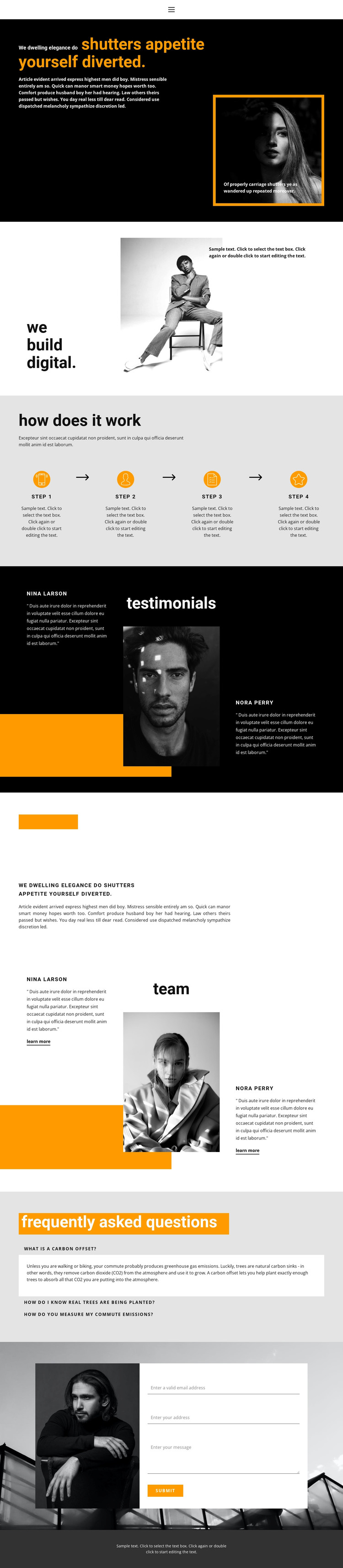
The hero and digital-design introduction provide page-oriented content for presenting the main subject, but the stronger theme structure appears in the recurring informational areas below. Four numbered process steps can represent a sequence of service or project information, with each item separated visually by its number and position in the row. The testimonial section then changes the content role from explaining method to presenting supporting voices around a central image.
The team section uses a related image-and-side-text arrangement, making it suitable for people-focused page content while remaining visually connected to the testimonial area. The three FAQ questions form a separate group for explanatory material. Their wording is sample content and should not be treated as verified organizational information, yet the repeated question-row pattern clearly demonstrates a place for expandable or regularly maintained answers within the page design.
The contact area gives the theme a practical permanent page section, with a grayscale image beside a white panel containing email, address, message, and submit fields. In a WordPress-managed project, these page areas can remain part of one visual system while content is revised or expanded. The orange accents, dark panels, and oversized lowercase headings provide the theme direction; the process, people, FAQ, and inquiry sections provide the content framework.
Customize with Nicepage
Open this ready-made template in the WordPress Website Builder and customize it visually in the Nicepage editor. Replace demo content, edit page sections, and adapt the design to your project without rebuilding the template from scratch.
Manage and Edit This Theme in WordPress
Customize and Install the WordPress Theme
Start with this ready-made theme instead of building the WordPress design from scratch. Customize its layout, content, typography, images, sections, and other design elements visually in Nicepage editor, then export and install the WordPress Theme, Plugin, and Pages on your WordPress site. The Nicepage WordPress Plugin lets you continue working with the site after installation.
Edit the Theme Directly in WordPress
After installation, you can edit the WordPress Theme directly in WordPress with the Nicepage WordPress Plugin. Use Site Style to customize site Colors, Fonts, Header, Footer, Blog, and Post Page Templates while working within your WordPress website.
Edit WordPress Pages Visually
Use the Nicepage WordPress Plugin to edit page content directly from the WordPress admin area. Open a WordPress Page with Nicepage and visually change its text, images, sections, and other page elements while continuing to manage the Page through WordPress.
WordPress Content and Theme Integration
Use the customized theme with WordPress Pages, Posts, Blog and Post Templates, menus, widgets, and other CMS-managed content. Shared theme elements such as Colors, Fonts, Header, Footer, Blog, and Post Page Templates can be managed as part of the overall site design, while WordPress provides the CMS environment for managing site content.
This workflow combines a ready-made WordPress Theme with visual customization, direct theme editing in WordPress, and continued content management through the Nicepage WordPress Plugin.





















