Creative positive things WordPress Theme


The Stacked Heading Creates a Distinct WordPress Page Section
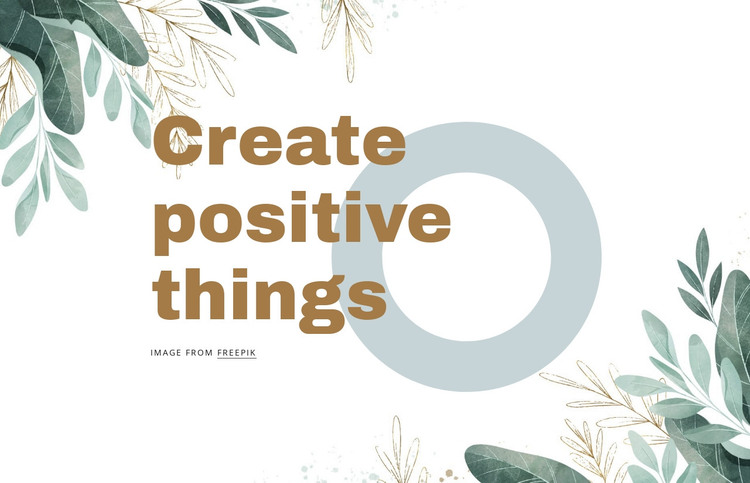
The phrase “Create positive things” carries the block’s main message, and the three-line arrangement gives that message a deliberate visual rhythm. Rather than filling the section with multiple content items, the design concentrates attention on the heading and uses the surrounding artwork to shape its setting. Muted green botanical illustrations trace the outer edges, the white background keeps the center open, and the pale blue-gray circular graphic sits behind the heading area as a quiet visual counterweight. Warm-brown type completes the hierarchy.
Within a WordPress-managed page, this block can function as stable introductory content for a creative or design-focused area. The section can remain a reusable visual region while the broader project handles other page content and publishing needs around it. Its static arrangement is useful when the opening message should establish tone before visitors reach more detailed text, images, or other sections. The visible Freepik image credit is part of the block’s content context and should remain attached to the botanical artwork when the section is reused. The result is not a complete theme, but a clearly bounded page section whose identity comes from the interaction of its stacked heading, circular accent, open white space, and illustrated framing.
Customize with Nicepage
Open this ready-made template in the WordPress Website Builder and customize it visually in the Nicepage editor. Replace demo content, edit page sections, and adapt the design to your project without rebuilding the template from scratch.
Edit Template Offline
2. Create a new page or select existing
3. Click Add new block, search for id 263625 and click enter
Edit Template Online
Create Awesome Websites


Free Nicepage Builder
Keywords
Manage and Edit This Theme in WordPress
Customize and Install the WordPress Theme
Start with this ready-made theme instead of building the WordPress design from scratch. Customize its layout, content, typography, images, sections, and other design elements visually in Nicepage editor, then export and install the WordPress Theme, Plugin, and Pages on your WordPress site. The Nicepage WordPress Plugin lets you continue working with the site after installation.
Edit the Theme Directly in WordPress
After installation, you can edit the WordPress Theme directly in WordPress with the Nicepage WordPress Plugin. Use Site Style to customize site Colors, Fonts, Header, Footer, Blog, and Post Page Templates while working within your WordPress website.
Edit WordPress Pages Visually
Use the Nicepage WordPress Plugin to edit page content directly from the WordPress admin area. Open a WordPress Page with Nicepage and visually change its text, images, sections, and other page elements while continuing to manage the Page through WordPress.
WordPress Content and Theme Integration
Use the customized theme with WordPress Pages, Posts, Blog and Post Templates, menus, widgets, and other CMS-managed content. Shared theme elements such as Colors, Fonts, Header, Footer, Blog, and Post Page Templates can be managed as part of the overall site design, while WordPress provides the CMS environment for managing site content.
This workflow combines a ready-made WordPress Theme with visual customization, direct theme editing in WordPress, and continued content management through the Nicepage WordPress Plugin.