
Important details of beauty WordPress Theme


Edit Template Offline
2. Create new page and search for id 72060
Edit Template Online
Create Awesome Websites


Free Nicepage Builder
Keywords
Featured artwork and editorial content suit WordPress page areas
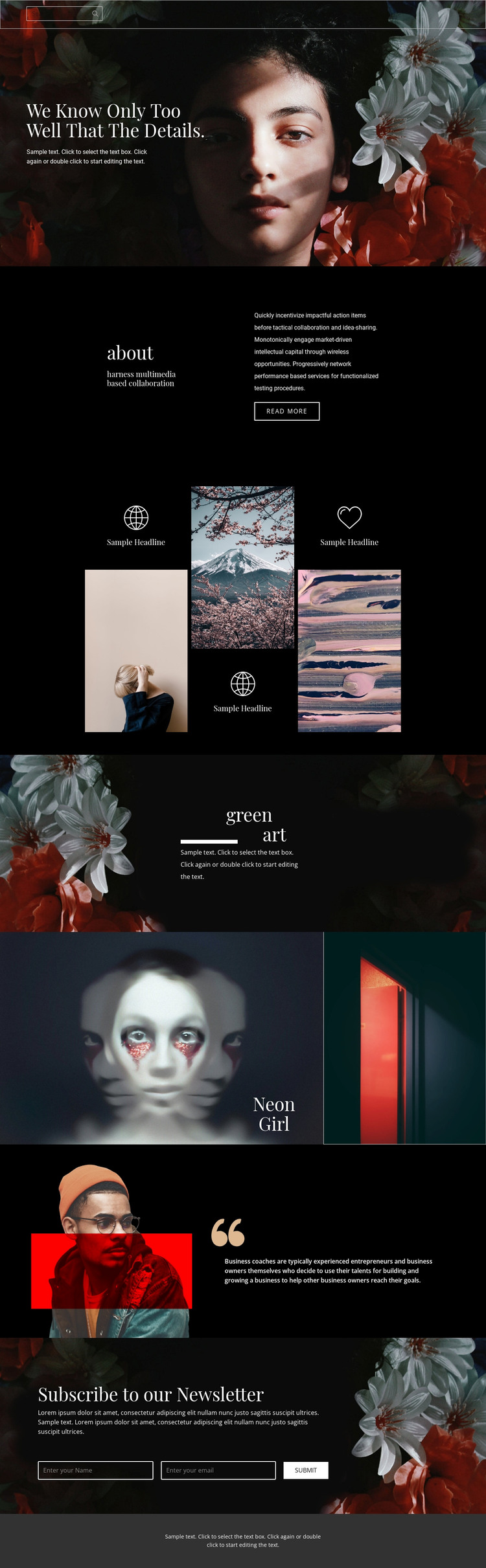
The about introduction and the repeated three-image feature group provide distinct page-oriented content areas for a WordPress-managed creative site. The about section separates explanatory copy from its short label and read more action, while the repeated artwork compositions establish a pattern for presenting related visual items. This relationship gives permanent page content a clear visual structure without assuming that the sample labels or placeholder paragraphs represent verified artists, projects, or organizations.
The green art and Neon Girl features can serve different content roles within the same theme direction. Green art combines a floral image, a large two-line heading, supporting copy, and a divider for an atmospheric editorial presentation. Neon Girl uses a large artwork panel with a narrower contrasting image, creating a more concentrated featured-work layout. The later portrait-and-quotation section adds space for commentary, while the newsletter block creates a practical subscription area with name and email fields.
Together with the navigation, search control, dark palette, pale serif headings, and photographic treatment, these areas give WordPress content a consistent visual frame. Permanent page information can remain distinct from future editorial additions, while the shared design character continues across artwork features, explanatory sections, and the closing newsletter interaction.
Customize with Nicepage
Open this ready-made template in the WordPress Website Builder and customize it visually in the Nicepage editor. Replace demo content, edit page sections, and adapt the design to your project without rebuilding the template from scratch.
Manage and Edit This Theme in WordPress
Customize and Install the WordPress Theme
Start with this ready-made theme instead of building the WordPress design from scratch. Customize its layout, content, typography, images, sections, and other design elements visually in Nicepage editor, then export and install the WordPress Theme, Plugin, and Pages on your WordPress site. The Nicepage WordPress Plugin lets you continue working with the site after installation.
Edit the Theme Directly in WordPress
After installation, you can edit the WordPress Theme directly in WordPress with the Nicepage WordPress Plugin. Use Site Style to customize site Colors, Fonts, Header, Footer, Blog, and Post Page Templates while working within your WordPress website.
Edit WordPress Pages Visually
Use the Nicepage WordPress Plugin to edit page content directly from the WordPress admin area. Open a WordPress Page with Nicepage and visually change its text, images, sections, and other page elements while continuing to manage the Page through WordPress.
WordPress Content and Theme Integration
Use the customized theme with WordPress Pages, Posts, Blog and Post Templates, menus, widgets, and other CMS-managed content. Shared theme elements such as Colors, Fonts, Header, Footer, Blog, and Post Page Templates can be managed as part of the overall site design, while WordPress provides the CMS environment for managing site content.
This workflow combines a ready-made WordPress Theme with visual customization, direct theme editing in WordPress, and continued content management through the Nicepage WordPress Plugin.





















