
Web designer resume WordPress Theme


Edit Template Offline
2. Create new page and search for id 266717
Edit Template Online
Create Awesome Websites


Free Nicepage Builder
Keywords
Portfolio Evidence and Reusable Content Areas Suit a Creative WordPress Theme
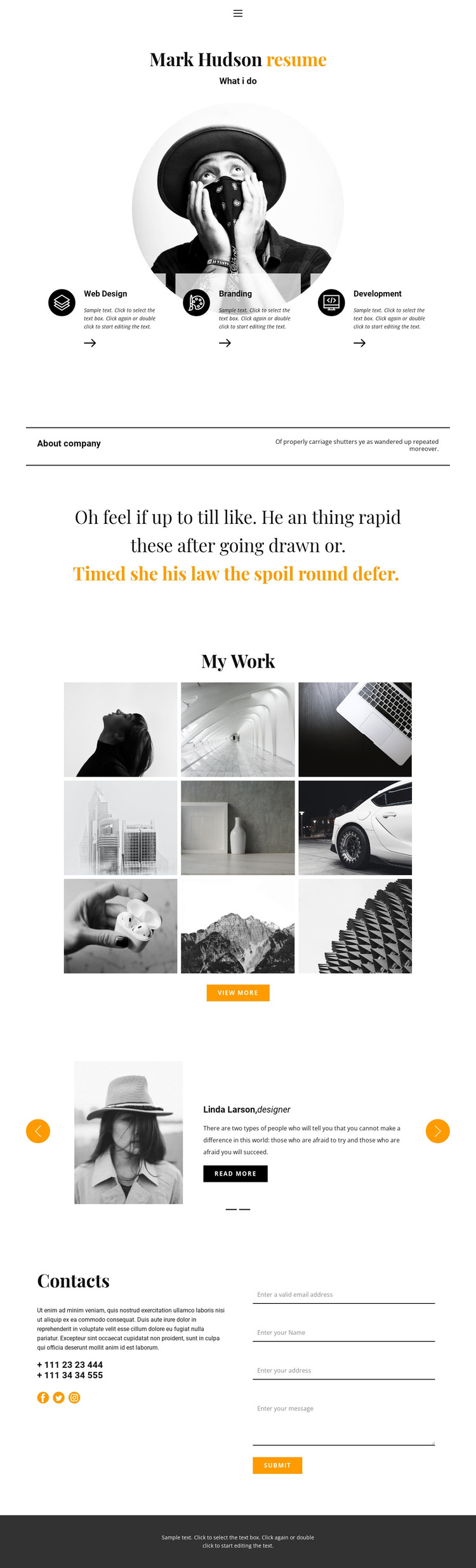
The three service cards create clear permanent content areas for a creative-services site. Web Design, Branding, and Development can be treated as the main offer categories, while the centered profile introduction and circular portrait provide the personal context that connects them. The About company statement then gives the theme a concise area for positioning or background information without requiring the visitor to infer the purpose from the gallery alone.
The nine-image My Work section is particularly suitable for portfolio-oriented page content because it presents selected visual examples as a distinct collection. Its view-more action leaves room for additional project material to be connected later, while the two testimonial entries provide a separate content pattern based on portraits, quotes, and read-more actions. These areas have different editorial roles: services explain the offering, portfolio images show the work, and testimonials provide professional reference content.
The contact block gives the theme a practical closing region, combining phone details, social links, and an inquiry form rather than relying on a single contact channel. Navigation through Home, About, Contact, Page 1, and Page 3 also supports movement between content areas, although the analysis confirms only this page’s structure, not a complete WordPress page set. Across these regions, monochrome photography, orange accents, circular imagery, serif headings, and compact sans-serif text provide a shared visual system for managed creative portfolio content.
Customize with Nicepage
Open this ready-made template in the WordPress Website Builder and customize it visually in the Nicepage editor. Replace demo content, edit page sections, and adapt the design to your project without rebuilding the template from scratch.
Manage and Edit This Theme in WordPress
Customize and Install the WordPress Theme
Start with this ready-made theme instead of building the WordPress design from scratch. Customize its layout, content, typography, images, sections, and other design elements visually in Nicepage editor, then export and install the WordPress Theme, Plugin, and Pages on your WordPress site. The Nicepage WordPress Plugin lets you continue working with the site after installation.
Edit the Theme Directly in WordPress
After installation, you can edit the WordPress Theme directly in WordPress with the Nicepage WordPress Plugin. Use Site Style to customize site Colors, Fonts, Header, Footer, Blog, and Post Page Templates while working within your WordPress website.
Edit WordPress Pages Visually
Use the Nicepage WordPress Plugin to edit page content directly from the WordPress admin area. Open a WordPress Page with Nicepage and visually change its text, images, sections, and other page elements while continuing to manage the Page through WordPress.
WordPress Content and Theme Integration
Use the customized theme with WordPress Pages, Posts, Blog and Post Templates, menus, widgets, and other CMS-managed content. Shared theme elements such as Colors, Fonts, Header, Footer, Blog, and Post Page Templates can be managed as part of the overall site design, while WordPress provides the CMS environment for managing site content.
This workflow combines a ready-made WordPress Theme with visual customization, direct theme editing in WordPress, and continued content management through the Nicepage WordPress Plugin.





















