Luxury Apartments WordPress Theme


Edit Template Offline
2. Create new page and search for id 24215
Edit Template Online
Create Awesome Websites


Free Nicepage Builder
Keywords
Amenity content and destination sections give the theme a clear page foundation
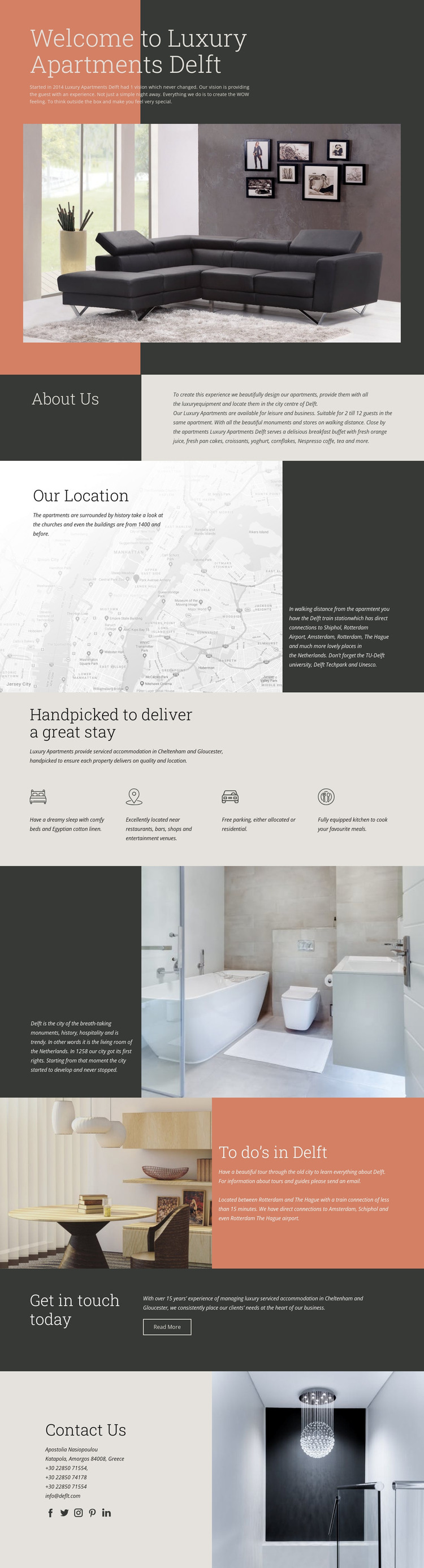
The design already identifies several durable content areas for an accommodation-focused website. The welcome section establishes the apartment identity with a large living-room image, while About Us can carry the core explanation of the stay and its suitability for leisure and business travelers. Our Location adds a separate page-oriented subject, combining historic surroundings with transport connections rather than repeating the accommodation introduction.
The amenity grid is especially useful as recurring structured content. Four peer statements cover comfortable beds and linen, central location, free parking, and an equipped kitchen. Their consistent layout could support a stable presentation when the underlying wording or property details change. The Delft history and “To do’s in Delft” sections extend the content environment toward destination guidance, local tours, and regional travel information, giving the theme more than a property-only focus.
The final blocks establish shared communication content. Get in touch today presents a visible invitation and Read More action, while Contact Us supplies direct details and social links. Together, these regions create a practical route from page content to contact without requiring unsupported claims about bookings, posts, or other WordPress structures already existing in the template. The design can therefore be interpreted as a visual foundation for WordPress-managed accommodation pages where permanent property information, local guidance, amenity content, and contact-oriented sections remain within one coherent hospitality identity.
Customize with Nicepage
Open this ready-made template in the WordPress Website Builder and customize it visually in the Nicepage editor. Replace demo content, edit page sections, and adapt the design to your project without rebuilding the template from scratch.
Manage and Edit This Theme in WordPress
Customize and Install the WordPress Theme
Start with this ready-made theme instead of building the WordPress design from scratch. Customize its layout, content, typography, images, sections, and other design elements visually in Nicepage editor, then export and install the WordPress Theme, Plugin, and Pages on your WordPress site. The Nicepage WordPress Plugin lets you continue working with the site after installation.
Edit the Theme Directly in WordPress
After installation, you can edit the WordPress Theme directly in WordPress with the Nicepage WordPress Plugin. Use Site Style to customize site Colors, Fonts, Header, Footer, Blog, and Post Page Templates while working within your WordPress website.
Edit WordPress Pages Visually
Use the Nicepage WordPress Plugin to edit page content directly from the WordPress admin area. Open a WordPress Page with Nicepage and visually change its text, images, sections, and other page elements while continuing to manage the Page through WordPress.
WordPress Content and Theme Integration
Use the customized theme with WordPress Pages, Posts, Blog and Post Templates, menus, widgets, and other CMS-managed content. Shared theme elements such as Colors, Fonts, Header, Footer, Blog, and Post Page Templates can be managed as part of the overall site design, while WordPress provides the CMS environment for managing site content.
This workflow combines a ready-made WordPress Theme with visual customization, direct theme editing in WordPress, and continued content management through the Nicepage WordPress Plugin.