Inspiration from IKEA WordPress Theme


Edit Template Offline
2. Create new page and search for id 17262
Edit Template Online
Create Awesome Websites


Free Nicepage Builder
Keywords
Product and Editorial Areas Support a WordPress Content Model
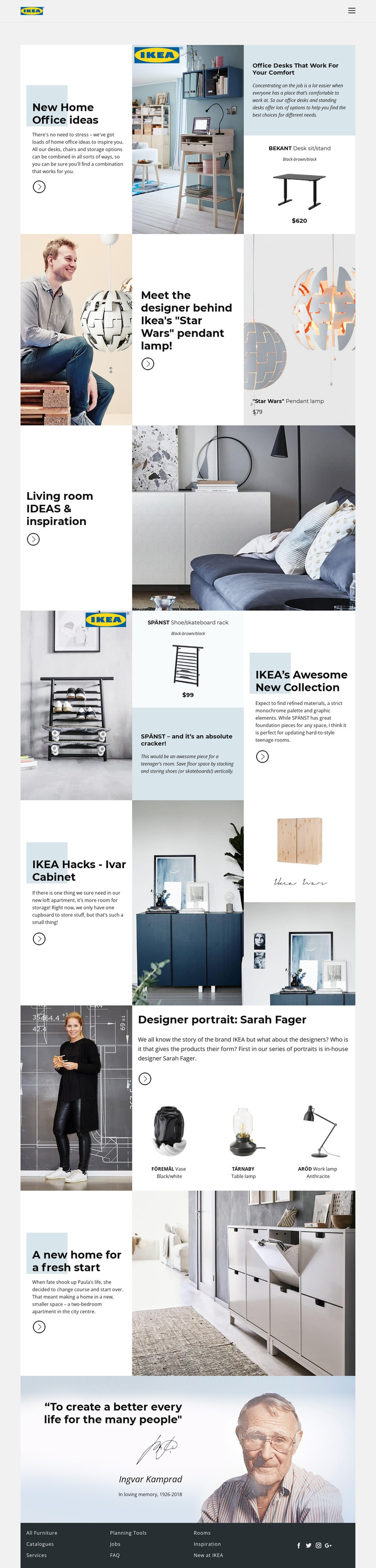
The page contains several permanent content areas that can be interpreted naturally within a WordPress-managed site. Home-office ideas, living-room inspiration, lighting, storage, and the SPÄNST collection each provide a subject for page-oriented content, while the designer feature can support a profile or editorial page pattern. The Sarah Fager section is especially useful because it connects a named designer with three distinct products: FÖREMÅL, TÄRNABY, and ARÖD.
The apartment story offers a separate narrative model based on a home transformation, and the closing quotation provides a brand or editorial feature rather than another product listing. Together, these areas create a mix of evergreen furnishing information and content that could later be expanded or updated. The navigation and dark footer provide shared site regions for moving between furniture, catalogues, services, planning tools, jobs, FAQ, rooms, and inspiration.
The design therefore suits a WordPress interpretation in which permanent pages and evolving editorial material remain within one visual system. A WordPress Plugin can be used as an optional product bridge, but the template-specific value comes from the distinction between product content, designer information, room inspiration, and home stories rather than from CMS terminology alone.
Customize with Nicepage
Open this ready-made template in the WordPress Website Builder and customize it visually in the Nicepage editor. Replace demo content, edit page sections, and adapt the design to your project without rebuilding the template from scratch.
Manage and Edit This Theme in WordPress
Customize and Install the WordPress Theme
Start with this ready-made theme instead of building the WordPress design from scratch. Customize its layout, content, typography, images, sections, and other design elements visually in Nicepage editor, then export and install the WordPress Theme, Plugin, and Pages on your WordPress site. The Nicepage WordPress Plugin lets you continue working with the site after installation.
Edit the Theme Directly in WordPress
After installation, you can edit the WordPress Theme directly in WordPress with the Nicepage WordPress Plugin. Use Site Style to customize site Colors, Fonts, Header, Footer, Blog, and Post Page Templates while working within your WordPress website.
Edit WordPress Pages Visually
Use the Nicepage WordPress Plugin to edit page content directly from the WordPress admin area. Open a WordPress Page with Nicepage and visually change its text, images, sections, and other page elements while continuing to manage the Page through WordPress.
WordPress Content and Theme Integration
Use the customized theme with WordPress Pages, Posts, Blog and Post Templates, menus, widgets, and other CMS-managed content. Shared theme elements such as Colors, Fonts, Header, Footer, Blog, and Post Page Templates can be managed as part of the overall site design, while WordPress provides the CMS environment for managing site content.
This workflow combines a ready-made WordPress Theme with visual customization, direct theme editing in WordPress, and continued content management through the Nicepage WordPress Plugin.