Personal campus education WordPress Theme


Edit Template Offline
2. Create new page and search for id 16521
Edit Template Online
Create Awesome Websites


Free Nicepage Builder
Keywords
Course Cards and Blog Areas Support Expandable Academic Content
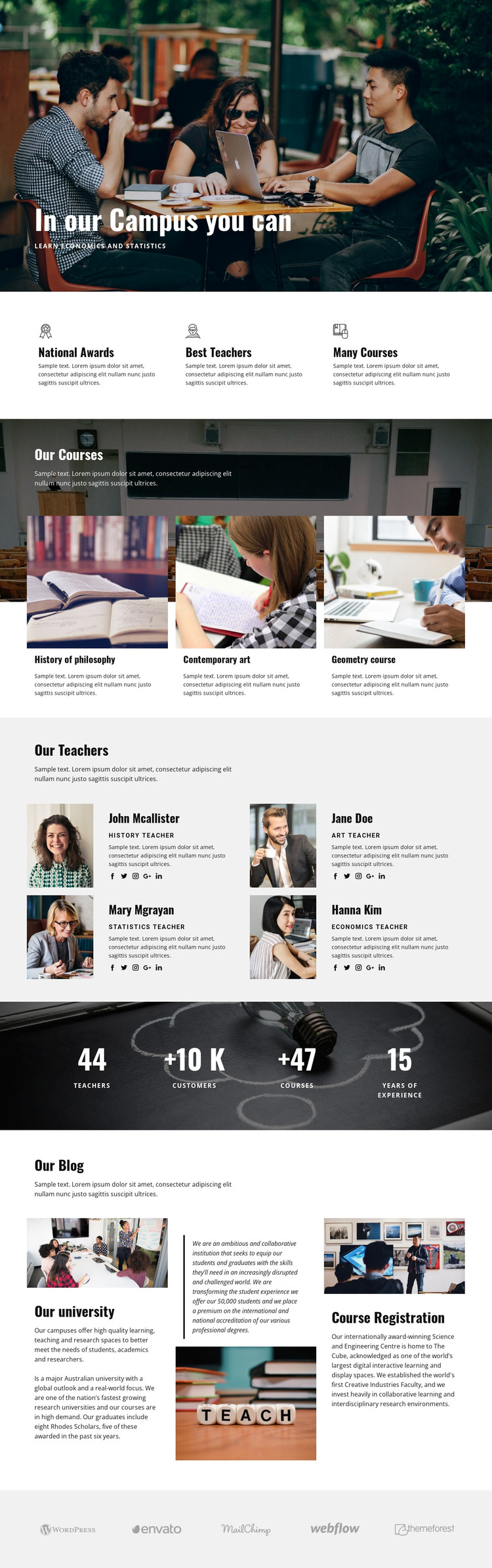
The three course cards provide a clear page-oriented content group for the academic offer, while the four teacher profiles create a separate set of permanent institutional information. Their portraits, roles, descriptions, and social links give a WordPress-managed education site distinct areas for course and staff content without requiring the two subjects to share one layout. The three feature items reinforce the same structure through concise statements about awards, teachers, and course variety.
The three blog-style columns add a different content relationship. Their subjects include the university and Course Registration, making them suitable reference points for information that may change more often than the core course or teacher presentation. The dark metrics band and the five logo marks can remain shared visual regions around that content, although the sample values and names should not be treated as verified institutional facts.
A WordPress interpretation can therefore map the design to permanent page content and potentially expanding editorial material, without claiming that Posts, categories, or blog templates already exist in the source page. The visual system remains recognizable as the content grows: light-gray information blocks, dark photographic emphasis, repeated cards, profile imagery, and bold headings can connect future academic information to the original campus presentation.
Customize with Nicepage
Open this ready-made template in the WordPress Website Builder and customize it visually in the Nicepage editor. Replace demo content, edit page sections, and adapt the design to your project without rebuilding the template from scratch.
Manage and Edit This Theme in WordPress
Customize and Install the WordPress Theme
Start with this ready-made theme instead of building the WordPress design from scratch. Customize its layout, content, typography, images, sections, and other design elements visually in Nicepage editor, then export and install the WordPress Theme, Plugin, and Pages on your WordPress site. The Nicepage WordPress Plugin lets you continue working with the site after installation.
Edit the Theme Directly in WordPress
After installation, you can edit the WordPress Theme directly in WordPress with the Nicepage WordPress Plugin. Use Site Style to customize site Colors, Fonts, Header, Footer, Blog, and Post Page Templates while working within your WordPress website.
Edit WordPress Pages Visually
Use the Nicepage WordPress Plugin to edit page content directly from the WordPress admin area. Open a WordPress Page with Nicepage and visually change its text, images, sections, and other page elements while continuing to manage the Page through WordPress.
WordPress Content and Theme Integration
Use the customized theme with WordPress Pages, Posts, Blog and Post Templates, menus, widgets, and other CMS-managed content. Shared theme elements such as Colors, Fonts, Header, Footer, Blog, and Post Page Templates can be managed as part of the overall site design, while WordPress provides the CMS environment for managing site content.
This workflow combines a ready-made WordPress Theme with visual customization, direct theme editing in WordPress, and continued content management through the Nicepage WordPress Plugin.