Largest consulting firm WordPress Theme


Company Highlights as Reusable WordPress Page Content
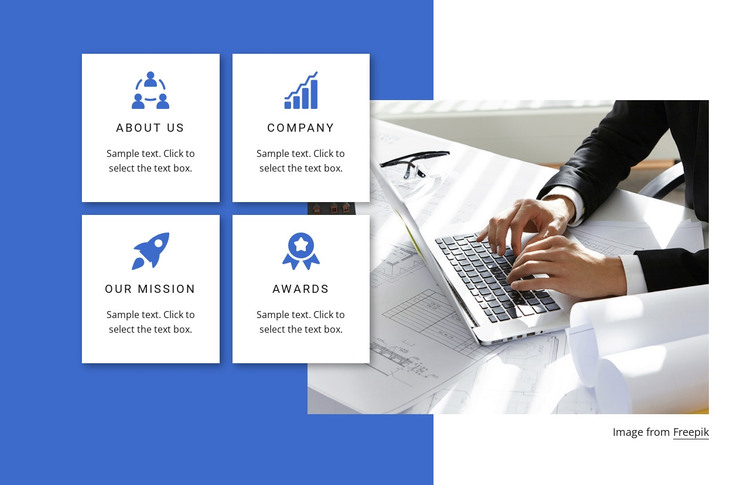
The headings About Us, Company, Our Mission, and Awards give the block a stable company-information role. Rather than presenting one continuous passage, the section separates these themes into four repeated cards arranged in a two-by-two grid. Each card begins with a blue circular icon, continues with its heading, and leaves space for a supporting paragraph. That repeated pattern makes the content suitable for a WordPress-managed page where organizational information needs to remain visually consistent as the surrounding site develops.
The large business workspace photograph changes the pace of the section. A person using a laptop beside architectural plans provides a practical professional setting, while the cards carry the labeled information. Both parts sit against a prominent blue background shape, and the white cards stand out through strong contrast and subtle shadows. The partial overlap between image and grid gives the page content a defined visual unit without adding verified interactive behavior.
Within a broader WordPress project, this block can remain a reusable company-highlights section on a stable page. Its sample text can be replaced with organization-specific descriptions, while the four-topic structure continues to distinguish company background, mission, and recognition content. Other WordPress-managed pages or sections can provide navigation and deeper material; this block contributes one focused content region rather than functioning as a complete theme.
Customize with Nicepage
Open this ready-made template in the WordPress Website Builder and customize it visually in the Nicepage editor. Replace demo content, edit page sections, and adapt the design to your project without rebuilding the template from scratch.
Edit Template Offline
2. Create a new page or select existing
3. Click Add new block, search for id 150421 and click enter
Edit Template Online
Create Awesome Websites


Free Nicepage Builder
Keywords
Manage and Edit This Theme in WordPress
Customize and Install the WordPress Theme
Start with this ready-made theme instead of building the WordPress design from scratch. Customize its layout, content, typography, images, sections, and other design elements visually in Nicepage editor, then export and install the WordPress Theme, Plugin, and Pages on your WordPress site. The Nicepage WordPress Plugin lets you continue working with the site after installation.
Edit the Theme Directly in WordPress
After installation, you can edit the WordPress Theme directly in WordPress with the Nicepage WordPress Plugin. Use Site Style to customize site Colors, Fonts, Header, Footer, Blog, and Post Page Templates while working within your WordPress website.
Edit WordPress Pages Visually
Use the Nicepage WordPress Plugin to edit page content directly from the WordPress admin area. Open a WordPress Page with Nicepage and visually change its text, images, sections, and other page elements while continuing to manage the Page through WordPress.
WordPress Content and Theme Integration
Use the customized theme with WordPress Pages, Posts, Blog and Post Templates, menus, widgets, and other CMS-managed content. Shared theme elements such as Colors, Fonts, Header, Footer, Blog, and Post Page Templates can be managed as part of the overall site design, while WordPress provides the CMS environment for managing site content.
This workflow combines a ready-made WordPress Theme with visual customization, direct theme editing in WordPress, and continued content management through the Nicepage WordPress Plugin.