Beach Fashion WordPress Theme


Edit Template Offline
2. Create new page and search for id 14599
Edit Template Online
Create Awesome Websites


Free Nicepage Builder
Keywords
Spring-Summer Collection Content Anchors the WordPress Theme
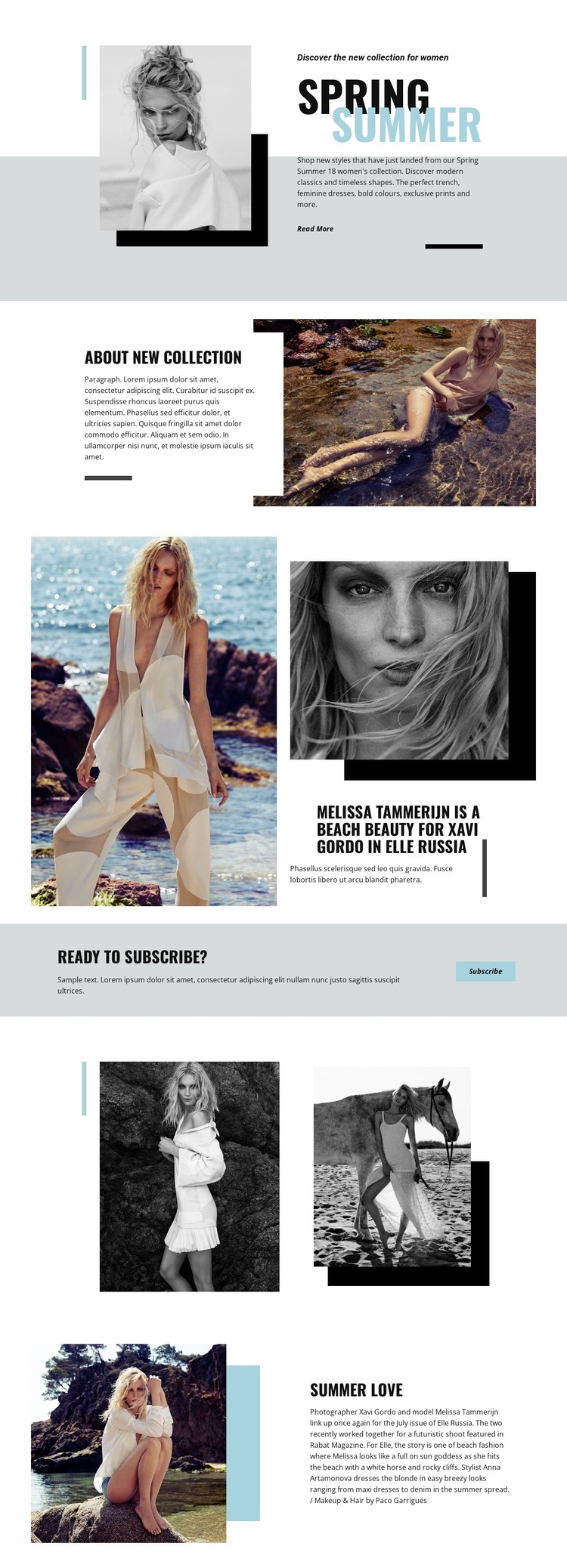
The Spring Summer introduction gives the design a clear page-oriented starting point: a seasonal women’s collection, a layered fashion portrait, a short explanatory text area, and a Read More link. Those elements can represent the core content of a WordPress-managed fashion page without requiring the visual system to be rebuilt around dense text. The About New Collection section adds a separate information area, using a large beach photograph and overlapping white card to keep descriptive material connected to the imagery.
The Elle Russia feature and Summer Love section provide different kinds of editorial content within the same theme direction. The first combines a prominent headline with images of Melissa Tammerijn and the credited photographer Xavi Gordo, while the latter pairs a beach portrait with article copy and styling credits for Anna Artamonova and Paco Garrigues. Their different image-to-text relationships leave room for collection features, magazine-style stories, or other publishable fashion content while preserving a consistent presentation.
The colored Ready to subscribe? banner gives the page a distinct audience-response area rather than blending the action into an article block. Its Subscribe button can remain visually connected to the surrounding editorial material while serving a separate purpose. In WordPress, the design therefore offers clear permanent page content and repeatable editorial zones: collection information, credited stories, image-led features, and subscription messaging, all held together by the same monochrome, beach, and accent-color language.
Customize with Nicepage
Open this ready-made template in the WordPress Website Builder and customize it visually in the Nicepage editor. Replace demo content, edit page sections, and adapt the design to your project without rebuilding the template from scratch.
Manage and Edit This Theme in WordPress
Customize and Install the WordPress Theme
Start with this ready-made theme instead of building the WordPress design from scratch. Customize its layout, content, typography, images, sections, and other design elements visually in Nicepage editor, then export and install the WordPress Theme, Plugin, and Pages on your WordPress site. The Nicepage WordPress Plugin lets you continue working with the site after installation.
Edit the Theme Directly in WordPress
After installation, you can edit the WordPress Theme directly in WordPress with the Nicepage WordPress Plugin. Use Site Style to customize site Colors, Fonts, Header, Footer, Blog, and Post Page Templates while working within your WordPress website.
Edit WordPress Pages Visually
Use the Nicepage WordPress Plugin to edit page content directly from the WordPress admin area. Open a WordPress Page with Nicepage and visually change its text, images, sections, and other page elements while continuing to manage the Page through WordPress.
WordPress Content and Theme Integration
Use the customized theme with WordPress Pages, Posts, Blog and Post Templates, menus, widgets, and other CMS-managed content. Shared theme elements such as Colors, Fonts, Header, Footer, Blog, and Post Page Templates can be managed as part of the overall site design, while WordPress provides the CMS environment for managing site content.
This workflow combines a ready-made WordPress Theme with visual customization, direct theme editing in WordPress, and continued content management through the Nicepage WordPress Plugin.