
French fashion WordPress Theme


Edit Template Offline
2. Create new page and search for id 145915
Edit Template Online
Create Awesome Websites


Free Nicepage Builder
Keywords
Editorial Page Areas Give WordPress Content a Consistent Visual Frame
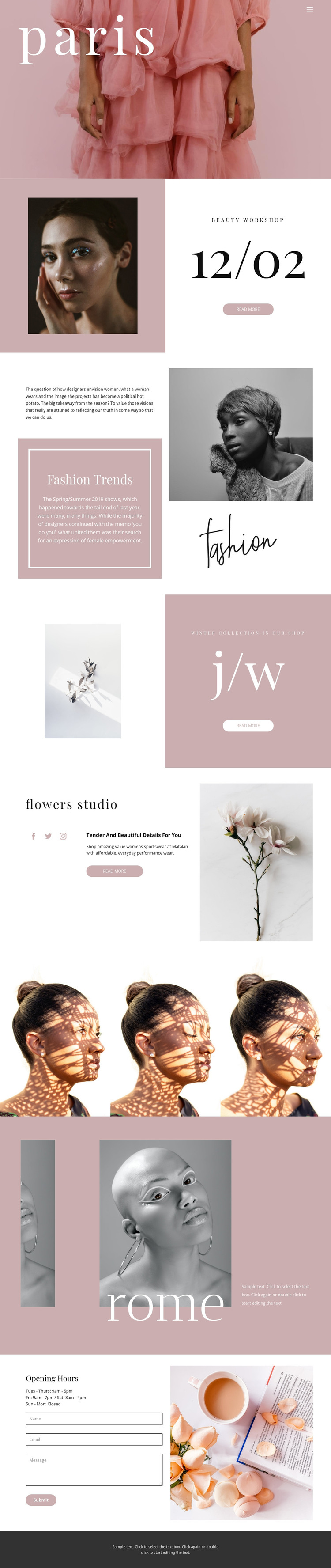
The permanent content areas in this design are well suited to a page-oriented WordPress interpretation. The Paris hero can introduce the site's fashion direction, while the beauty workshop section provides a focused area for dated or feature-based information without claiming that a post system already exists. Fashion Trends offers editorial text and image content, whereas the winter collection panel presents a more promotional subject. The flowers studio section adds supporting copy, social links, and a separate visual identity within the same page.
The three-image portrait gallery works as a concentrated visual content area, and the Rome section expands the editorial range through location and image relationships. Together, these areas give different kinds of page content a shared presentation: large serif type, blush and white blocks, monochrome photography, and generous spacing. The opening-hours section then shifts from editorial browsing to practical communication by displaying the weekly schedule beside a contact form with name, email, and message inputs.
A WordPress project could preserve this distinction between permanent page information, visual gallery content, and future regularly updated material. The verified template does not prove that Posts, categories, or blog structures are already present, so those possibilities should be treated as later content decisions rather than existing components. Its main value is the cohesive visual frame around the available content areas.
Customize with Nicepage
Open this ready-made template in the WordPress Website Builder and customize it visually in the Nicepage editor. Replace demo content, edit page sections, and adapt the design to your project without rebuilding the template from scratch.
Manage and Edit This Theme in WordPress
Customize and Install the WordPress Theme
Start with this ready-made theme instead of building the WordPress design from scratch. Customize its layout, content, typography, images, sections, and other design elements visually in Nicepage editor, then export and install the WordPress Theme, Plugin, and Pages on your WordPress site. The Nicepage WordPress Plugin lets you continue working with the site after installation.
Edit the Theme Directly in WordPress
After installation, you can edit the WordPress Theme directly in WordPress with the Nicepage WordPress Plugin. Use Site Style to customize site Colors, Fonts, Header, Footer, Blog, and Post Page Templates while working within your WordPress website.
Edit WordPress Pages Visually
Use the Nicepage WordPress Plugin to edit page content directly from the WordPress admin area. Open a WordPress Page with Nicepage and visually change its text, images, sections, and other page elements while continuing to manage the Page through WordPress.
WordPress Content and Theme Integration
Use the customized theme with WordPress Pages, Posts, Blog and Post Templates, menus, widgets, and other CMS-managed content. Shared theme elements such as Colors, Fonts, Header, Footer, Blog, and Post Page Templates can be managed as part of the overall site design, while WordPress provides the CMS environment for managing site content.
This workflow combines a ready-made WordPress Theme with visual customization, direct theme editing in WordPress, and continued content management through the Nicepage WordPress Plugin.





















