One Structure at a Time WordPress Theme


Edit Template Offline
2. Create new page and search for id 6488254
Edit Template Online
Create Awesome Websites


Free Nicepage Builder
Keywords
Project imagery and recurring agency content suit WordPress pages
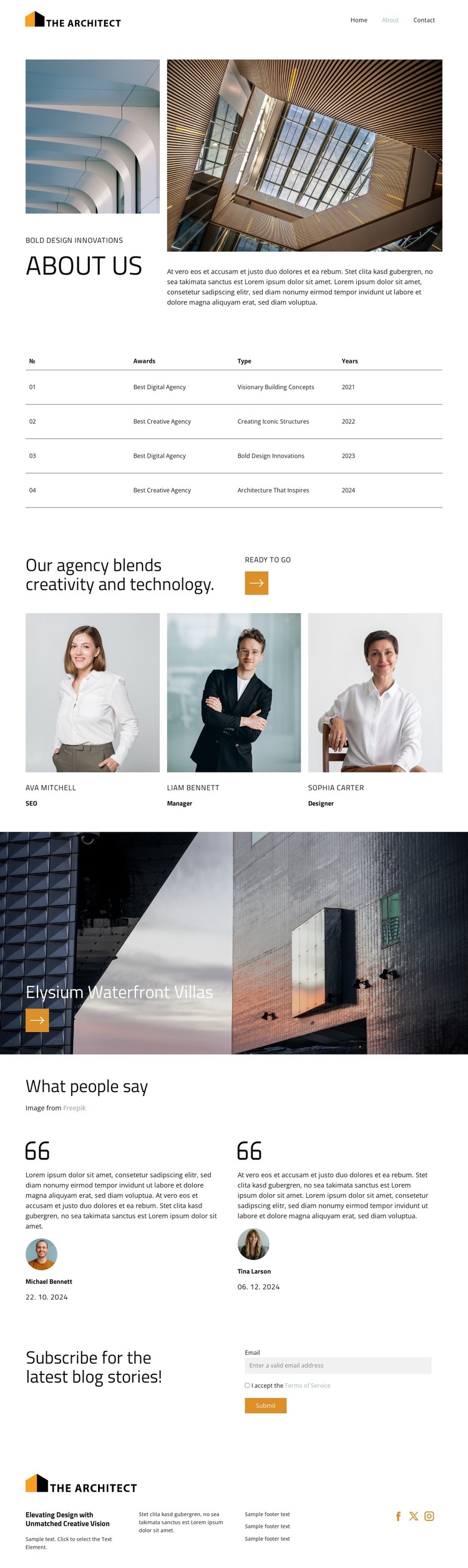
The architectural introduction gives the theme a strong permanent page area: imagery and explanatory text present the agency before visitors reach the more repeatable parts of the layout. The awards table, with four entries dated from 2021 through 2024, can be understood as a compact record of agency recognition, while the team presentation supplies a separate area for role-based information. Its three portrait cards and the SEO, Manager, and Designer labels make that content more specific than a general company statement.
Elysium Waterfront Villas shifts the page toward project-led content. The large image and overlaid title create a useful visual pattern for a featured work item, and the accent action icon gives the project area a distinct interaction point without requiring a claim that a full portfolio already exists. The two testimonial cards provide another reusable content relationship, placing external response after the agency and project material rather than mixing quotations into the opening section.
The newsletter block adds an editorial connection through its invitation to subscribe for the latest blog stories. Its email signup form, terms acceptance, and Submit action create a clear place for ongoing updates, while the footer keeps the wider identity consistent with its logo, text columns, and three social links. Together, these page-oriented sections can work within a WordPress content environment where permanent agency information and later editorial additions remain under the same visual direction.
Customize with Nicepage
Open this ready-made template in the WordPress Website Builder and customize it visually in the Nicepage editor. Replace demo content, edit page sections, and adapt the design to your project without rebuilding the template from scratch.
Manage and Edit This Theme in WordPress
Customize and Install the WordPress Theme
Start with this ready-made theme instead of building the WordPress design from scratch. Customize its layout, content, typography, images, sections, and other design elements visually in Nicepage editor, then export and install the WordPress Theme, Plugin, and Pages on your WordPress site. The Nicepage WordPress Plugin lets you continue working with the site after installation.
Edit the Theme Directly in WordPress
After installation, you can edit the WordPress Theme directly in WordPress with the Nicepage WordPress Plugin. Use Site Style to customize site Colors, Fonts, Header, Footer, Blog, and Post Page Templates while working within your WordPress website.
Edit WordPress Pages Visually
Use the Nicepage WordPress Plugin to edit page content directly from the WordPress admin area. Open a WordPress Page with Nicepage and visually change its text, images, sections, and other page elements while continuing to manage the Page through WordPress.
WordPress Content and Theme Integration
Use the customized theme with WordPress Pages, Posts, Blog and Post Templates, menus, widgets, and other CMS-managed content. Shared theme elements such as Colors, Fonts, Header, Footer, Blog, and Post Page Templates can be managed as part of the overall site design, while WordPress provides the CMS environment for managing site content.
This workflow combines a ready-made WordPress Theme with visual customization, direct theme editing in WordPress, and continued content management through the Nicepage WordPress Plugin.